Backend vs Frontend Web Development: 8 Core Principles
Backend work asks you to think in terms of systems, invariants, reliability, trust boundaries, data flow, and failure modes. Frontend work asks you to think in terms of interaction, clarity, feedback, accessibility, rendering, and how real people experience state changes over time.
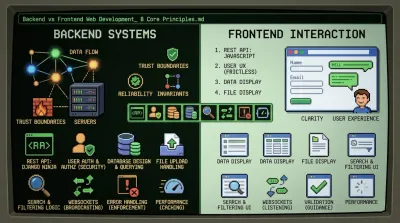
Backend vs frontend web development is often framed as a tooling choice. Python or JavaScript. Django or React. API or UI. That framing is too shallow to help you choose well.
The essential split is cognitive. Backend work asks you to think in terms of systems, invariants, reliability, trust boundaries, data flow, and failure modes. Frontend work asks you to think in terms of interaction, clarity, feedback, accessibility, rendering, and how real people experience state changes over time. Both require discipline. They just punish different mistakes.
That distinction has been with web development for a long time. The formal separation became prominent in the mid-1990s, especially after JavaScript arrived in 1995 and client-side behavior started diverging from server-side processing, as described in this history of frontend and backend development. If you're deciding where to focus, that history matters because the split wasn't arbitrary. It emerged because the web needed two different kinds of engineering.
The practical question isn't which side is better. It's which class of problems you want to own when something important breaks.
1. Building a REST API with Django Ninja vs Consuming It with JavaScript #
A clean API exposes the most useful boundary in modern web systems. Backend engineers define the contract. Frontend engineers live with it. If the contract is vague, everyone loses time.
When you build a REST API with Django Ninja, your job isn't just returning JSON. You're deciding what the client is allowed to ask for, what shape responses take, how validation fails, how auth is enforced, and which business rules remain impossible to bypass. The frontend then consumes that contract through JavaScript and turns it into a usable experience.

Start with the contract, not the controller #
Stripe, GitHub, and X all make the same point in different ways. Their APIs are products. The backend owns transactional safety, permission checks, rate boundaries, and resource modeling. The frontend or third-party client owns composition, interaction, and timing.
Django Ninja is a strong fit here because it encourages explicit schemas and automatic validation. If you're learning this style, build the interface first, then the implementation. A good walkthrough is this Django REST API tutorial with Django Ninja.
Use a few habits from day one:
- Version early: Put endpoints under a stable path such as
/api/v1/before you need it. - Mock responses first: Frontend work shouldn't stall because the database layer isn't ready.
- Return structured errors: Give the frontend error codes and fields it can react to.
- Document while building: OpenAPI output is useful only if endpoint names and payloads are coherent.
Practical rule: If the frontend team has to ask what a field means, the API design isn't finished.
What works and what doesn't #
What works is boring consistency. Consistent resource naming, predictable status codes, and stable response shapes let frontend developers move fast without reverse-engineering backend intent.
What doesn't work is backend code that mirrors database tables too closely. A database schema is storage design. An API is product design. Those are related, but they aren't the same thing.
2. User Authentication and Authorization #
Authentication is where backend authority and frontend empathy meet. The backend decides whether a user is real and what they're allowed to do. The frontend decides whether the path into that decision feels clear, fast, and recoverable.
A lot of beginners treat login as a form problem. It isn't. It's a trust problem. The browser is a hostile environment, and the backend has to act accordingly.
The backend is the source of truth #
Google OAuth, GitHub login, and Netflix account gating all follow the same pattern. The frontend redirects, gathers user intent, and presents state. The backend validates tokens, establishes identity, checks permissions, and enforces every protected rule.
Don't treat frontend checks as security. Hiding an admin button in React is a UX choice, not access control. Real authorization lives at the API layer.
A practical setup usually includes these habits:
- Hash passwords server-side: Never depend on browser logic for credential safety.
- Validate every protected request: Auth should be enforced per endpoint, not per page.
- Use role checks in backend code: RBAC belongs where the rules can't be bypassed.
- Prefer httpOnly cookies for sensitive tokens: That reduces exposure to common browser-side attacks.
- Log failed auth events: Security work gets easier when you can reconstruct what happened.
Frontend validation should reduce friction. Backend validation should prevent abuse.
Good auth feels strict, not hostile #
Bad auth flows punish legitimate users while still leaving gaps for attackers. Good auth systems separate friction from enforcement. The backend remains uncompromising. The frontend stays informative.
That means clear loading states during login, obvious failure messages without leaking sensitive account information, and predictable session expiry behavior. It also means avoiding a common anti-pattern: building a beautiful login screen before deciding how refresh, logout, expiry, and permission changes work.
3. Database Design and Querying vs Data Display #
At this point, the responsibilities stop being theoretical. Backend owns data shape, integrity, and retrieval cost. Frontend owns comprehension.
Facebook's feed, Amazon's product listings, and LinkedIn's relationship views all depend on the same split. The backend decides how posts, products, or connections are stored and queried. The frontend decides how users can scan them, filter them, and act on them without confusion.
Data models are product decisions #
Schema design isn't just a storage concern. It affects every API response, every filter, every sort option, and every future feature. If your model is sloppy, your UI gets weird fast.
For backend vs frontend web development, this is one of the clearest dividing lines. Frontend developers can compensate for a clumsy payload for a while. They can't fix bad relational modeling, weak indexing, or expensive joins from the browser.
A few practices matter more than most:
- Design for access patterns: Start with the queries your product needs, not abstract elegance.
- Index common filters: Fields such as
user_id, timestamps, and status flags usually need intentional support. - Avoid N+1 behavior: Use relation loading strategies instead of firing repetitive queries.
- Paginate by design: Large datasets need stable response boundaries from the start.
If you're building that skill set, a solid foundation in data modeling and querying matters more than framework memorization. This SQL course for developers is the kind of learning path that pays off across every backend stack.
Frontend should shape presentation, not rescue the backend #
The frontend should format dates, prioritize visual hierarchy, and support scanning. It shouldn't reconstruct missing relationships, guess sort behavior, or issue five extra requests because the API response was underdesigned.
A common failure mode is backend teams returning "generic" payloads they think are flexible. In practice, generic payloads often force the frontend into brittle mapping logic and excessive request chaining.
A good API response reduces frontend conditionals. A bad one creates them.
4. File Upload Handling vs File Display #
File uploads look simple in demos and turn ugly in production. The frontend gives users drag-and-drop zones, progress bars, previews, and retry states. The backend deals with trust, storage, metadata, validation, and cleanup.
Google Drive, Slack, and GitHub all prove the same lesson. The visible part is the easy part. The dangerous part is what happens after the browser says "upload complete."
Treat every upload as untrusted input #
A file name isn't trustworthy. An extension isn't trustworthy. A client-side size check isn't trustworthy. The backend has to validate what arrived.
That means checking file type by content, not just extension, storing metadata separately, and deciding where files should live before traffic arrives. In many systems, direct-to-object-storage uploads are cleaner than routing everything through your app server.
What usually works best:
- Validate file signatures: Read actual file characteristics, not just user-provided labels.
- Store metadata explicitly: Keep path, uploader, original name, and lifecycle info in the database.
- Generate previews asynchronously: Don't make users wait for image or PDF processing to finish.
- Clean up abandoned files: Upload systems accumulate waste if you don't design expiry and deletion paths.
- Serve through a CDN: Delivery and storage are different concerns.
Frontend owns confidence #
The frontend can't secure uploads, but it can make them understandable. Show progress. Explain failures. Let users retry without wondering whether the first attempt partially worked.
What doesn't work is a polished uploader with weak backend controls. That's how teams end up storing malicious files, oversized files, or files with no ownership trail. In backend vs frontend web development, uploads are one of the clearest reminders that "working in the browser" and "safe in production" are not the same thing.
5. Search and Filtering #
Search exposes the philosophical split better than almost anything else. Users experience search as a text box and a set of filters. Engineers know it's really query design, ranking decisions, indexing strategy, and trade-offs between correctness and speed.
Google, Airbnb, Amazon, and eBay all separate these concerns carefully. The backend determines what results qualify and in what order. The frontend determines whether people can refine those results without getting lost.
Backend search is about intent, not just syntax #
Beginners often ship search by stuffing a few LIKE queries into a database call and calling it done. That may be fine early on. It stops being fine the moment users expect combinations like location plus price plus category plus availability plus partial text matching.
Good backend search design starts with the product's mental model. Which filters compose cleanly? Which ones should affect counts? Which fields need full-text support? At what point does the database stop being the right search engine?
Useful defaults include:
- Use composable query logic: Keep filters additive and predictable.
- Index heavily used fields: Search without indexing becomes an avoidable tax.
- Return facet metadata: The frontend shouldn't guess available filter states.
- Instrument queries: Search quality improves when you can see what users tried to find.
- Cache common lookups carefully: Popular queries often deserve dedicated treatment.
Frontend search is about reducing decision fatigue #
The frontend should make refinement obvious. Good controls tell users what happened, what's active, and how to undo it. Bad controls leave them staring at a page, unsure whether the system ignored their input or found nothing.
One practical habit matters a lot here. Keep the URL in sync with search state when possible. It makes results shareable, debuggable, and easier to reason about across refreshes and tabs.
6. Real-time Updates with WebSockets #
Real-time systems break the request-response comfort zone. In a typical API flow, the client asks and the server answers. With WebSockets, the connection stays open and the server has to manage ongoing state, delivery, reconnection, and fan-out.
Slack messages, Google Docs collaboration, and live trading dashboards all depend on that shift. The frontend listens and renders. The backend coordinates who should receive what, when, and under which rules.
Persistent connections change backend architecture #
In this context, event-driven thinking starts to matter. You're not just processing requests. You're managing long-lived sessions, message lifecycles, and distributed broadcasting.
That usually means your app needs a channel layer or message broker, plus clear event types and auth rules for socket connections. If you're learning this style, this explanation of event-driven architecture connects the design mindset to what happens in real systems.
Here are the patterns that hold up:
- Define message envelopes: A stable structure like type, data, and timestamp keeps clients sane.
- Authenticate the socket: Real-time transport still needs identity and permission checks.
- Handle disconnects intentionally: Reconnection is part of the feature, not an edge case.
- Broadcast through shared infrastructure: Multi-instance apps need coordination beyond in-memory state.
For a visual walkthrough, this short demo is useful:
Frontend real-time work is mostly state discipline #
The hardest frontend problem in real-time apps usually isn't opening the socket. It's deciding how incoming events affect current UI state without duplication, flicker, or stale assumptions.
A chat client, for example, has to reconcile optimistic messages, confirmed deliveries, unread counts, reconnect gaps, and ordering. That's why real-time frontends often fail even when the backend transport is technically fine.
7. Error Handling and Validation #
Why do some products feel trustworthy even when something goes wrong, while others fall apart on the first bad input?
The answer usually sits in the boundary between enforcement and guidance. Error handling is one of the clearest ways to understand the backend vs frontend split at an architectural level. Backend work protects system integrity. Frontend work helps people recover without confusion.
Backend validation is enforcement #
The backend owns the final decision about what data the system will accept. That has nothing to do with whether the frontend looked polished. Requests can be forged, clients can go stale, and parallel actions can create invalid state even when every field looked fine in the browser.
Production maturity also shows up here. Logs, safe defaults, validation rules, retries, and clear failure modes sit in the middle layer that many beginners miss when they picture frontend and backend as separate boxes. Hadil S. discusses those "in-between" concerns in this essay on what actually matters beyond frontend and backend.
Strong backend habits include:
- Return the right status code: Distinguish invalid input from authentication failures, permission failures, and server errors.
- Attach machine-readable error codes: The frontend should branch on stable codes, not parse human wording.
- Log enough context to debug: User identity, route, payload shape, and stack trace matter during incident review.
- Hide sensitive internals: Error responses should not reveal whether an account exists or which dependency failed.
- Test failure paths: Validation conflicts, race conditions, and dependency timeouts deserve the same attention as the happy path.
A backend developer is usually solving for correctness under messy conditions. That includes bad inputs, duplicate submissions, expired sessions, and partial failures between services.
The user doesn't care whether an error came from validation, authorization, or a dependency timeout. They care whether recovery is clear.
Frontend validation is guidance #
Frontend validation reduces friction before a request ever leaves the page. Required fields, format checks, range limits, and inline feedback help users succeed faster and submit cleaner data.
That work is less about enforcement and more about interaction design. A good frontend anticipates mistakes, preserves user input, highlights the right field, and explains what to do next. A weak frontend dumps a red banner at the top of the form and forces the user to hunt for the problem.
The trade-off is simple. If you duplicate too much business logic in the client, it drifts from the server and becomes expensive to maintain. If you do too little, the backend stays correct but the product feels hostile.
Keep the contract strict on the backend. Keep the recovery path clear on the frontend. That division of responsibility scales better than trying to invent two separate truth systems.
8. Performance Optimization and Caching vs Loading States #
What makes an app feel fast. Lower query time, or a screen that stays clear and responsive while data is on the way?
The answer tells you a lot about the backend versus frontend split. Backend work reduces waiting at the system level. Frontend work manages waiting at the human level. If you want to choose a path in web development, this section is a good test. Do you prefer removing waste from the request path, or designing an interface that stays trustworthy under delay?

Backend performance comes from removing repeated work #
On the backend, performance problems usually come from work the system keeps doing over and over. Rebuilding the same response, re-running the same expensive query, fetching data that rarely changes, or sending oversized payloads for every request. Caching helps because it changes the shape of the system, not just the speed of one endpoint.
That is the architectural principle behind backend performance. Reduce avoidable work close to the source.
Good backend optimization usually looks like this:
- Cache high-read, low-volatility data: Profiles, settings, product metadata, and leaderboard slices are common candidates.
- Use HTTP caching correctly: ETags, Cache-Control, and conditional requests let browsers and CDNs avoid unnecessary fetches.
- Trim response payloads: Pagination, field selection, and compressed responses cut transport cost and improve cache efficiency.
- Watch cache behavior, not just cache usage: Hit rate, miss patterns, invalidation timing, and stale reads matter more than saying "we have Redis."
The trade-off is real. Aggressive caching lowers load and latency, but it also introduces invalidation rules, consistency questions, and debugging overhead. A fast wrong answer is still wrong. Backend engineers spend a lot of time deciding where stale data is acceptable and where it is not. That decision is architectural, not cosmetic.
AWS describes the backend as the part of the application responsible for processing requests, working with databases, and supporting scale across many concurrent users, while the frontend handles what each user sees and interacts with in the browser, according to AWS's comparison of frontend and backend architecture.
Frontend performance is about trust #
On the frontend, performance is less about raw infrastructure efficiency and more about whether the interface keeps its promise to the user. People can tolerate a short delay. They do not tolerate confusion.
That is why loading states matter. Skeleton screens preserve layout. Progressive rendering shows useful content early. Lazy loading keeps the first screen lighter. Good transitions make state changes readable instead of abrupt. None of that makes the database faster, but it does make the product easier to use under real network conditions.
This is a different kind of engineering judgment. Frontend developers decide how much to render up front, what to defer, how to avoid layout shift, and how to keep interactions responsive while data changes underneath the UI.
Framework benchmarks get attention, but they rarely settle the question on their own. In practice, frontend performance usually depends more on bundle discipline, rendering strategy, request waterfalls, image handling, and state management than on a headline comparison between libraries. I have seen fast apps built with heavy frameworks and slow apps built with lightweight ones. The pattern is usually the same. Teams blame the tool when the underlying problem is architectural drift.
Faster rendering helps. Clear loading behavior protects user trust. A backend that avoids unnecessary work improves both.
The cleanest split is this. Backend developers optimize the path data takes through the system. Frontend developers optimize the path users take through delay. Both are performance work. They just solve different problems.
Backend vs Frontend, 8-Point Comparison #
| Project | Implementation complexity 🔄 | Resource requirements ⚡ | Expected outcomes 📊 | Ideal use cases 💡 | Key advantages ⭐ |
|---|---|---|---|---|---|
| Building a REST API with Django Ninja vs Consuming It with JavaScript | Moderate, endpoint design, validation, docs, cross-team coordination | Moderate, backend server, DB, frontend client, API docs | Reusable, testable APIs and independent frontend builds | Web/mobile apps needing centralized data APIs | Clear separation of concerns; API reuse; independent testing |
| User Authentication & Authorization (Backend Security vs Frontend UX) | High, token/session flows, RBAC, refresh patterns | High, secure storage, identity providers, monitoring, SSO infra | Strong access control and auditable auth events | Any app with user accounts, paid features, multi-app auth | Backend-enforced security, scalable stateless auth, SSO support |
| Database Design & Querying vs Data Display | Moderate–High, schema design, indexing, n+1 prevention | Moderate, relational DB (Postgres), caching, query tools | Efficient, consistent data access and stable API responses | Data-heavy apps, relational models, reporting/feeds | Data integrity, optimized queries, backend-driven performance |
| File Upload Handling (Multipart Backend vs Frontend Rendering) | Moderate, multipart parsing, validation, async processing | High, object storage (S3), CDN, virus scanning, storage costs | Secure, scalable file storage with previews and processing | UGC platforms, media services, document management | Secure validation, scalable storage (S3), async processing |
| Search & Filtering (Backend Query Logic vs Frontend UI) | High, indexing, relevance tuning, complex filters | High, search engine (Elasticsearch) or DB indexes, caching | Fast, relevant search and faceted filtering with aggregations | E‑commerce, content discovery, large catalogs | Backend-controlled relevance, scalable search, advanced features |
| Real-time Updates with WebSockets (Backend Broadcasting vs Frontend Listening) | High, connection management, scaling, reconnection logic | High, WebSocket servers, Redis channel layer, monitoring | Low-latency broadcasts and live collaborative experiences | Chat, live collaboration, real-time dashboards/notifications | Instant updates, efficient multi-client broadcasting |
| Error Handling & Validation (Backend Enforcement vs Frontend Guidance) | Low–Moderate, consistent validation schemas and error codes | Low, logging/monitoring, standardized error formats, tests | Predictable client behavior, better observability and robustness | Any production API, forms, payment flows, integrations | Defensive validation, consistent errors, improved debugging |
| Performance Optimization: Caching (Backend) vs Loading States (Frontend) | Moderate, cache layers, invalidation, TTL tuning | High, Redis, CDN, monitoring, cache warming strategies | Reduced latency, lower DB load, improved perceived performance | High-traffic or read-heavy sites, media platforms | Scalable throughput, faster responses, cost-effective delivery |
Choosing Your Path. Problem-Solver or Experience-Builder? #
Which kind of problem do you want to own every day: system correctness or user experience?
That question is more useful than the usual frontend-versus-backend identity debate. The split is not about prestige. It is about where complexity lives, what breaks under pressure, and what kind of trade-offs you want to make for a living.
Backend work usually fits people who care about rules, data flow, failure cases, and long-term system behavior. You spend your time deciding how APIs should behave, where trust boundaries sit, how to model data cleanly, and what happens when traffic spikes or inputs turn hostile. Pay can be comparable on both paths, and Coursera's comparison of frontend and backend roles notes strong demand for each. Salary is not the useful separator here. The better question is whether you enjoy building the parts users never see, but everyone depends on.
Frontend work suits a different instinct. You care about clarity, feedback, accessibility, state transitions, layout, and whether the product feels obvious instead of frustrating. A backend can be perfectly designed and still feel broken if the interface hides system status, drops context, or makes basic actions hard to complete. Frontend engineers do not just paint pixels. They shape how the architecture is experienced.
The hiring trade-off matters too. Teams often give junior frontend developers smaller, lower-risk UI tasks sooner than they give junior backend developers access to production data, permissions, billing logic, or security-sensitive flows. That does not make frontend easier. It means backend trust is earned later because the blast radius is larger. If you choose backend first, expect to build stronger fundamentals in data modeling, HTTP, auth, validation, and debugging earlier.
I usually tell new developers to choose based on what bothers them. If an inconsistent API response makes you want to trace the contract and fix the root cause, backend is probably a better fit. If a confusing form, unreadable table, or awkward interaction keeps pulling your attention, frontend is probably the better match.
This article has focused on architecture and design patterns for a reason. Good backend engineers think in terms of invariants, boundaries, and system guarantees. Good frontend engineers think in terms of feedback loops, mental models, and interaction costs. Both write code. The difference is the class of problems they are trained to see.
Depth first works better than random exposure. Pick one side, learn its constraints properly, and build projects that force real decisions. Backend learners should spend time on Python, APIs, databases, authentication, error handling, and performance. Frontend learners should spend time on semantics, accessibility, rendering, state management, and UI behavior on slow or unreliable networks.
Codeling focuses on the backend path for a practical reason. Companies need developers who can design stable APIs, reason about system behavior, and ship server-side code that holds up in production. If those are the problems you want to solve, commit to that path and build proof through finished work.
If you want a structured way to become that kind of engineer, Codeling is built for it. It focuses on hands-on backend learning through Python, APIs, databases, architecture, and real projects you can publish on GitHub, so you're not just studying concepts. You're building proof that you can do the job.