Your First SQL Course: A Backend Dev's Guide
Backend engineers don't use SQL as an isolated language. They use it to shape how an application stores truth, retrieves relationships, enforces consistency, and scales under load.
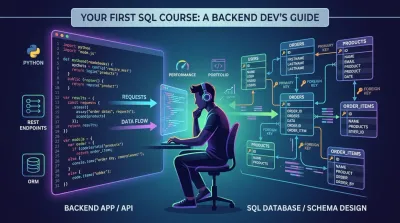
The most popular advice about taking a sql course is also the most limiting: start by memorizing SELECT, grind through quiz questions, and assume the rest will sort itself out later. That approach works if your goal is to pass a beginner exercise. It fails if your goal is to build APIs, debug production issues, and design data models that survive real feature changes.
Backend engineers don't use SQL as an isolated language. They use it to shape how an application stores truth, retrieves relationships, enforces consistency, and scales under load. A query is never just a query in a real codebase. It's attached to request latency, ORM behavior, transaction boundaries, and the quality of your schema decisions.
A useful sql course should teach syntax, but it should also teach how data modeling affects code, how backend frameworks generate SQL, and how poor query habits turn into application bugs. That's the difference between learning commands and learning systems.
Why Your SQL Course Needs to Go Beyond Syntax #
A shallow sql course treats SQL like flash cards. Learn SELECT, add WHERE, sprinkle in JOIN, move on. That produces learners who can answer isolated prompts but freeze when they need to design a schema for a billing system or diagnose why an endpoint became slow after a new feature shipped.
SQL has never been just a toy language for classroom exercises. It was originally developed by IBM in the early 1970s as part of the System R project, first called Sequel, then standardized by ANSI in 1986, with later standards such as SQL:1999 expanding the language with features like recursive queries and object-oriented support, as described in this history of SQL standards. That history matters because it explains why SQL keeps showing up everywhere. It's mature, standardized, and deeply tied to serious software systems.
Syntax is the surface, not the job #
When a junior developer says, "I know SQL," what they often mean is, "I can write a query if the schema is already perfect and the dataset is tiny." Production work asks different questions:
- Can you model relationships so the same business fact isn't duplicated across multiple tables?
- Can you predict query shape before writing an endpoint?
- Can you spot when the ORM is hiding expensive database behavior?
- Can you change a schema safely after the product requirements shift?
Those are architecture questions, not syntax questions.
Practical rule: If a sql course teaches commands without teaching data modeling, it teaches you how to type, not how to build.
What backend developers actually need #
A backend developer should think about SQL early, before controllers, serializers, and background jobs pile up. Database design choices become application design choices. If you model orders, users, inventory, and payments badly, no amount of clean Python or JavaScript will rescue the system.
A better mental model is this:
| What a quiz-focused course teaches | What a backend-focused sql course teaches |
|---|---|
| How to retrieve rows | How to represent business concepts |
| How to pass syntax checks | How to support application workflows |
| How to write one correct query | How to maintain correctness over time |
| How to answer exercises | How to ship features without schema chaos |
That shift changes how you study. You stop asking, "What does this keyword do?" and start asking, "Why is this table separated, and what happens if I collapse these entities into one?"
Mastering the Relational Mindset First #
Most beginners want to jump straight into joins. That's backwards. Before you write a JOIN, you need to know why the tables were separated and what business rule that separation protects.
A common gap in SQL education is practical database design for full-stack projects. For backend engineers, the core question isn't just how to write a join, but how to design a schema that scales and supports API logic, a gap noted in this overview of SQL course offerings.

Start with entities, not queries #
Suppose you're building a small e-commerce app. New learners often sketch one giant table because it feels simpler. They put customer details, product details, shipping info, and order status in one place. That works for a demo and becomes painful almost immediately.
A relational design starts by identifying distinct entities:
- Users who place orders
- Products with prices and inventory-related attributes
- Orders that belong to users
- Order items that connect an order to multiple products
- Payments and shipments as separate operational records
This isn't academic purity. It's what prevents duplicated data and conflicting updates.
Normalization as bug prevention #
You don't need to memorize normalization terminology to use it well, but you do need the instinct behind it. Each table should represent one kind of thing. Each row should represent one instance of that thing. Repeated facts should be stored once and referenced through keys.
Think about what happens when a product price is copied into too many places without intention. Or when a user's email appears in multiple unrelated records. Sooner or later, one copy changes and another doesn't. The bug won't look like a SQL bug. It will look like "customers are seeing inconsistent information."
A strong schema reduces the number of places where your application can lie.
A practical design checklist #
When reviewing a schema for a project, use a checklist like this:
- Name the business entities clearly. If you can't explain what a table represents in one sentence, it's probably doing too much.
- Separate relationships from attributes. An order item exists because orders and products relate. That relationship deserves its own table.
- Store changing facts intentionally. Some values should be snapshots. Others should always reflect the latest state. Decide which before coding.
- Design for reads you know you'll need. If your API frequently lists a user's recent orders, that should influence table relationships and indexing later.
- Protect consistency with constraints. Application logic is useful. Database rules are safer.
What good learners do differently #
Good learners don't ask only, "How do I join these tables?" They ask better questions:
- If this relationship becomes many-to-many, does the schema still hold?
- If a feature adds refunds or partial shipments, where does that data belong?
- If a record is deleted, what related records should remain?
- If the ORM generates a query from this model setup, will the result reflect the business rule correctly?
That's the relational mindset. A sql course worth your time should train it early.
A Practical Roadmap for Learning SQL #
The fastest way to get stuck with SQL is to study it in random fragments. One week of syntax videos, then a blog post on indexes, then a window functions tutorial, then a week off. You end up with scattered knowledge and no confidence using it in a backend project.
A better path is phased learning. A structured methodology for backend-oriented SQL study suggests a beginner phase of 2 to 4 weeks for core syntax, then an intermediate phase of 2 to 3 months focused on joins and subqueries. It also notes that success rates double with instant-feedback platforms compared with video-only learning, where 70% of learners drop off without hands-on practice, according to this SQL learning timeline guide.

Phase one builds fluency #
At the start, keep the scope narrow. Learn how to retrieve, filter, sort, and aggregate data. That's SELECT, FROM, WHERE, ORDER BY, and basic grouping functions.
The mistake here is trying to feel advanced too early. You don't need clever queries yet. You need fluency. You should be able to look at a table and answer simple business questions without hesitation.
Useful beginner habits:
- Work in a browser-based environment so setup friction doesn't steal your study time.
- Query real-looking datasets instead of toy examples with five rows.
- Explain each query in plain English before you run it.
- Avoid
SELECT *by default so you start thinking about the shape of data you need.
Phase two is where real learning starts #
This is the phase many learners underestimate. Joins, subqueries, and CTEs are where SQL stops feeling like filtering and starts feeling like modeling relationships.
Here, don't study join types as definitions alone. Study them as answers to specific backend questions.
| SQL concept | Backend question it answers |
|---|---|
| INNER JOIN | Which related records must exist together? |
| LEFT JOIN | Which parent records should still appear even if child records are missing? |
| Subquery | Can I compute a condition first, then filter on it? |
| CTE | Can I make a complex query readable enough to maintain? |
At this point, one practical option is Codeling's Learn SQL and Relational Databases course, which teaches querying, schema design, joins, transactions, and performance in a browser-based format with instant feedback. That's the kind of environment that fits the way backend engineers learn, through repeated correction and applied work rather than passive watching.
Don't measure progress by how many topics you've watched. Measure it by whether you can design a small schema and query it without guessing.
Phase three should look like engineering #
Once the basics feel stable, move into topics that affect real systems:
- Schema design for application workflows
- Indexes and when they help or hurt
- Transactions and data consistency
- Window functions for reporting and ranking use cases
- Query planning and the first steps of optimization
A solid learning week at this stage looks less like "finish chapter 8" and more like "build a feature, inspect the generated SQL, refine the schema, then test the query under realistic conditions."
Passive content still has a place. It's useful for overview and reference. But practice is what turns recognition into skill.
Connecting SQL to Your Backend Application #
The biggest jump in SQL learning happens when you stop running queries in isolation and start seeing how they behave inside an application. That's where many courses fall short. They teach query writing in a sandbox but don't show how SQL fits into an ORM, an API endpoint, or a production debugging workflow. That gap is a major issue in current course design, especially for engineers working with ORMs and REST APIs, as noted in this discussion of SQL learning gaps.

ORMs don't replace SQL understanding #
Django ORM, SQLAlchemy, and similar tools are productive because they let you express database operations in application code. But they don't remove the database. They translate your code into SQL. If you don't understand the SQL being generated, you won't understand why the endpoint is slow or why the result set is wrong.
A junior developer often assumes the ORM is the abstraction layer that makes SQL optional. A senior developer treats the ORM as a convenience layer built on top of SQL behavior.
That distinction matters when you hit common problems:
- N+1 queries caused by lazy loading related records in loops
- Over-fetching because models pull more columns than the endpoint needs
- Confusing joins generated by relationships that weren't modeled carefully
- Write-path bugs when transactions aren't handled intentionally
A familiar backend scenario #
Say you build an endpoint that returns recent orders with customer and item details. In early development, it works fine. Later, the dataset grows and the endpoint feels sluggish. The bug isn't in your serializer. The bug may be that your ORM is making one query for the orders, then additional queries for each related user and item set.
That's why SQL and backend engineering need to be learned together. The application code is only half the picture. The generated database traffic is the other half.
For a broader backend context, this Django REST API tutorial is a useful companion because it frames database access as part of endpoint design rather than an isolated data exercise.
When to stay in the ORM and when to drop lower #
Use the ORM when:
- the query is straightforward
- the model relationships are clear
- readability matters more than squeezing every last bit of performance
- the team needs maintainable code over clever SQL tricks
Drop to raw SQL or more explicit query control when:
- you need a specialized query shape the ORM expresses poorly
- query performance matters and you need exact control
- a reporting or aggregation path becomes difficult to reason about through ORM abstractions
- debugging generated SQL reveals waste you can't easily remove at the ORM layer
A short walkthrough helps make that bridge concrete:
If you can't explain what SQL your endpoint probably runs, you don't fully understand the endpoint yet.
Learn to inspect the invisible layer #
A practical sql course for developers should force you to inspect generated queries, reason about relationship loading, and connect schema design to endpoint behavior. That habit changes how you code. You stop treating database access as a hidden implementation detail and start treating it as part of application architecture.
That's when SQL stops being a course topic and becomes part of how you think as a backend engineer.
Thinking in Performance How to Optimize Your Queries #
Getting the right rows isn't enough. In production, the database also has to retrieve them efficiently. Many new developers think optimization is an advanced specialty they can ignore until much later. In practice, even early projects benefit from learning how to reason about performance.
Formal SQL education treats this seriously. One representative 7-week SQL certificate program scheduled in 2026 requires 5 to 7 hours per week and costs up to $1,195 for general participants, reflecting how structured, hands-on SQL training is positioned as a career investment in software and data roles, according to the University of San Francisco SQL certificate program.

Read the plan before changing the query #
The first professional habit in SQL optimization is checking how the database plans to execute the query. In PostgreSQL, MySQL, and SQL Server, the exact tooling differs, but the mindset is the same. Don't optimize from intuition alone. Inspect the plan.
When you read an execution plan, you're trying to answer questions like:
- Is the database scanning far more data than expected?
- Is a join order making the query expensive?
- Is an index missing for the filter or lookup path?
- Is the query selecting data the application never uses?
That last point matters more than many learners expect. Performance problems often come from asking for too much data, not from writing obviously complex SQL.
Indexes are a trade-off, not a trophy #
Beginners often hear "add an index" as universal advice. That's incomplete. Indexes can speed up reads, but they also add maintenance cost on writes and can complicate schema decisions if added carelessly.
A practical way to think about indexing:
| Good reason to index | Bad reason to index |
|---|---|
| Frequently filtered columns | Every column "just in case" |
| Join keys used often | Rarely queried fields |
| Sorting paths used by hot endpoints | Columns added without measuring impact |
| Lookups that appear in real application flows | Guessing before understanding workload |
Good optimization work usually follows a sequence:
- Identify the slow path. Start with an endpoint, task, or report that hurts user experience or operational cost.
- Inspect the query and execution plan. Confirm what the database is doing.
- Reduce unnecessary work. Fetch fewer columns, tighten filters, simplify joins where possible.
- Add or adjust indexes intentionally. Match them to access patterns you can explain.
- Re-test in context. The point is not a prettier query. The point is a faster system.
Performance tuning is applied reasoning. You form a hypothesis, change one thing, and verify the result.
Learn the write-side consequences #
A lot of beginner material frames optimization only around reads. Backend work requires a wider view. An index that helps one endpoint might slow inserts or updates on a high-write table. A denormalized shortcut might speed a dashboard and complicate consistency everywhere else.
That's why mature SQL learning should include trade-offs, not recipes. You need enough judgment to ask, "What kind of workload does this table serve?" before changing it.
A strong sql course should eventually train you to think like this: correct first, observable second, optimized third. But once correctness is stable, performance becomes part of the design, not a final cleanup pass.
From Learning SQL to Building Your Developer Portfolio #
Certificates can help structure learning. They don't prove that you can build software. A hiring manager learns much more from a project where SQL supports a real application than from a resume line that says you've completed a sql course.
The portfolio projects that stand out are not giant or flashy. They're coherent. They show that you can model data well, connect it to application logic, and make sane engineering trade-offs. A modest system with a well-designed schema and clean API says more about your readiness than a folder full of disconnected query files.
What a strong SQL project actually looks like #
A good portfolio project usually has these traits:
- A clear domain model. Users, resources, events, transactions, or content entities are separated in a way that makes business sense.
- A backend use case. The database isn't floating on its own. It supports an API, admin workflow, or background process.
- Intentional querying. The project shows joins, aggregations, or reporting logic tied to a product need.
- Evidence of performance thinking. You don't need a perfect system. You do need signs that you understand efficient data access.
- Versioned changes. Schema evolution through migrations shows you understand that databases change along with code.
Portfolio ideas worth building #
If you're learning SQL for backend development, build projects that reveal judgment:
-
E-commerce backend Include users, products, carts, orders, and order items. This shows relational modeling and transactional thinking.
-
Team task manager Add projects, memberships, tasks, comments, and activity logs. This reveals many-to-many relationships and permission-aware querying.
-
Content platform Model posts, authors, categories, tags, and moderation states. This gives you realistic listing, filtering, and aggregation problems.
-
Booking system Reservations, time slots, resources, and cancellation rules force you to think carefully about consistency and conflict handling.
Each of these can become a strong GitHub project if you treat the database as part of the architecture rather than as storage hidden behind an ORM.
What employers actually notice #
Employers notice when your project answers practical questions:
- Why did you choose this schema?
- How do relationships map to your API?
- Which queries are likely to be hot?
- Where would you add indexes if usage grows?
- How would you migrate the schema if the product changed?
Those answers signal maturity. A lot of self-taught learners can write basic queries. Fewer can explain the reasoning behind their table design and query choices.
For a broader path into backend work, this guide on how to become a backend developer pairs well with SQL study because it places databases alongside APIs, architecture, and deployment as part of one skill set.
Build fewer projects, but finish them with enough depth that another developer can see how you think.
The point of learning SQL isn't to collect isolated knowledge. It's to become the kind of developer who can build data-backed systems that remain understandable when features, traffic, and requirements change. That's the standard worth aiming for.
If you want a hands-on path into backend engineering, Codeling teaches through structured browser-based practice and project work instead of passive lectures. It's built for learners who want to connect Python, APIs, databases, and real portfolio projects into one progression.