Master Vibe Coding Tools for Software Development
Vibe coding has moved past novelty. It describes a way of building software through conversation, iteration, and rapid synthesis.
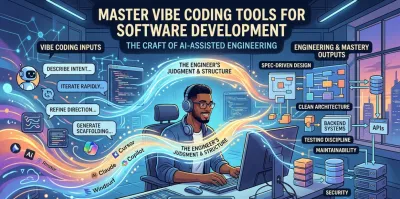
The most popular advice about vibe coding tools is also the worst: “just start prompting.”
That works for toy apps. It works for flashy demos. It even works long enough to make you think you’re becoming dramatically more productive. Then the project grows, the behavior gets inconsistent, the architecture starts to sag, and you realize you’ve generated a codebase you don’t fully understand.
That’s the core divide in modern AI-assisted development. The winning skill isn’t getting a model to spit out code. It’s knowing how to turn fast AI output into software another engineer can maintain, test, extend, and trust. If you want to become a serious developer, especially in backend work, that transition matters more than the initial generation step.
The Rise of Vibe Coding in Modern Development #
Vibe coding has moved past novelty. It describes a way of building software through conversation, iteration, and rapid synthesis with tools like GitHub Copilot, Cursor, Claude Code, Windsurf, Google AI Studio, Replit, and v0. Instead of typing every line manually, developers increasingly work by describing intent, reviewing suggestions, refining direction, and steering the system toward a result.

This shift is large enough that ignoring it would be a mistake. The global market for vibe coding platforms reached $4.7 billion in 2025 and is projected to hit $12.3 billion by 2027, while 92% of US developers use AI coding tools daily and 46% of all new code in 2026 is AI-produced, according to Second Talent’s vibe coding statistics roundup.
Why this isn’t just autocomplete with better marketing #
Older coding assistants mostly reacted at the line level. Today’s vibe coding tools participate at the task level. You can ask for a refactor, request a test suite, sketch an API, or reason through data flow. That changes the shape of development work.
A new developer often sees this and concludes that fundamentals matter less. The opposite is true. When the tool can generate syntax on demand, your weaknesses show up somewhere else:
- Architecture judgment: You still have to decide where logic belongs.
- Boundary design: You still define interfaces, ownership, and failure modes.
- Testing discipline: You still need evidence that the code works.
- Maintainability: You still pay for every rushed decision later.
What strong developers do differently #
Strong developers don’t treat vibe coding tools as oracles. They use them like fast, tireless collaborators. They know where to let the tool run and where to slow it down. They use AI to accelerate implementation, not to outsource judgment.
Practical rule: If you can’t explain why a generated change belongs in your system, you’re not done reviewing it.
That mindset matters because AI generation compresses the time between idea and implementation. It doesn’t remove the need for engineering. If anything, it increases the need for deliberate design, because bad decisions arrive faster too.
The good news is that this creates a clear opportunity for learners. You don’t need to reject vibe coding tools to become a real engineer. You need to learn how to use them with structure. That’s where the craft begins.
Understanding the Philosophy Beyond Code Generation #
The fastest way to misuse vibe coding tools is to think of them as typing machines. The better model is this: you’re collaborating with a brilliant but naive junior engineer who can implement quickly, mimic patterns, and make plausible guesses, but who lacks durable context unless you provide it.
That changes your role. Your job isn’t to produce keystrokes. Your job is to provide intent, constraints, trade-offs, and review.
From typist to architect #
If you approach Cursor or GitHub Copilot with only a shallow prompt, you often get shallow software in return. The output might compile. It might even pass a quick manual check. But production software needs more than locally correct snippets. It needs coherence.
Think in terms of questions a senior engineer would answer before coding starts:
| Focus area | What you should define |
|---|---|
| Purpose | What problem is this feature solving? |
| Scope | What is included, and what is explicitly out of scope? |
| Constraints | Which frameworks, patterns, and operational limits must be respected? |
| Failure handling | What should happen when dependencies fail or inputs are invalid? |
| Quality bar | What tests, logging, and review standards must be met? |
When developers skip these decisions, the tool fills the gaps with guesses. Some guesses are decent. Others create fragile coupling, confusing abstractions, or hidden edge cases.
The right mental model for collaboration #
Treat vibe coding tools as systems that amplify clarity. If your thinking is fuzzy, they amplify fuzziness. If your architecture is disciplined, they accelerate disciplined implementation.
That’s why developers still matter in an AI-heavy workflow. The tool can synthesize code quickly, but it doesn’t own the system. You do. If you want a deeper take on that shift in responsibility, this discussion on whether software developers are still needed in the age of AI is worth reading.
The developer who wins with AI isn’t the one who prompts the most. It’s the one who supplies the clearest model of the system.
What works and what fails #
A few patterns hold up consistently in practice.
- Good use of AI: Scaffolding a service layer, generating tests from known behavior, proposing refactors, outlining edge cases, or translating a clear design into code.
- Bad use of AI: Letting it invent the architecture, define security-sensitive logic without review, or create “smart” abstractions before the domain is understood.
- Mixed use: Asking it to explore multiple options can help, but only if you compare those options against real requirements.
New developers often assume the main skill is prompt wording. Prompting matters, but it’s not the center of the craft. The center is thinking clearly enough to direct the tool well, then reviewing the result like an engineer responsible for the consequences.
That’s why the most valuable habit isn’t “prompt better.” It’s “design before generation.”
Using Spec-Driven Design for Reliable AI Code #
If you want better output from vibe coding tools, stop asking them to “build the feature” from a loose paragraph. Give them a spec.
Spec-driven design is one of the most practical ways to get reliable AI-assisted code. Instead of generating first and cleaning up later, you define the feature before implementation begins. That sounds slower. In practice, it usually saves time because it cuts down on rework, contradictory assumptions, and insidious wrong behavior.

Luke Bechtel’s write-up on spec-driven vibe coding describes a workflow where developers write a detailed plan before generating code. In that methodology, spec-first work can reduce implementation errors by 40-60% and produce 85% first-pass acceptance in team pull requests.
What goes into a useful spec #
A good spec doesn’t need to read like a legal document. It needs to remove ambiguity in the places where AI tools usually improvise badly.
For a backend feature, cover these elements:
-
Purpose and user outcome State what the feature must accomplish. Not the implementation. The outcome.
-
Success criteria Define what “done” means. Include expected behavior, edge-case handling, and performance expectations in qualitative terms if needed.
-
Scope boundaries Clarify what the feature will not do, as vibe coding tools often expand the problem unless constrained.
-
Technical constraints Specify framework choices, naming patterns, layering rules, data ownership, error handling style, and any required tests.
-
Approval before implementation Review the spec first. Don’t generate code until the plan is accepted.
That last point is where many people break the process. They write half a spec, get impatient, and jump into generation. Then the tool starts making design choices that should have been made by a human.
A practical workflow that holds up #
The useful pattern is simple:
- Start with a feature document that describes purpose, inputs, outputs, and non-goals.
- Refine it through dialogue with the tool. Ask it to identify ambiguity, dependency risks, and missing edge cases.
- Freeze the plan once the shape is right.
- Generate in slices rather than all at once. A route handler, then validation, then domain logic, then tests.
- Review against the spec, not against whether the code merely “looks good.”
A lot of prompt advice focuses on clever phrasing. A more durable approach is to define the work so clearly that almost any reasonable model can produce useful output. If you want to strengthen that side of the process, these prompt engineering best practices are most effective when paired with a real spec instead of used as a substitute for one.
Why this matters more on backend projects #
Frontend prototypes can hide loose thinking for a while. Backend systems can’t. Once you’re dealing with authentication, business rules, state transitions, persistence, or external APIs, vague instructions become expensive.
Working standard: Don’t ask an AI model to infer rules you haven’t written down yourself.
Spec-driven work also teaches the right habits. You learn to name requirements, separate concerns, and think in contracts instead of vibes alone. That’s exactly the muscle you need when projects outgrow the prototype stage.
From AI Prototype to Production-Ready Application #
Most AI-assisted projects feel impressive at the start. You describe a product idea, the tool generates a stack of files, and a working interface appears faster than it would through manual coding.
Then the cracks show.
Developers often hit complexity walls with vibe-coded projects and move back to conventional tools because there’s too little guidance on how to turn prototypes into maintainable applications with clean architecture and testing, as discussed in Vestbee’s analysis of the vibe coding revolution.

What the prototype phase gets wrong #
AI prototypes usually optimize for speed, not for software shape. They tend to blur boundaries, duplicate logic, and place too much responsibility in the wrong layer. You’ll often see route handlers doing validation, orchestration, and data access all at once. You’ll see helpers with unclear ownership. You’ll see naming that mirrors prompts rather than domain concepts.
None of that is fatal in the first hour. It becomes painful in the third feature.
The hard truth is that employers don’t care much that you got version one running quickly. They care whether you can evolve the system without breaking it.
The productionizing checklist that actually matters #
Turning a generated prototype into durable software means slowing down and asking better engineering questions.
- Separate responsibilities: Split transport logic, domain logic, and persistence concerns. A route shouldn’t contain business policy just because the model placed it there.
- Refactor names and modules: Generated code often uses vague or repetitive naming. Rename aggressively until the domain is obvious from the code.
- Write tests around behavior: Start with the parts that represent business rules and integration boundaries. Don’t just test the happy path.
- Reduce hidden coupling: Look for utility functions that implicitly depend on framework objects, shared state, or global configuration.
- Replace convenience shortcuts: AI often picks the quickest path. Production code usually needs the clearest path.
A simple lens for evaluation #
Use this table when reviewing AI-generated work:
| Question | Prototype answer | Production-ready answer |
|---|---|---|
| Can it run? | Usually yes | Yes, and predictably |
| Can someone else understand it? | Not always | That’s a requirement |
| Can it be tested in isolation? | Often difficult | Designed for it |
| Can you change one part safely? | Risky | Expected |
| Does it reflect domain intent? | Sometimes | Clearly |
Real engineering begins under specific conditions. A generated codebase becomes valuable only when it can survive change.
A useful demonstration of this broader transition is below. Watch it as a reminder that tool fluency is only part of the job. Engineering judgment is what carries a project across the messy middle.
What hireable developers do that hobbyists skip #
A hobbyist may stop when the feature appears to work. A hireable developer keeps going.
They review module boundaries. They ask whether the tests prove the right things. They remove magic values. They make data flow explicit. They document assumptions in code structure rather than relying on tribal memory.
A fast prototype proves an idea. A maintainable codebase proves a developer.
That’s why vibe coding tools can be an advantage for learners, but only if they don’t stop at generation. The conversion from sketch to system is the skill most guides ignore. It’s also the part that most closely resembles real work.
Navigating Security and Maintainability Risks #
Speed creates a dangerous illusion. When a tool generates plausible code quickly, it’s easy to trust output that hasn’t earned trust.
That’s risky in any codebase, but backend systems raise the stakes. Authentication, authorization, data handling, external integrations, and stateful logic all create places where “looks fine” is nowhere near good enough.

A key concern with vibe coding is that it lacks the guardrails of traditional low-code platforms and can be “fragile and vulnerable,” especially for non-experts. The same discussion notes that security risks remain a major concern for 75% of R&D leaders, according to GuidePoint Security’s review of vibe coding risks.
Where the risk actually shows up #
The common failure mode isn’t dramatic movie-style hacking. It’s ordinary bad engineering under AI acceleration.
Examples include:
- Unchecked assumptions: The model invents validation logic that seems reasonable but doesn’t match the business rule.
- Insecure defaults: Generated code may skip defensive handling around auth, permissions, or input boundaries.
- Black-box helpers: Utility layers appear “clean” while hiding behavior nobody on the team has really inspected.
- Maintenance debt: The original prompt is forgotten, but the generated abstractions remain.
These problems compound because teams often trust generated code more when it arrives neatly formatted. Presentation quality can hide reasoning quality.
The review standard should be stricter, not looser #
AI-generated code needs the same review as human-written code, and often more. Good teams apply friction in the right places.
- Review security-sensitive paths manually: Never accept generated auth, permission, token, or data-access logic on appearance alone.
- Use static analysis and tests: Let tooling catch classes of issues that your eyes may miss.
- Ask for explanations, then verify them: A model can describe code confidently and still be wrong.
- Prefer explicitness over cleverness: Clear, boring code is easier to secure and maintain than compact generated magic.
One non-negotiable habit: If the code affects security, money, privacy, or data integrity, read every line and verify every assumption.
Maintainability is part of security #
Teams often separate maintainability from security, but they’re closely linked. Code nobody understands is harder to review, harder to patch, and easier to misuse.
That’s why disciplined hygiene matters with vibe coding tools. Keep modules small. Keep responsibilities narrow. Keep tests close to business behavior. Keep generated changes reviewable in small batches instead of giant AI dumps.
A secure system isn’t one that used no AI. It’s one where developers stayed accountable for what AI produced.
Integrating Vibe Tools into a Structured Learning Path #
The best way to learn with vibe coding tools isn’t to hand them your ambition and hope they return a career. It’s to place them inside a structured path where fundamentals come first and acceleration comes second.
That means learning core programming concepts, data structures, debugging, version control, APIs, and testing in a deliberate order. Then, once you understand the shape of a problem, use AI to move faster inside that structure.
A learning model that builds real skill #
This pattern works well for aspiring backend developers:
-
Learn the concept directly Study how routing, validation, persistence, and error handling work without relying on AI to hide the moving parts.
-
Build a small version yourself Write enough code manually to understand where decisions live and how components interact.
-
Use vibe coding tools as an accelerator Ask Cursor, Claude Code, or GitHub Copilot to propose tests, alternative implementations, refactors, or additional endpoints.
-
Productionize the result Apply the standards covered earlier. Review architecture, tighten boundaries, write tests, and remove weak abstractions.
This order matters. If you reverse it and start with generation, you’ll often create the illusion of competence without the ability to debug, adapt, or explain the system.
What to use AI for while you’re learning #
Used well, vibe coding tools can support learning instead of replacing it.
- For comparison: Generate multiple implementations and evaluate trade-offs.
- For explanation: Ask the tool to justify a pattern, then confirm that reasoning against documentation and your own understanding.
- For repetition: Use it to create variants of an exercise so you practice the same concept in different contexts.
- For extension: Take a stable project and add features without losing architectural clarity.
If you want a practical next step, a structured path into modern backend and applied AI work helps far more than random experimentation. This AI engineering with LLM APIs course is the kind of focused environment where vibe coding tools become force multipliers instead of crutches.
Learn enough to challenge the tool. Then use the tool to deepen what you’ve learned.
That’s the durable path. Vibe coding tools are powerful. They can help you move faster, explore more options, and build more ambitious projects earlier than before. But they don’t replace the disciplines that make software reliable. They reward them.
Codeling helps you build those disciplines in the right order. If you want to become a backend engineer without relying on passive tutorials, Codeling offers a structured, hands-on Python path with browser-based exercises, instant feedback, local workflow practice, and portfolio-ready projects across Git, Linux, REST APIs, testing, and modern AI engineering. It’s a strong fit if you want to use vibe coding tools well without skipping the fundamentals that get you hired.