Top 10 Skills in Software Engineering for 2026
Most advice about skills in software engineering is shallow. It tells people to learn a language, memorize a framework, grind some interview questions, and collect certificates like badges on a backpack. That advice produces code typists, not engineers.
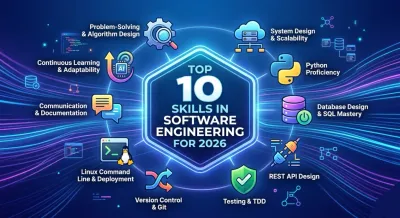
Engineering starts where syntax stops. A junior developer can memorize Python keywords in a weekend. A useful engineer knows when a list is the wrong data structure, when a database schema will cause pain six months later, when an API contract is too brittle to survive mobile clients, and when a clean-looking abstraction hides a maintenance trap. Those are different skills.
That difference matters because the field keeps expanding. The US Bureau of Labor Statistics projection cited here notes 25% growth in software developer employment from 2022 to 2032, compared with about 3% national average job growth. Growth creates opportunity, but it also raises the bar. Teams don't just need people who can write code. They need people who can reason about systems, trade-offs, failure modes, and team workflows.
The strongest skills in software engineering aren't isolated tricks. They're connected habits of thought. Problem-solving affects architecture. Testing affects design. Communication affects delivery. Git discipline affects reliability. Learn them as a system, not as a checklist.
1. Problem-Solving & Algorithm Design #
If you can't break a messy problem into smaller parts, every tool you learn will feel random. Languages change. Frameworks change faster. Problem-solving stays.

A lot of beginners treat algorithms like interview theater. That's a mistake. Data structures and algorithms are how you control cost, speed, and complexity before production punishes you. The FDM overview of software engineering skills highlights problem-solving through DSA as central in hiring, and that matches what working engineers see every day.
Think in constraints #
Real problem-solving isn't about showing off dynamic programming when a dictionary lookup will do. It's about matching the tool to the shape of the problem.
Consider a backend service that checks whether a user has already seen a notification. A beginner might loop through a list every time. A stronger engineer asks:
- What grows over time: If the collection keeps growing, linear scans become a tax on every request.
- What matters most: Fast membership checks point toward sets or indexed storage.
- What breaks first: Memory, latency, and duplicate logic usually fail before the code looks “clever.”
Practical rule: Optimize for clarity first, then for the bottleneck you can name.
If you're building this muscle, start with data structures and algorithms for beginners, then apply each concept to something real: caching, deduplication, scheduling, pagination, search ranking, rate limiting.
What works and what doesn't #
What works is deliberate repetition on common patterns: arrays, hash maps, trees, graphs, recursion, and complexity analysis. What doesn't work is solving fifty puzzle problems and never asking where that pattern appears in an API, database, or background worker.
The mature version of this skill is simple to state and hard to fake. You can look at a feature request, identify the core problem, and choose an approach that won't collapse under normal growth.
2. System Design & Scalability Thinking #
System design starts the moment a feature has to survive success, failure, and change.
A script can finish a task once. A system has to keep doing it after traffic spikes, retries pile up, requirements shift, and three other teams depend on it. That changes the job. The question stops being "Can this endpoint work?" and becomes "What breaks under load, what becomes expensive to change, and how do we recover when part of it fails?"

Design for change under pressure #
Junior developers often treat system design like diagramming. Boxes, arrows, message brokers, service meshes. It looks advanced right up until a small product change requires touching six repositories and coordinating four deployments.
Start with a modular monolith unless the constraints clearly demand more. That choice is boring, and boring wins a lot in production. Clear module boundaries inside one codebase give you faster local development, simpler debugging, easier refactors, and fewer distributed failure modes. Split services later, when independent scaling, separate team ownership, or different reliability requirements justify the extra operational cost.
That is the core discipline here. Architecture is not a collection of trendy parts. It is the skill of placing boundaries where change is likely and keeping those boundaries cheap to maintain.
A useful design review sounds less like a framework debate and more like risk management:
- State: Where does truth live, and what is only a cache or projection?
- Failure: What happens on timeouts, retries, duplicate events, and partial writes?
- Change: Can you roll out schema changes, version contracts, and backfill data without freezing delivery?
- Visibility: How will you know the system is slow, wrong, or dropping work unnoticed?
Good architecture lowers the cost of future mistakes.
One practical way to build this muscle is to model system boundaries with the same care used for application code. Engineers who understand object-oriented design as a tool for defining clear responsibilities and interfaces usually make better service boundaries too. The principle is the same. High cohesion, low coupling, explicit contracts.
Scale is a trade-off, not a badge #
Many systems do not fail because they lacked Kubernetes, event streaming, or horizontal partitioning. They fail because the team built a machine nobody could reason about.
I have seen teams add a queue to "improve scalability" when the actual bottleneck was a missing database index. I have also seen a single background worker save a product launch because it removed slow work from the request path without introducing distributed complexity. Both decisions affect scale. Only one respects the actual problem.
Scalability thinking means choosing the cheapest design that can survive expected growth. Sometimes that means caching hot reads. Sometimes it means batching writes, pushing long-running jobs to async workers, or making endpoints idempotent so retries do not corrupt data. Sometimes it means doing nothing yet because the operational overhead would cost more than the load.
The strong engineers are not the ones who reach for distributed systems first. They are the ones who know the price of every extra moving part, and spend that complexity only when the system gets a clear return.
3. Python Proficiency & Object-Oriented Principles #
Python gets overrated for the wrong reason. The syntax is friendly, so many developers assume the hard part is already solved. It is not. Python lets you ship useful code fast, but it also lets weak design hide behind readable syntax for far too long.
Strong Python work shows up in how you shape code under change. Can another engineer trace the behavior without opening twelve files. Can you add one pricing rule without breaking four others. Can you delete code without fear. That is the standard.
Write Python that survives contact with real products #
A lot of bad Python looks productive in month one. By month six, the module has turned into a junk drawer. One function validates input, writes to the database, calls an API, sends email, and logs metrics because "it was faster" to keep it together.
Good Python code separates decisions from side effects. It keeps data flow obvious. It uses the language's strengths, clear standard library tools, readable iteration, straightforward error handling, instead of hiding simple behavior behind decorators, metaclasses, or framework magic.
If you want a practical foundation, study Python object-oriented programming as a way to define responsibilities and boundaries. OOP earns its keep when an object has real state, real invariants, and behavior that belongs with that state. It becomes expensive when classes exist only to make the codebase look "architected."
Classes are tools, not status symbols #
Engineers early in their career often overuse inheritance because it feels organized. In practice, deep class trees age badly. A small override in one subclass changes behavior three levels up, and now nobody is sure which method runs in production.
Billing code makes this obvious. A BasePlan with subclasses for StartupPlan, EnterprisePlan, DiscountPlan, and RegionalTaxPlan looks tidy until product asks for stacked discounts, temporary promotions, and customer-specific exceptions. That is when inheritance stops modeling the business and starts fighting it.
Composition usually handles this better. Keep pricing, discounting, tax calculation, and invoice generation as separate parts with narrow responsibilities. You can test them in isolation, swap policies without surgery, and understand failures faster.
A few rules hold up well:
- Use classes for stateful domain concepts: orders, accounts, subscriptions, sessions.
- Use composition for variable behavior: pricing rules, permission checks, serializers, notification channels.
- Use plain functions when state does not matter: parsing, formatting, validation helpers, data transforms.
One hard-earned lesson stays true. Many problems blamed on Python are design mistakes with Python syntax wrapped around them.
Python proficiency also means knowing where the language can hurt you. Mutable defaults create bugs that look supernatural. Broad except Exception blocks bury production failures. Heavy ORM usage can hide query costs until latency spikes. Type hints help when they clarify contracts, but adding them everywhere without discipline turns them into decoration.
Write Python that another engineer can change on a tired Friday afternoon without causing an incident. That is fluency.
4. Database Design & SQL Mastery #
Most applications are just dressed-up database systems. The UI gets attention. The database gets blame.
This skill gets neglected because SQL feels less glamorous than application code. That's backwards. A weak schema infects everything above it: performance, reporting, API design, feature speed, and migration safety.
Your schema is part of your architecture #
A novice database design often mirrors forms on a screen. A stronger design models the business. Those are not the same.
Take an e-commerce backend. If you cram addresses, line items, and payment state directly into an orders table because it's fast to ship, you'll regret it when refunds, partial shipments, and audit history show up. Good modeling separates concerns early enough to avoid duplication, but not so aggressively that every query becomes a join maze.
A few practical rules hold up well:
- Normalize until duplication becomes intentional: Don't store the same business fact in three places and call it convenience.
- Index for access patterns, not for decoration: Every index helps one query and taxes writes.
- Treat migrations as product work: If data changes matter, plan rollback and compatibility.
SQL is a thinking tool #
Strong engineers don't treat SQL as a string buried in application code. They use it to understand shape, cardinality, joins, filters, and sort costs.
You should be comfortable reading execution plans, spotting N+1 query patterns, and deciding when to denormalize. You should also know when the database shouldn't do the work. Some reporting logic belongs in analytics pipelines, not transactional tables.
A practical example: if an API endpoint returns user dashboards, don't issue one query for users, then one query per widget, then one query per widget state. That's death by politeness. Pull related data with intent, not with hope.
Database skill is one of the clearest separators between developers who can ship demos and developers who can support live systems.
5. REST API Design & Implementation #
A REST API is a contract. Treat it like one. If your API is inconsistent, every client pays for your indecision.
Many backend developers assume API development is strictly about creating endpoints that return JSON. That is plumbing rather than design. True API proficiency involves resource modeling, naming, idempotency, authentication, pagination, versioning, error handling, and documentation that humans can use.
Design for consumers, not for controllers #
Bad APIs expose database tables with verbs glued on top. Good APIs model tasks from the client's point of view.
If you're building order management, /orders/{id}/cancel may be clearer than a vague status update endpoint that accepts anything and validates later. If clients need filtered lists, give them stable query parameters and predictable sorting. Don't make frontend developers reverse-engineer your assumptions from trial and error.
For a grounded set of patterns, read REST API design best practices. Then test your design against real use cases: mobile retry behavior, admin workflows, batch operations, and backwards compatibility.
An API that is easy to use is usually the result of someone taking naming and edge cases personally.
The trade-offs that matter #
Versioning is a classic example. People either ignore it or panic and version everything too early. The sane approach is simpler. Keep contracts stable, evolve additively when possible, and version only when you must break behavior.
A few habits separate mature API work from amateur work:
- Use HTTP semantics correctly: Status codes, methods, caching rules, and auth conventions exist for a reason.
- Make error responses structured: Clients need machine-readable failure details.
- Document examples, not just fields: Consumers think in requests and outcomes, not schema fragments.
The API is often the product boundary. Design it with the same care you'd give the product itself.
6. Testing & Test-Driven Development TDD #
If you only test by clicking around after you code, you're gambling with memory. The code may work today. You won't know what tomorrow's change broke.
Testing is less about finding bugs than about controlling fear. Teams with weak tests become afraid to refactor. They tiptoe around old modules, pile on conditionals, and slowly turn the codebase into wet cardboard.
Test behavior, not implementation trivia #
Many developers err in their testing methodology. They write fragile tests that assert every internal step, then wonder why refactors become painful. Good tests pin down behavior that matters and leave implementation room to breathe.
A practical stack usually looks like this:
- Unit tests: Fast checks on isolated business rules.
- Integration tests: Verification that modules, databases, and external boundaries work together.
- End-to-end tests: A small set of critical user flows, not a giant brittle script farm.
TDD can help, but only if you understand why you're using it. Writing the failing test first forces clarity. It doesn't magically make code good. Used badly, TDD produces test-shaped bureaucracy.
Where it pays off #
Suppose you're changing invoice calculations. If you have tests around tax rules, discount precedence, and rounding behavior, you can refactor confidently. Without them, every edit feels like cutting wires in a dark room.
The best teams use tests as design feedback. If code is hard to test, it's often too tightly coupled. If setup is painful, boundaries are probably wrong. If every test mocks everything, you've likely hidden the actual behavior behind too many layers.
Tests are not proof that your code is correct. They're proof that you cared enough to make change safer.
Write fewer, stronger tests. Keep them readable. Treat failing tests as signals, not annoyances to silence.
7. Version Control & Git Workflow Mastery #
Git is the memory of the codebase. If that memory is messy, every review, release, rollback, and hotfix gets harder than it should be.
Developers who only know add, commit, and push usually hit a wall the first time a branch lives too long, two features collide, or production needs a surgical fix. At that point, Git stops being a personal tool and becomes a coordination system.

Clean history reduces team drag #
Good Git habits are less about memorizing commands and more about controlling change.
A strong commit does one job. It has a clear boundary, a message that explains intent, and a diff small enough to review without guesswork. A weak commit mixes refactoring, formatting noise, dependency churn, and feature work into one blob. That kind of history punishes everyone who touches the code later.
The practical habits are simple:
- Keep commits focused: One logical change per commit.
- Write messages for the next engineer: Explain why, not just what.
- Read your diff before pushing: Catch accidental edits, debug prints, and generated junk early.
- Sync with the main branch often: Long-lived branches rot fast.
- Learn recovery commands:
revert,reset,cherry-pick, andreflogsave real projects.
Pull requests are design review in miniature #
A pull request is a technical document. It should explain the change, point out risk, and tell the reviewer how to verify behavior. Good PRs shorten review time because they reduce ambiguity. Bad PRs force reviewers to reverse-engineer your thinking from a noisy diff.
Workflow choices matter here. Squashing can keep history readable. Rebasing can keep a branch clean. Merge commits can preserve context when that context matters. The right choice depends on how your team debugs incidents, traces regressions, and audits changes under pressure.
Here is the trade-off many junior engineers miss. Clean history helps humans. Preserved history helps investigations. Mature teams choose deliberately instead of treating one Git style as doctrine.
A common production scenario makes the point. A customer-facing bug needs a fast fix. The best branch contains the smallest possible change, one or two clear commits, and a PR description that names the symptom, root cause, and rollback plan. That gets reviewed quickly. A branch that also sneaks in style cleanup and unrelated refactors creates hesitation at the exact moment the team needs confidence.
Git skill is change-management skill. It keeps collaboration disciplined, code review sharp, and releases boring. Boring releases are a sign of an engineer who knows what they are doing.
8. Linux Command Line & Deployment #
A lot of junior developers treat deployment like a final button click. That mindset causes long nights.
Software engineering does not stop at passing tests on a laptop. The job includes the machine that runs the code, the process that starts it, the environment that configures it, and the logs that explain why it failed at 2 a.m. Linux command line skill matters because production systems are usually plain, unforgiving environments. No IDE safety rails. No hidden magic.
The practical gap shows up fast. A developer can build a clean API, then freeze the moment they SSH into a server and need to answer basic questions. What process is running? Which port is bound? Which environment variable is missing? Why can this user read one file but not another? Those are not ops trivia. They are part of shipping backend software.
Learn the machine beneath the framework #
Start with the basics until they feel boring. File movement. Permissions. Environment inspection. Process control. Logs. Open ports. Shell pipes. Exit codes. Package installation. Service restarts. Container commands.
You do not need to become an infrastructure specialist. You do need enough command line fluency to inspect a broken system without guessing.
One staging failure captures the difference. The API returns 500s after deploy. A weak engineer changes application code first. A strong engineer checks the startup command, confirms the env file loaded, reads the service logs, verifies the app is listening on the expected interface, and inspects the reverse proxy config. Half the time, the bug is not in the code at all. It is a bad path, a missing secret, a permission error, or a process that never started.
Deployment exposes design quality #
Docker helps because it removes excuses. Hidden local dependencies, wrong working directories, fragile startup steps, and filesystem assumptions become obvious once the app runs in a container.
That pressure is useful. It forces better engineering habits:
- Keep environments close enough to compare: Big gaps between local, staging, and production create fake confidence.
- Script the setup: Manual deploy checklists rot fast and fail under pressure.
- Read logs before editing code: Configuration and runtime issues often masquerade as application bugs.
- Design for shutdown and restart: Processes get killed, rescheduled, and replaced. Code has to handle that cleanly.
Production is an audit of your assumptions.
Engineers who understand deployment write different software. They think about health checks, config loading, migrations, file permissions, and observability while building the feature, not after the first incident. That is the larger point. Linux and deployment are not side skills. They shape how disciplined engineers design systems from the start.
9. Communication & Code Documentation #
Weak communication turns good code into a liability.
Teams do not fail only because the implementation is wrong. They fail because nobody can tell what was decided, what assumptions the code depends on, or why one trade-off beat another. Engineering is a coordination job disguised as a coding job. The better your systems get, the more this matters.
Documentation is part of the design, not cleanup after the design. A solid README cuts onboarding time. A short design doc prevents the same argument from happening three times. A useful code review comment explains intent, risk, and alternatives so the next engineer can change the code without fear.
Write for handoff, not for decoration #
Good documentation earns its keep. It answers the next practical question before someone has to ask it in chat.
A README should cover:
- what the service does
- how to run it locally
- how to test it
- required environment variables
- known failure modes or sharp edges
Comments need the same discipline. Explain why a cache timeout is 30 seconds. Explain why an awkward query is safer than a cleaner one. Do not waste lines translating code into English. If a loop needs a comment to explain what it does, the code usually needs a rewrite.
Daily communication shows up in places junior engineers often underestimate:
- Design reviews: State the trade-off clearly. Faster writes, slower reads. Simpler deploy, weaker isolation. Pick one and explain why.
- Code reviews: Leave comments that reduce ambiguity, not comments that show off taste.
- Incident updates: Write the status like people are making decisions from it, because they are.
One sentence can lower team risk. "This migration is safe to rerun, but it will lock the table for a short period" is better than five vague paragraphs and much better than silence.
Clear writing usually means the engineer has done the hard thinking already.
The habit to build is simple. Treat every note, comment, PR description, and README as part of the system. Code changes behavior. Communication changes whether the team can maintain that behavior under pressure. That is a real engineering skill, not a soft extra.
10. Continuous Learning & Adaptability #
Rigid engineers break first.
Software changes under your feet. Frameworks age out. Deployment patterns shift. AI changes how code gets written, reviewed, and debugged. The engineers who last are not the ones who memorized the right stack in one good year. They are the ones who keep updating their mental model while holding the line on correctness, simplicity, and maintainability.
Learning is not tool collecting. It is judgment training.
A junior developer often asks, "What should I learn next?" My answer is usually irritatingly simple. Learn the next thing that removes a real bottleneck in your work. If you cannot trace a slow request, learn observability. If you keep shipping fragile changes, learn testing. If your service falls apart under load, study queues, caching, and failure modes. Skills compound when they connect to a system problem you have already felt in production.
Adapt your model of engineering #
Strong engineers do not build an identity around one language or framework. They build one around solving business and system problems with code.
Languages rise, fall, and then rise again in a different corner of the field. Entry paths change too. As noted earlier, the industry keeps proving that pedigree matters less than output. Teams keep the engineer who can learn a messy codebase, ask sharp questions, and ship reliable changes. That is the standard.
The deeper lesson is architectural. Every new tool should fit into an older principle. A new web framework still has request lifecycles, state boundaries, failure cases, and performance costs. An AI coding assistant still produces code that needs design judgment, tests, and review. The wrapper changes. The engineering does not.
What adaptation looks like in practice #
Good learning has an order to it. Build the base layer first, then widen.
- Base layer: one language you can use fluently, one relational database, Git, Linux, debugging, and basic web fundamentals
- Build layer: testing, API design, deployment, logging, metrics, and code review discipline
- Scale layer: distributed systems, concurrency, security, performance tuning, and AI-assisted development workflows
This order matters. Engineers who skip the base layer often become tool tourists. They can demo five frameworks and explain none of the trade-offs. Engineers with a base can pick up new tools fast because they recognize the shape of the problem underneath.
Projects beat tutorials for the same reason production beats theory. Friction teaches. A tutorial shows the happy path. A real project forces decisions: where to put validation, how to recover from partial failure, what to cache, what to log, and what to leave alone because the complexity tax is not worth paying yet.
That is adaptability in the professional sense. It is not reacting to hype. It is staying useful as the field changes, because your skills form a system instead of a pile of disconnected tricks.
Top 10 Software Engineering Skills Comparison #
| Skill | Complexity 🔄 | Resources & Effort ⚡ | Expected Outcomes 📊⭐ | Ideal Use Cases 📊 | Key Advantages ⭐ | Quick Tip 💡 |
|---|---|---|---|---|---|---|
| Problem-Solving & Algorithm Design | Medium–High, theoretical + practice | Practice platforms, algorithm texts, time investment | Higher-performing, scalable solutions, High ⭐⭐⭐ | Performance-critical code, interview prep, core libraries | Enables optimal data-structure/algorithm choices | Practice timed problems and analyze Big O |
| System Design & Scalability Thinking | High, distributed systems concerns | Architecture reading, whiteboard sessions, tooling | Highly scalable, reliable systems, Very High ⭐⭐⭐⭐ | High-traffic services, platform architecture, microservices | Guides trade-offs for availability, latency, cost | Sketch architectures and write ADRs |
| Python Proficiency & Object-Oriented Principles | Medium, language + design patterns | Projects, books, code reviews, refactoring time | Cleaner, maintainable codebases, High ⭐⭐⭐ | Backend services, domain modeling, team codebases | Improves modularity and long-term maintainability | Refactor scripts into classes and apply SOLID |
| Database Design & SQL Mastery | Medium–High, modeling + tuning | DB instances, real data, profiling tools (EXPLAIN) | Faster queries and consistent data, High ⭐⭐⭐ | Data-driven apps, transactional systems, analytics | Reduces technical debt and query bottlenecks | Design ERDs and use EXPLAIN to optimize queries |
| REST API Design & Implementation | Medium, HTTP, resource modeling | Web frameworks, OpenAPI/Swagger, auth tools | Predictable, consumable APIs, High ⭐⭐⭐ | Public APIs, microservices, frontend-backend integrations | Stable contracts and easier integrations | Document endpoints with OpenAPI/Swagger |
| Testing & Test-Driven Development (TDD) | Medium, discipline and tooling | Test frameworks, CI pipelines, mocks | Fewer regressions, safer refactors, Very High ⭐⭐⭐⭐ | Long-lived projects, team codebases, refactors | Acts as a safety net and living documentation | Start TDD for small features and add CI |
| Version Control & Git Workflow Mastery | Low–Medium, concepts + practice | Git hosts, branching practice, PRs | Clean history and smoother collaboration, High ⭐⭐⭐ | Team development, open-source contributions | Traceability and easier code review | Use atomic commits and feature branches |
| Linux Command Line & Deployment | Medium, ops fundamentals | VPS, SSH, Docker, shell scripting | Deployable, observable applications, High ⭐⭐⭐ | Production deployment, troubleshooting, DevOps | Bridges development and operations | Deploy a simple app to a VPS and automate steps |
| Communication & Code Documentation | Low–Medium, clarity skills | Writing tools, ADR templates, demo assets | Faster onboarding and clearer decisions, High ⭐⭐⭐ | Team collaboration, stakeholder alignment, OSS | Multiplies team impact beyond code | Maintain a pristine README explaining the "why" |
| Continuous Learning & Adaptability | Low, habit formation | Time for study, curated feeds, side projects | Sustained career relevance, High ⭐⭐⭐ | Career growth, adopting new tech, prototyping | Keeps skills current and enables pivots | Schedule regular deep-learning sessions each week |
From Skills to Systems Your Path Forward #
The fastest way to stall as an engineer is to treat skills like trading cards. Collect Python, Git, SQL, and system design as separate badges, and you end up with vocabulary instead of judgment. Good engineers build a connected mental model. They see how data shape affects API design, how deployment constraints change architecture, and how testing changes the way code gets written in the first place.
That shift matters.
A backend project is enough to force the connection. Build something small but real, like a task tracker, invoice service, or review platform. Define the domain carefully. Model the database so the data stays honest under change. Write endpoints that are boring in the best way: predictable, stable, easy to test. Add tests before a refactor, not after the bug report. Use branches and pull requests even if nobody else is on the repo, because discipline practiced alone is still discipline. Package the app, run it in a Linux environment, and write down the setup and the trade-offs in a README that another engineer could follow without guessing.
That is where isolated knowledge becomes engineering judgment.
There is a real trade-off here. This path feels slower than tutorials because it exposes friction. Schemas need revisions. Tests fail for annoying reasons. Deployments break because an environment variable was wrong or a file path assumed your laptop. That friction is the lesson. Architecture only becomes real when change is expensive. Testing only becomes convincing when it catches a regression you were sure could not happen. Documentation only proves its value when someone else tries to run your project and gets stuck on step three.
The career advantage comes from that durability. Tools change. Frameworks rise and fade. Engineers who can reason about boundaries, state, failure modes, and maintainability keep their footing because those principles transfer. A language is a tool. A system-building mindset is a profession.
Codeling fits that model in a practical way. It teaches backend development through hands-on Python work that includes object-oriented design, data structures, Git, Linux command line, REST APIs with Django Ninja, databases, testing, and AI-related projects. The format matters because browser exercises paired with synchronized local projects look much more like actual engineering work than passive watching.
Pick one project that makes you uncomfortable, then finish it properly. Make it clear, testable, deployable, and maintainable. Shipping code is useful. Shipping code that survives change is the standard.
If you want a structured way to build these skills in software engineering through real backend projects, explore Codeling. It gives you a hands-on Python curriculum with browser-based exercises, local project work, GitHub portfolio output, and practice across OOP, DSA, Linux, SQL, REST APIs, testing, and AI engineering.