Your Complete Python Object Oriented Programming Tutorial
Learning Python OOP is what separates someone who just writes code from a software engineer who designs systems.
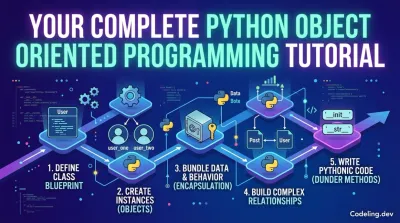
If you've spent any time writing Python, you've probably cobbled together a few scripts. Maybe you wrote something to scrape a website, automate a boring task, or crunch some data. That's a great start. But there's a world of difference between writing a script that runs and engineering an application that lasts.
This is where Object-Oriented Programming (OOP) comes in. It’s the leap from writing disconnected scripts to building structured, professional-grade software. Mastering it is your direct path to architecting the complex systems that power the modern web—a core skill for any serious backend developer.
From Scripts to Systems: Why OOP Is the Game-Changer #
Before we write a single line of code, we need to get the "why" straight. Why bother with classes and objects when a bunch of functions seems to work just fine?
The simple answer is that modern software is too complex for that. Think of it like this: you can build a shed with a pile of lumber and a handful of tools. But you can't build a skyscraper that way. You need blueprints, support beams, and modular components that all fit together predictably. OOP is the blueprint for your code. It's how you build the skyscraper.
Instead of juggling loose variables and functions, you start creating self-contained "objects" that bundle data and behavior together. This isn't just a neat trick; it's the fundamental design principle behind almost every major backend system you can think of, from e-commerce platforms to social media APIs.
The Shift from Coder to Architect #
Learning Python OOP is what separates someone who just writes code from a software engineer who designs systems. It forces you to stop thinking about one-off tasks and start planning for how your application will grow and change over time.
This isn't just a "nice-to-have" skill. It’s a hard requirement for most backend roles. Companies use Python for its powerful libraries and clean syntax, but they need engineers who can organize that power into a logical, maintainable structure. The job market data is pretty clear on this.
Industry analysis shows that 86% of developers use Python as their primary language for applications and APIs. As a result, 45.7% of recruiters are actively looking for Python talent, making it the most in-demand programming language.
How OOP Connects to Your Career #
So, what does this actually mean for you? When you start thinking in objects, you’re directly preparing for the day-to-day work of a backend developer.
When you're asked to build a new feature for a REST API, you'll be modeling the data as classes. When you design a new service, you'll encapsulate all its logic inside objects. This isn't just academic—it leads to real-world benefits:
- Scalable Systems: Your code becomes easier to expand without accidentally breaking something else.
- Maintainable Code: Other developers (including your future self) can actually understand what you wrote and contribute to it.
- Reusable Components: An object you build for one feature can often be plugged into another, saving you from reinventing the wheel.
This tutorial is designed to give you that architectural mindset. If you're serious about building a career in this field, our guide on how to become a backend developer provides a complete roadmap.
Creating Your First Python Class From a Practical Example #
Enough with the abstract theory. To make this Python object-oriented programming tutorial feel real, we're skipping the classic "Car" and "Animal" examples you see everywhere else. We're going to build something you'd actually find in the wild: a User class for a social media app.
This way, you’re grounding the concepts in a practical scenario right from the start.
Let's begin with the fundamental building block of OOP in Python: the class keyword. A class is simply the blueprint for creating individual objects. It’s like a cookie-cutter—the class defines the shape (User), but every cookie you press out is a unique instance.
Defining the User Blueprint #
Every blueprint needs a way to set up the initial details for a new object. In Python, this is handled by a special "dunder" (double underscore) method called __init__. Think of it as the constructor; it runs automatically every single time you create a new object from the class.
Let's build our User class with an __init__ method that takes a username and email.
class User:
    def __init__(self, username, email):
        self.username = username
        self.email = email
        self.is_active = True
        self.followers = 0

    def display_profile(self):
        print(f"Username: {self.username}")
        print(f"Email: {self.email}")
        print(f"Followers: {self.followers}")

    def deactivate_account(self):
        self.is_active = False
        print(f"User {self.username} has been deactivated.")
Pay close attention to the self parameter in every method. This is absolutely crucial. It’s a reference back to the specific instance of the class being worked on, which lets methods access that object's unique data, like self.username or self.is_active.
From Blueprint to Actual Users #
With our User blueprint ready, we can start creating actual User objects. These are called instances. Each instance is a distinct, self-contained object made from the User class, complete with its own set of data.
Let's create two different users.
user_one = User("alex_dev", "[email protected]")
user_two = User("sara_codes", "[email protected]")
Here, user_one and user_two are two separate objects living in your computer's memory. Even though they came from the same User blueprint, their attributes (username and email) are totally independent. If you change one user's data, the other remains completely untouched.
This separation is one of the core strengths of OOP. Imagine trying to manage this same data with a bunch of loose dictionaries or lists—it would quickly devolve into a confusing mess.
Key Takeaway: A class is the template (
User). An instance is a specific object created from that template (user_one). The__init__method sets up the initial state (attributes) for each new instance.
Now for the fun part. We can interact with these user instances by calling their methods. Methods are just functions that belong to a class, and they define what an object can do.
Calling methods on our instances #
Calling display_profile:
user_one.display_profile()Output:
Username: alex_dev
Email: [email protected]
Followers: 0
Calling deactivate_account:
user_two.deactivate_account()Output:
User sara_codes has been deactivated.As you can see, calling display_profile() on user_one prints out its specific details. Meanwhile, the deactivate_account() method changes the internal state of user_two by flipping its is_active attribute to False.
This powerful idea of bundling data (attributes like username) and behavior (methods like display_profile) together is called encapsulation. It’s what makes object-oriented code so organized and easy to manage.
To see just how much cleaner this is, let's contrast it with a more traditional, procedural approach.
Managing User Data: Procedural vs. Object-Oriented Approach #
This table shows the difference between juggling loose variables and functions versus organizing everything neatly inside a User class.
| Concept | Procedural Programming Example | Object-Oriented Programming (OOP) Example |
|---|---|---|
| Data Structure | user1_data = {'name': 'alex', 'email': 'alex@...'} |
user1 = User('alex', 'alex@...') |
| Behavior | deactivate_user(user1_data) |
user1.deactivate_account() |
| Clarity | Logic is completely separated from the data it operates on. You have to mentally connect them. | Data and the logic that manipulates it are bundled together, creating a clear, intuitive model. |
| Scalability | Becomes a nightmare to manage as you add more user-related functions all over your codebase. | It's easy to add new methods to the User class without breaking other parts of your code. |
The difference is stark. In the procedural example, the data and the functions that use it are disconnected. In the OOP example, the User object knows how to manage itself. This makes your code dramatically easier to read, scale, and maintain.
By writing this simple User class, you've just taken a huge first step in this Python object-oriented programming tutorial. You’ve successfully created a blueprint, brought objects to life from it, and made them perform actions—that’s the foundational workflow of OOP right there.
Choosing Between Inheritance and Composition #
Once you have a working class like our User object, you’ll quickly run into a new question: how do different objects relate to each other? In any real application, objects don't live in a vacuum. They interact, share data, and build on one another to create something complex. This is where inheritance and composition come into play, and they are absolutely essential concepts in object-oriented programming.
These two ideas are all about defining the relationships between your classes. Honestly, learning when to use one over the other is a hallmark of an experienced developer. Get this choice right, and your code will be flexible, readable, and easy to maintain. Get it wrong, and you can paint yourself into a corner.
The whole thing boils down to a simple question: are you dealing with an "is-a" or a "has-a" relationship? Does your new object represent a more specialized version of an existing one, or does it simply contain another object?
Using Inheritance for Specialized Roles #
Inheritance is your tool for creating an "is-a" relationship. You use it when you want to make a new class that is a more specific type of an existing parent class. The new "child" class automatically gets all the attributes and methods from its parent, but you can also give it new abilities or even change how the old ones work.
Think about our social media app. Not all users are created equal. Some will have special powers. Let's imagine we need Moderator and Admin roles. A Moderator is-a User, and an Admin also is-a User, just with more privileges. This is a textbook case for inheritance.
Let's see what a Moderator class that inherits from User looks like:
class Moderator(User):
    def __init__(self, username, email):
        super().__init__(username, email)
        self.permissions = {"can_delete_posts", "can_edit_comments"}

    def ban_user(self, other_user):
        # We can call methods on the other_user object
        other_user.deactivate_account()
        print(f"Moderator {self.username} has banned {other_user.username}.")
So, what's going on here?
class Moderator(User):: This is how we tell Python thatModeratoris a child ofUser. Simple as that.super().__init__(...): This little line is crucial. It calls the parent class's (User) constructor, making sure everyModeratorstill gets ausernameandemailjust like a regular user.ban_user(...): Here's the new power. We've added a method that only moderators get. A standardUserobject can't do this.
Now, a Moderator can do everything a User can, and then some.
Let's create our users
base_user = User("charlie_p", "[email protected]")
mod_user = Moderator("diana_mod", "[email protected]")
The Moderator can use methods from the User class
mod_user.display_profile()And the Moderator can also use its own special methods
mod_user.ban_user(base_user)The base_user is now deactivated
Inheritance is powerful, but it creates a very tight bond between the parent and child classes. If you change the parent, you might accidentally break all its children. This leads to a classic piece of software design advice.
Favor composition over inheritance. This is a design principle you'll hear over and over again. It encourages building complex objects from smaller, independent ones, which almost always leads to more flexible and robust code.
This brings us to the more common and, frankly, more flexible alternative.
Using Composition for Complex Objects #
Composition is how you create a "has-a" relationship. Instead of a class being another type, it simply contains one or more other objects as attributes. It's how you build complex things out of simpler parts, just like a car "has-a" an engine and wheels. The car isn't a type of engine; it's a completely separate thing that uses an engine to work.
Back in our app, a User "has-a" collection of posts. The user isn't a post, and a post isn't a user. They are distinct objects, but they're related.
First, let's whip up a simple Post class:
class Post:
    def __init__(self, content):
        self.content = content
        self.likes = 0

    def display(self):
        print(f'"{self.content}" - Likes: {self.likes}')
Now, let's update our User class to hold a list of these posts. This is composition in action.
class User:
    def __init__(self, username, email):
        self.username = username
        self.email = email
        self.is_active = True
        self.posts = [] # The User 'has-a' list of Post objects

    def add_post(self, content):
        new_post = Post(content)
        self.posts.append(new_post)
        print(f"New post added by {self.username}.")

    def display_profile(self):
        status = "Active" if self.is_active else "Deactivated"
        print(f"Username: {self.username}, Email: {self.email}, Status: {status}")

    def deactivate_account(self):
        self.is_active = False
        print(f"User {self.username} has been deactivated.")
By adding that posts list, we've composed a User that now manages Post objects. The best part? The User and Post classes remain totally independent. You can change how Post works all day long without breaking the User class. This is a massive win for long-term maintainability. If you find yourself building deep, multi-level inheritance chains (a User has a Moderator which has a SuperModerator...), you might be creating what's known as premature abstraction, which you can learn more about in our detailed article.
When to Choose Which #
So, how do you decide? Here’s a quick-and-dirty cheat sheet:
- Use Inheritance (is-a): When your new class is a true, logical specialization of the parent. An
Adminis-aUser, but with more powers. This relationship should feel permanent and make intuitive sense. - Use Composition (has-a): For almost everything else. When an object needs to own, manage, or be made up of other objects, composition is your friend. A
UserhasPosts. APlaylisthasSongs. ACarhas anEngine. This is by far the more flexible, scalable, and common pattern you'll use in modern backend development.
Get comfortable with both of these patterns, and you'll be well on your way to designing clean, logical, and maintainable object-oriented systems.
Writing Pythonic Code with Dunder Methods #
So far, the only special method we've really touched on is __init__. But that's just scratching the surface of what makes Python's object model so powerful.
Python has a whole collection of special methods, instantly recognizable by their double underscores. We call them dunder methods (for double underscore), and they are your ticket to hooking into Python's built-in behaviors and writing code that feels truly "Pythonic."
Ever wonder why you can call len() on a list or str() on an integer? It's not magic. Those types simply implement dunder methods like __len__ and __str__. By adding these to your own classes, you can make your custom objects play by the same rules, which makes them far more intuitive for you and other developers to work with.
Improving Readability with __str__ and __repr__ #
Let's see what happens if you try to print() one of our User objects right now. You'll get something pretty ugly and not very helpful, like <__main__.User object at 0x7f1234567890>.
This is the default representation, and it tells you almost nothing. We can do much better by implementing two essential dunder methods: __str__ and __repr__.
__str__: This provides the "informal" or user-friendly string version of your object. It's what gets called when you useprint()orstr().__repr__: This creates the "official" or developer-focused string representation. The goal here is to be unambiguous. Ideally, it should be a valid Python expression that could be used to recreate the object.
Let's add these to our User class. You'll see right away how much better it makes debugging and logging.
class User:
    def __init__(self, username, email):
        self.username = username
        self.email = email # ... other attributes

    def __str__(self):
        return f"User({self.username})"

    def __repr__(self):
        return f"User(username='{self.username}', email='{self.email}')"

    # ... other methods
With just those two methods added, look at the difference. Our User objects are suddenly much more communicative.
Create a user instance
user_one = User("alex_dev", "[email protected]")The str method is called by print()
print(user_one)Output: User(alex_dev)
The repr method is shown in an interactive console or when calling repr()
user_oneOutput: User(username='alex_dev', email='[email protected]')
This tiny change makes a massive difference in day-to-day development.
A good rule of thumb is to always implement
__repr__on your classes. If you only have time to implement one, make it__repr__, because__str__will fall back to using it if it isn't defined.
Making Objects Behave Like Collections with __len__ #
Dunder methods go way beyond just string output. They can make your custom objects feel just like native Python collections.
For instance, let's say we have a PostManager class that holds a list of Post objects. It would feel completely natural to want to check how many posts it's managing by simply calling len() on it.
We can make that happen by implementing the __len__ method.
Here's a simple PostManager that uses composition to hold a collection of posts.
class PostManager:
    def __init__(self, user):
        self.owner = user
        self._posts = [] # Using a leading underscore for internal data

    def add_post(self, post):
        self._posts.append(post)

    def __len__(self):
        return len(self._posts)

# Example Usage:

post_manager = PostManager("alex_dev")
post_manager.add_post("My first post!")
post_manager.add_post("Another thought.")

# Now we can use len() directly on our object!

print(f"Number of posts: {len(post_manager)}")

# Output: Number of posts: 2
Just by adding that tiny __len__ method, which just passes the call through to the internal _posts list, our PostManager now works seamlessly with Python's built-in len() function.
This is the essence of writing Pythonic code. You adapt your objects to the language's existing patterns, which creates a fluid and predictable experience for anyone using your code. Getting a handle on dunder methods is a huge step in your journey toward mastering object-oriented Python.
Building a Portfolio-Ready Task Manager Project #
Alright, let's pull all this theory together. Isolated examples are great for getting your head around a concept, but the real learning—and the stuff that catches a hiring manager's eye—happens when you build something tangible. We're going to build a complete, portfolio-ready command-line task manager from the ground up.
This isn't just a coding exercise; it's about thinking like an engineer. You'll be designing classes, figuring out how objects should talk to each other, handling user input, and structuring your project like a pro. When we're done, you'll have a real project in a GitHub repository that proves you can apply OOP principles to build a working application.
Designing the Core Task Class #
Every task manager, at its heart, is about one thing: the task. This makes it the perfect candidate for our first class. We'll create a Task class that acts as a blueprint, holding all the little details for a single to-do item.
A Task object should be self-contained, managing its own state. Let’s map out its essential attributes:
description: The text of the task itself (e.g., "Finish OOP project report").due_date: When the task is supposed to be done.status: Is the task "Pending" or "Completed"?
Now, let's write the code. We’ll use the __init__ dunder method to set up the object when it's created and __str__ to give us a clean, human-readable output when we print it.
In a file named task.py
import datetime

class Task:
    def __init__(self, description, due_date_str=None):
        self.description = description
        self.creation_date = datetime.date.today()
        self.status = "Pending"

        if due_date_str:
            self.due_date = datetime.datetime.strptime(due_date_str, "%Y-%m-%d").date()
        else:
            self.due_date = None

    def mark_as_completed(self):
        self.status = "Completed"

    def __str__(self):
        due = f"Due: {self.due_date}" if self.due_date else "No due date"
        return f"[{self.status}] {self.description} ({due})"
See how this Task class is a neat, self-contained unit? It knows everything about itself and even has a method, mark_as_completed(), to change its own state. This is encapsulation in action.
Creating the TaskManager with Composition #
One task is fine, but a task manager needs to juggle a whole collection of them. This is a perfect job for composition. We'll create a TaskManager class that "has a" list of Task objects. This TaskManager will be the conductor of our application, handling all the main logic like adding, viewing, and updating tasks.
This design is incredibly flexible. The TaskManager doesn't need to know the messy details of how a Task works; it just needs to know how to hold onto Task objects and interact with them through their public methods.
In a file named task_manager.py
from task import Task

class TaskManager:
    def __init__(self):
        self._tasks = [] # A list to hold Task objects

    def add_task(self, description, due_date_str=None):
        task = Task(description, due_date_str)
        self._tasks.append(task)
        print(f"Added task: '{description}'")

    def view_tasks(self):
        if not self._tasks:
            print("No tasks to show.")
            return
        for i, task in enumerate(self._tasks):
            print(f"{i + 1}. {task}")

    # Additional methods like update_task and delete_task would go here
Our TaskManager uses a private list, _tasks, to hold instances of our Task class. This "has-a" relationship is a hallmark of clean, maintainable software. If you're tackling a similar problem, check out our guide on how to build a library management system, which relies on these same compositional patterns.
From Project to Portfolio on GitHub #
Look, having the code is only half the battle. To turn this into a real portfolio piece, you have to present it professionally with Git and GitHub. This shows employers you understand modern development workflows, which is often just as critical as your ability to write Python.
Here’s the essential workflow to get your project on GitHub:
- Initialize a Git Repository: In your project's main folder, run
git init. This creates a new, local Git repository. - Create a
.gitignoreFile: Make a file named.gitignoreand add stuff you don't want to track, like__pycache__/or.envfiles. This keeps your repo clean. - Make Your First Commit: Stage your files with
git add .and then commit them with a clear message:git commit -m "Initial commit: Add Task and TaskManager classes". - Create a GitHub Repository: Hop over to GitHub, create a new repository, and follow the instructions to connect your local repo to the remote one.
- Push Your Code: Finally, send your local commits up to GitHub with
git push -u origin main.
Key Takeaway: A portfolio project isn't just a folder of code; it's a version-controlled, publicly-accessible demonstration of your skills. Learning basic Git commands is non-negotiable for aspiring developers.
This small but solid application does a great job of showing you understand core OOP concepts. You’ve used classes to model a real-world idea, composition to manage how objects relate, and standard developer tools to share your work. This is exactly the kind of practical experience that builds both your confidence and your resume.
And this skill set is more important than ever. The Python ecosystem for web development and APIs has seen a major comeback, with 46% of developers reporting they use Python for web development in 2026. This revival is especially driven by new frameworks—FastAPI has been the clear winner, jumping from 29% to 38% adoption among Python web developers. For anyone hoping to become a backend engineer, this data points to a huge market opportunity: mastering Python's OOP fundamentals alongside modern API frameworks puts you right where the demand is. You can discover more insights in the full Python 2025 developer survey. Building projects like this task manager is your first real step toward tapping into that market.
Answering Your Top Python OOP Questions #
As you get your hands dirty with object-oriented programming in Python, you'll start running into questions. That's a good sign. It means you're moving beyond just memorizing syntax and are starting to think about design.
Let's cut through the noise and tackle the questions that come up time and time again. These aren't just academic exercises; they’re about the real-world decisions you'll make every day when building applications.
When Should I Use a Class Instead of Functions and Dictionaries? #
This is probably the most common—and important—question. So let me be direct.
You should reach for a class the moment you find yourself bundling related data and behavior together. Think of it this way: if you're passing the same dictionary around to a bunch of different functions, that’s a massive red flag. That dictionary wants to be a class.
For example, instead of a user_dict that gets passed to format_user_name(user_dict) and send_user_email(user_dict), you should create a User class. That class can then have its own methods, like .format_name() and .send_email(). This keeps everything neat and tidy in one self-contained unit, making your code infinitely easier to read and maintain.
Is Inheritance or Composition Better? #
Ah, the classic debate. Inheritance creates an "is-a" relationship (a Moderator is a User), while composition creates a "has-a" relationship (a User has a list of Posts). While both have their place, modern development has a clear winner.
Favor composition over inheritance. This isn't just my opinion; it's a core principle of good software design.
Composition is just far more flexible. It lets you build complex objects from smaller, independent, and reusable parts. Inheritance, on the other hand, can lock you into rigid hierarchies that become a nightmare to change later on. Start with composition first. Only use inheritance when you have a crystal-clear "is-a" relationship that's unlikely to change.
How Does Python OOP Relate to Frameworks Like Django or FastAPI? #
Here's the thing: you can't be effective with a major web framework without a solid grasp of OOP. These tools are built from the ground up on object-oriented principles. They use classes to give you a sane, organized way to build massive backend systems.
Think about it:
- In Django, your database tables are literally classes that inherit from
models.Model. A blog post becomesclass Post(models.Model): .... - In FastAPI, you define your API data contracts using Pydantic classes, like
class Item(BaseModel): ....
Your core business logic—the rules that make your application actually do something useful—will almost always live inside service classes. So no, OOP isn't just an abstract concept. It's the language you need to speak to use these powerful tools effectively.
What Does self Really Do in a Python Method? #
The self parameter trips a lot of people up at first, but it's actually pretty straightforward. It’s just a reference to the specific instance of the class that a method is being called on. It’s how Python connects a method to the object’s own data.
When you write my_user.display_profile(), Python secretly passes the my_user object itself as the first argument to the display_profile method. Inside that method, we call that first argument self by convention. This allows your code to access instance-specific attributes like self.username or self.email.
Could you name it something else? Technically, yes. Should you? Absolutely not. self is a universal convention in the Python world. Using anything else will just confuse other developers (and probably your future self). Just stick with self.
Ready to stop just reading and start building? At Codeling, we believe the best way to learn is by doing. Our interactive platform guides you through a hands-on Python curriculum designed for aspiring backend engineers, with browser-based exercises and real portfolio projects you can put on your GitHub. Build your skills and your confidence at https://codeling.dev.