Programming Languages for Beginners: Master Core Principles
Most advice about programming languages for beginners starts in the wrong place. It treats the first language like a permanent identity decision.
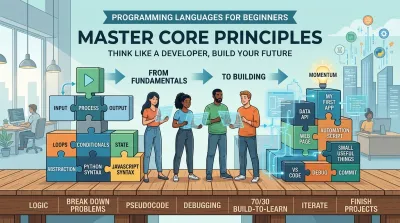
Most advice about programming languages for beginners starts in the wrong place. It treats the first language like a permanent identity decision, as if picking Python instead of JavaScript will define your whole career.
It won't.
Beginners usually don't get stuck because they chose the “wrong” language. They get stuck because they never built a problem-solving process, they consume too much theory without applying it, or they hit setup friction before they write enough code to feel progress. If your goal is to become a software developer, the better question isn't “Which language is easiest?” It's “Which path helps me learn how software works, how to break down problems, and how to keep building when things stop working?”
That shift matters. A language is a tool. A developer is someone who can model a problem, design a solution, test assumptions, and improve a system over time. Those skills transfer across stacks, frameworks, and jobs. Syntax changes. The way you think shouldn't.
Why Choosing a Language Is Your Last Problem #
The internet loves ranking languages. Python versus JavaScript. Java versus C#. Rust versus Go. For a beginner, that creates the impression that success depends on picking the perfect entry point.
It doesn't.
The first language matters far less than is commonly thought because your early bottleneck usually isn't syntax. It's whether you can learn core ideas well enough to solve simple problems on your own. If you can decompose a task, reason about inputs and outputs, read errors calmly, and improve a rough solution, you can carry that ability into almost any modern stack.
That doesn't mean all choices are equal. Some languages are friendlier at the start, and some lead more directly into certain domains. But beginners often overestimate the strategic importance of the first language and underestimate the importance of learning habits. A weak learner with the “best” language still struggles. A disciplined learner with a decent language keeps moving.
Practical rule: Pick a language that lets you build small useful things quickly, then spend your energy on thinking clearly and finishing projects.
This is also where career thinking helps. You're not trying to win a forum argument about elegance. You're trying to build a foundation for backend development, web applications, automation, data work, or whatever direction you want to pursue next. The first language should support that path, not distract you from it.
A beginner who spends weeks comparing languages is already avoiding the actual work. The durable advantage comes from learning how software is structured, how systems fail, and how developers recover when they do.
Mastering the Developer's Mindset First #
A developer's job isn't typing code fast. It's turning messy problems into manageable pieces.
That starts before you care about frameworks, libraries, or interview questions. Good beginners learn to think in layers. They stop treating programs as magic and start seeing them as systems with inputs, decisions, state, and outputs.

Break problems into parts #
If a task feels overwhelming, it's usually because it's still too large. “Build a to-do app” is too vague for a beginner. “Store a task.” “Show all tasks.” “Mark one complete.” Those are solvable.
This is the same skill you use in normal life. If you're cooking dinner, you don't think “produce meal” as one action. You gather ingredients, prep tools, cook in sequence, and plate the result. Programs work the same way. Large outcomes come from smaller repeatable steps.
Use a simple lens:
- Input: What information comes in?
- Process: What needs to happen to it?
- Output: What result should the user or system see?
That model sounds basic, but it's the backbone of software design. APIs, databases, command-line tools, and web apps all follow some version of it.
Learn abstraction early #
Beginners often think abstraction is an advanced topic. It isn't. You use it the moment you stop thinking about every internal detail at once.
A button in a web app is an abstraction. A function is an abstraction. A database query is an abstraction. Each one hides lower-level complexity behind a clear interface. That's how developers keep large systems understandable.
Abstraction is what lets you work on one layer of a system without carrying the full weight of every layer underneath it.
The mistake is trying to understand everything simultaneously. You don't need to know every internal detail of HTTP, the operating system, and memory management to build your first backend feature. You need to know enough of the current layer to make progress, while staying curious about what sits below it.
Think in systems, not isolated lines #
New developers often focus on single lines of code. Senior developers focus on relationships. They ask how parts interact, where data originates, what depends on what, and what happens when one part breaks.
That's why architecture matters early, even in simple projects. You don't need enterprise patterns on day one. You do need the habit of separating concerns. Keep business logic out of the user interface. Keep data handling distinct from presentation. Name things clearly. Make small units do one job well.
A solid beginner path teaches this kind of thinking through hands-on progression, not just syntax drills. If you want a practical companion for that approach, this guide on learning programming from scratch aligns well with the mindset-first way of learning.
Adopt the 70/30 Build-to-Learn Method #
Most beginners consume too much and build too little. They watch tutorial after tutorial, take notes, feel productive, and then freeze the moment they face a blank editor.
That pattern has a name. It's tutorial hell.
The fix is straightforward. A practical guide from freeCodeCamp recommends a 70/30 split where 70% of your time goes to building and 30% goes to learning concepts, along with a three-step routine of plain-English explanation, pseudocode, and then code. The same guide gives a conservative benchmark of 2 to 3 months at 10 to 15 hours per week to learn the basics of beginner-friendly languages like Python or JavaScript. You can read that guidance directly in freeCodeCamp's fundamentals-first learning article.

Why building works better than passive study #
When you build, you hit constraints. Your assumptions get tested. Your code fails in visible ways. That feedback loop is where real learning happens.
Passive study feels cleaner because nothing breaks. That's also why it's deceptive. You can recognize a concept in a video and still be unable to apply it in a project. Building forces recall, adaptation, debugging, and decision-making. Those are the muscles developers use at work.
A simple comparison makes the point clearer:
| Approach | What it feels like | What it actually builds |
|---|---|---|
| Watching tutorials | Smooth and reassuring | Recognition without much retention |
| Building small projects | Frustrating but memorable | Problem-solving ability and recall |
| Copying code line by line | Fast in the moment | Weak independence |
| Writing your own version | Slower at first | Stronger mental models |
Here's a useful companion video before you start your next study block:
Use a routine that reduces overwhelm #
Beginners often fail because they try to jump straight from problem statement to working code. That leap is too large.
Use this sequence instead:
-
Explain the task in plain English If you can't describe the task clearly, you probably don't understand it yet.
-
Write rough pseudocode List the steps without worrying about syntax.
-
Translate each step into code Focus on one small piece at a time.
The point isn't to avoid difficulty. The point is to make difficulty small enough to work through.
This method also changes what counts as progress. Progress isn't “I finished a course.” Progress is “I built a script that renames files,” or “I made an API endpoint return the right data,” or “I fixed a bug without copying the answer.”
Choosing Your First Language as a Strategic Tool #
Once you stop treating your first language like a lifelong commitment, the decision gets easier. You're choosing a tool that helps you learn fundamentals and build relevant projects, not signing a contract with a tribe.
For most beginners, the practical shortlist starts with Python and JavaScript.
According to Statista's 2025 developer language survey, JavaScript was used by 66% of software developers worldwide in 2025, while Python was used by 57.9%. The same survey lists HTML/CSS at 61.9% and SQL at 58.6%, which reinforces an important point: beginner-friendly tools aren't side roads. They sit close to real web and data workflows.

When Python is the better first tool #
Python is a strong starting point if you want readable syntax and a broad path into automation, backend work, and data-oriented tasks. Independent learning guides consistently rank it highly for beginners because it removes a lot of visual noise. You can focus on logic instead of wrestling with punctuation-heavy syntax.
That matters early. If the language is readable, your attention stays on flow and structure. You spend more effort understanding conditions, functions, data structures, and program design, which is exactly where a beginner should invest.
Python is especially good for learners who want to move toward backend engineering. It fits naturally with scripting, APIs, data processing, and general-purpose tooling.
When JavaScript is the better first tool #
JavaScript is the obvious first tool if you want immediate access to web development. It powers interactivity in the browser, and it also extends into backend work through the wider ecosystem. That makes it uniquely convenient if your motivation comes from seeing something visual on screen quickly.
Its biggest advantage isn't simplicity in the abstract. It's proximity to output. You can change some code and watch a page react. For many beginners, that feedback is enough to keep momentum alive.
A practical way to think about the trade-off:
- Choose Python if you want a cleaner path into backend logic, automation, and data-flavored work.
- Choose JavaScript if you want to build for the web early and see immediate results in the browser.
- Choose either one confidently if your main goal is building strong fundamentals.
If you want a broader comparison before deciding, this guide to the best programming language to learn is a useful supplement.
Navigating the Real First Challenge Setup Friction #
A lot of beginner advice says a language is easy when it really means the syntax is approachable. That leaves out the part that derails many new developers first: getting the environment to work.
You install a language runtime. Then a package manager. Then an editor extension. Then the terminal says a command isn't recognized. Then a tutorial assumes your shell behaves a certain way. Then your first hour of learning turns into troubleshooting software you don't yet understand.

That frustration is normal, and it's under-discussed. One beginner-oriented source argues that the true entry barrier of a language is often platform friction, not syntax alone, and points out that JavaScript can be started directly in a browser while some other environments ask beginners to deal with more tooling up front. That argument appears in this essay on the best beginner language and setup friction.
Reduce moving parts early #
When you're new, convenience matters. Fewer moving parts means fewer failure points.
Start with tools that let you write and run code quickly:
- Use browser-based environments when possible. They remove a surprising amount of local machine friction.
- Prefer one editor and learn it well. Visual Studio Code is enough for a long time.
- Delay advanced tooling. You don't need Docker, custom shell tweaks, or a complicated plugin stack on day one.
That last point matters. Beginners often confuse professional-looking setups with professional skill. Clean habits beat complex tooling.
Treat setup as your first debugging exercise #
Setup friction feels like wasted time, but it teaches an essential lesson early: software development includes environment problems, dependency problems, version problems, and configuration problems. You aren't failing when you hit them. You're meeting the job.
Field note: The first real programming skill many beginners build isn't writing logic. It's learning how to stay calm while a system refuses to cooperate.
If your environment breaks, simplify. Remove extras. Reproduce the smallest possible setup. Read the exact error. Search for the exact phrase. Keep notes on what fixed it. That behavior scales all the way up to production systems later.
From First Line of Code to First Project #
A strong start in programming languages for beginners doesn't come from obsessing over the perfect language. It comes from a sequence that builds real capability.
Start with mindset. Learn to break work into parts, think in inputs and outputs, and separate one concern from another. That gives you a way to reason about software before syntax starts crowding your attention.
Then fix your learning method. Build more than you consume. Write your own solutions, even clumsy ones. Use plain English, then pseudocode, then code. That rhythm creates understanding that survives outside a tutorial.
After that, choose a first tool with a purpose. Python is a strong path for backend logic, automation, and data-flavored work. JavaScript is a strong path for fast web feedback and browser-based experimentation. Either choice is fine if you're building consistently and thinking clearly.
The next hurdle is practical, not philosophical. Get through setup friction without turning it into a verdict on your ability. Every developer has lost time to environment issues. The difference is that experienced developers expect friction and work through it methodically.
Then build something small and complete. Not ambitious. Complete.
A useful first project usually has a few traits:
- Small enough to finish: a CLI tool, a task tracker, a simple API, or a tiny web app
- Clear input and output: the user does something, the system responds predictably
- One core responsibility: avoid stacking authentication, payments, dashboards, and deployment into version one
- Room to improve later: once it works, refactor structure, naming, and error handling
If you need ideas that fit that standard, this list of programming projects for beginners is a practical place to start.
The first project matters more than the first language because it changes your identity. You stop being someone who is “learning to code” and become someone who has built software. That shift is where momentum starts.
Codeling helps aspiring developers learn by doing, not by passively watching. If you want a structured path into backend engineering with hands-on Python, browser-based exercises, local project workflows, and portfolio-ready applications, explore Codeling.