Huggingface Transformers Tutorial for Backend Devs
Transformers are not just an ML topic. They’re a software integration problem. Learn how to move beyond basic notebooks to deploying models in production.
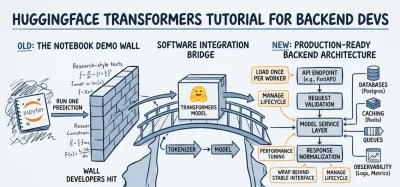
You probably already know how to build a clean Python API. You can define schemas, structure service layers, write tests, and ship endpoints that talk to databases and queues. Then you open a typical huggingface transformers tutorial and hit a wall. It loads a model in a notebook, runs one prediction, and stops right before the part that matters in a real product.
That gap is where most backend developers get stuck.
The useful mental shift is simple. Transformers are not just an ML topic. They’re a software integration problem. You aren’t starting from zero. If you’ve integrated Stripe, Redis, Postgres, or S3, you already understand the core discipline involved: choose the right dependency, wrap it behind a stable interface, manage lifecycle and failure modes, and expose it through a reliable API.
Why Backend Developers Should Master Transformers #
A backend team gets the feature request on Monday. “Add ticket triage, summary generation, and basic moderation to the support API.” The model is usually the easy part. The hard part is fitting that capability into an application that already has latency budgets, deploy pipelines, validation rules, and on-call obligations.
That is why Transformers belong on a backend developer’s roadmap. Hugging Face turned a large amount of NLP and multimodal research into packaged dependencies you can evaluate, load, version, and serve inside real systems. As noted earlier, the ecosystem has grown into a large model hub with heavy production use. For backend engineers, the important point is not the exact count. It is the shift from “build an ML system from scratch” to “integrate the right model with clear boundaries.”
Treat models like production dependencies #
A pretrained transformer is often closer to Redis or Elasticsearch than to a research project. You still need to understand what it does well, where it fails, and what it costs to run. But you usually do not need to invent the core capability yourself. You need to choose a model that fits the task, wrap it behind an interface your application can trust, and keep its behavior predictable under load.
That framing changes the work.
The first questions are architectural, not academic:
- Where should the model live: inside the web app process, in a worker, or behind a separate inference service?
- When should it load: at boot, lazily on first request, or on a warm pool of workers?
- What do you validate: input length, language, PII, prompt size, and unsupported formats?
- What happens on failure: timeout, fallback response, retry, queue for async processing, or return a partial result?
- How do you observe it: latency percentiles, GPU or CPU usage, token counts, cache hit rate, and bad-output logs?
These are familiar backend concerns. The only new piece is the model.
The skill carries into product work fast #
Teams shipping internal tools, SaaS products, and customer support platforms are being asked to add classification, summarization, tagging, semantic search, moderation, and extraction. In many cases, the shortest path is integrating a pretrained model and putting operational guardrails around it.
That favors backend engineers who already know how to design stable interfaces around unstable dependencies.
A model can return inconsistent output, spike memory usage, or slow down a hot endpoint. Backend engineers already have patterns for this. Constrain the input. Normalize the output. Isolate side effects. Add timeouts. Cache what is safe to cache. Push expensive work to async jobs when the request path cannot afford it.
Why backend engineers have an advantage #
The same skills used to ship reliable APIs transfer directly to transformer integration:
| Backend skill | Transformer integration equivalent |
|---|---|
| Dependency management | Choosing and versioning a model from the Hub |
| Service abstraction | Isolating tokenization, inference, and post-processing behind one interface |
| API design | Returning stable schemas from probabilistic model output |
| Performance tuning | Handling cold starts, batching, concurrency, and hardware limits |
| Reliability engineering | Setting timeouts, retries, circuit breakers, logs, and fallback behavior |
The payoff is practical. A developer who can expose model behavior through a clean service boundary becomes far more useful than someone who can only run a notebook demo.
That is the primary reason to learn Transformers as a backend engineer. The value is not “doing AI.” The value is shipping AI features that survive contact with production.
The Core Architectural Pattern From Hub to Inference #
A backend team usually hits the same moment early in an AI project. The model works in a notebook, then falls apart once it sits behind an API with real request volume, latency targets, and memory limits. The fix is architectural clarity.
The durable pattern is simple: select, load, infer.

The important shift is to treat that pattern as a service design, not a demo script. Once you do that, Hugging Face stops feeling like a collection of model examples and starts looking like a predictable backend integration point.
Browse with production criteria #
Model selection is dependency selection.
Start with task fit. A text classification model, a seq2seq summarizer, and an embedding model solve different problems and produce different output contracts. Picking the wrong family creates cleanup work later because your API layer ends up compensating for model behavior it was never designed for.
Then check operational cost. Parameter count affects memory footprint, startup time, and hardware choices. A model that feels fast in a local test can still be too slow for a synchronous endpoint, especially if token counts vary a lot between requests. Long inputs are where latency surprises show up.
Domain fit matters too. A model that performs well on public benchmark text may still behave poorly on support tickets, contracts, medical notes, or internal product data. Before you commit to a model, run a small evaluation set from your own application. Ten representative examples often reveal more than a leaderboard ranking.
Load with clear boundaries #
The loading step should create a stable boundary in your codebase.
Keep the tokenizer and model as separate components, even if a quick prototype hides that detail. The tokenizer is responsible for turning application input into tensors with the right truncation, padding, and special tokens. The model is responsible for producing logits, hidden states, or generated tokens. Those are different concerns, and keeping them separate makes testing much easier.
AutoTokenizer and the AutoModel family are useful because they let your service code depend on a consistent interface while you swap the underlying checkpoint. That matters in production. If the first model misses your latency target or struggles with domain text, you want to replace the implementation without rewriting your request handler.
This boundary also gives you one place to control model revisions, cache location, device placement, and startup behavior. Those decisions affect reliability as much as they affect correctness.
Infer as a controlled data pipeline #
Inference is a sequence of data transformations:
- Accept raw application input.
- Validate and normalize it.
- Tokenize it with explicit limits.
- Run the model.
- Convert raw outputs into a stable response schema.
The fifth step is where backend work starts to matter. The model may return scores, token IDs, multiple candidate sequences, or text with inconsistent formatting. Your API should not expose that mess directly unless downstream clients are built for it. Convert model output into something your product can support over time.
For example, a sentiment endpoint should usually return a small contract such as label, confidence, and any metadata you want for tracing. It should also define what happens on oversized input, unsupported language, model timeout, or empty text. Those cases are easy to ignore in a notebook. They are expensive to ignore in production.
Hugging Face pipeline() is still useful here. It gives you a fast way to validate product ideas and confirm that a model is directionally right. The trade-off is control. Pipelines hide tokenization choices, post-processing details, and some performance behavior. That is convenient for exploration and limiting for long-lived services.
My rule is simple. Use pipeline() to prove the feature. Use explicit tokenizer and model objects to ship the feature.
A good huggingface transformers tutorial should teach more than how to get a prediction. It should show how to turn Hub artifacts into a maintainable inference layer with clear contracts, replaceable components, and operational limits you can defend in a real backend.
Fine-Tuning a Model The Software Engineering Way #
A common failure pattern looks like this. The team gets a base model working in a notebook, sees a few wrong outputs on domain-specific examples, and jumps straight to training. Two weeks later, nobody can explain which dataset version produced the current checkpoint, why validation accuracy moved, or whether the gain survives real traffic.

Fine-tuning is not just a modeling decision. It changes your delivery pipeline. Once you train a custom model, you own dataset quality, experiment tracking, artifact versioning, rollback strategy, and deployment compatibility. The practical question isn’t “Can I fine-tune this?” It’s “Will the product improvement justify the operational cost?”
Fine-tune only when the base model misses a product requirement #
Training is easier to justify when the failure mode is clear and repeatable. "The outputs feel off sometimes" is too vague. "The classifier mislabels internal finance terminology and breaks a review queue" is specific enough to act on.
Fine-tuning starts to make sense when one of these conditions shows up:
- Your domain language is specialized: legal, medical, support, compliance, or internal company jargon changes model behavior in ways prompting does not fix reliably.
- Output shape needs to stay consistent: downstream systems depend on predictable labels, formats, or ranking behavior.
- A smaller adapted model beats a larger general model: that trade-off can lower latency and infrastructure cost enough to matter in production.
If those pressures are weak, keep the system simple and spend your time on evaluation, prompt design, and API contracts instead. That often delivers more value for a first release than building a training pipeline too early.
Treat training code like a service, not an experiment dump #
A notebook is fine for exploration. It is a bad system of record.
Training code should be organized so another engineer can rerun it without reading your notebook history line by line. In practice, that means separating the pipeline into a few clear responsibilities:
- Dataset ingestion: load raw data, validate schema, reject bad rows early
- Preprocessing: tokenize inputs, map labels, enforce sequence limits
- Configuration: store model name, hyperparameters, output paths, and seed values in one place
- Training orchestration: initialize the model, trainer, callbacks, and checkpoint behavior
- Evaluation: compute metrics that match the business task, then inspect failure cases manually
- Artifact packaging: save the tokenizer, model weights, config, and version metadata together
This structure pays off fast. You can isolate whether a regression came from bad labels, truncation, split leakage, or a changed learning rate. It also makes deployment safer because the artifact your API serves is tied to a reproducible run.
If your backend already follows layered service design, apply the same discipline here. Good training pipelines and REST API design patterns that keep contracts stable solve a similar problem. They reduce surprises at handoff boundaries.
Use Trainer when it buys repeatability #
The Trainer API is useful because it standardizes the boring parts: training loop setup, checkpointing, logging, and evaluation hooks. For a backend engineer, that matters less as a convenience feature and more as a consistency feature. A repeatable skeleton beats custom glue code that only one person understands.
That does not mean Trainer is always the right abstraction. If you need a custom loss, unusual batching logic, or tight control over distributed training behavior, writing more of the loop yourself can be the better choice. The trade-off is maintenance. More control gives you more code to test, document, and support later.
A good default is simple. Start with Trainer for standard classification, token classification, or sequence tasks. Drop lower only when the product requirement forces it.
Resource limits should shape the plan from day one #
Many tutorials treat fine-tuning as if GPU memory, dataset quality, and iteration speed are secondary details. In a real backend project, those constraints usually decide the approach.
Use conservative defaults first:
| Constraint | Better default |
|---|---|
| Limited memory | Start with a smaller base model and shorter sequence lengths |
| Small dataset | Keep the split clean, evaluate carefully, and expect overfitting |
| Unclear ROI | Prove the feature with inference before training |
| Slow iteration | Prefer a simpler training setup over aggressive experimentation |
Parameter-efficient methods such as LoRA can help when full fine-tuning is too expensive. Quantization can also reduce deployment cost, but it adds another variable to test. The trade-off is straightforward. Every optimization that saves memory or latency can introduce compatibility or quality risk, so change one thing at a time and measure it.
Training discipline beats training ambition. A small workflow that your team can rerun, inspect, and ship is better than a complicated setup that only works on one machine.
The end goal is not a fine-tuned checkpoint sitting in a notebook output folder. The goal is a versioned artifact your backend can load predictably, your team can evaluate objectively, and your product can roll back if quality drops.
Architecting a Transformer-Powered API #
Most beginner material often falls short in this area. There’s a real gap between loading a model and turning it into a backend service. Beginner tutorials rarely explain production integration, and community questions often center on wrapping models in REST APIs, handling concurrent requests, and choosing between Flask, FastAPI, or ASGI patterns (deployment-focused tutorial gap summary).

Keep the model behind a service boundary #
Don’t let your route handler import a tokenizer, load a model, and run inference inline. That works for a demo and ages badly almost immediately.
A better shape looks like this:
- API layer: request parsing, auth, rate limits, response schema
- Service layer: model orchestration, input normalization, output mapping
- Infrastructure layer: model loading, cache paths, hardware config, observability
This separation makes testing practical. You can unit test request validation without touching the model, and test inference logic separately with representative inputs.
If you’re already working with Django Ninja or FastAPI, the same API design habits still apply. Stable schemas, predictable status codes, and explicit versioning matter just as much here as they do in any other service. Good patterns from REST API design best practices carry over directly.
Load once, not per request #
Model initialization is application lifecycle work, not request lifecycle work. If your endpoint reloads weights on every call, you’ve already lost.
Load the tokenizer and model during startup, or in a managed singleton-like service that initializes once per worker process. Then hold those objects in memory for reuse. That reduces repeated setup cost and avoids the surprise latency that turns a “working demo” into an unusable endpoint.
A simple decision table helps:
| Choice | Usually good | Usually bad |
|---|---|---|
| Load at startup | Stable, predictable API service | Very large model in a short-lived process |
| Load per request | Rare one-off scripts | Public API endpoint |
| Shared service object | Clean app architecture | Poorly synchronized mutable state |
| Inline route inference | Quick prototype | Long-term maintainability |
Design the endpoint contract around product needs #
A model’s native output is not your API. Your API should expose what the client needs.
For sentiment analysis, that may be a label and confidence-like score if appropriate for your use case. For summarization, it may be a normalized text field plus metadata about truncation. For classification, it may be a ranked list that your frontend can render consistently.
What doesn’t work well is leaking library-specific implementation details into your public contract. If your clients depend directly on raw Hugging Face response structure, swapping models later gets harder.
The endpoint should represent the business capability, not the internals of the model library.
Synchronous versus asynchronous endpoints #
A lot of developers assume async automatically solves inference throughput. It doesn’t. Async helps when your bottleneck is waiting on network or disk. If your process is tied up doing heavy CPU or GPU work, async route syntax alone won’t save you.
Use sync or async based on your full request path:
- Mostly compute-bound inference: keep the service simple and measure worker behavior.
- I/O around inference: async can help if requests involve storage, DB lookups, or external systems before or after prediction.
- Long-running generation jobs: consider job queues and polling or webhook completion instead of blocking HTTP requests.
That design decision should come from profiling and product expectations, not fashion.
Plan for concurrency and warming #
Real traffic introduces concerns that notebook examples ignore. Multiple requests can hit the model simultaneously. Startup cold paths can delay the first request. Large inputs can create uneven latency. Error handling becomes user-facing instead of developer-facing.
Useful safeguards include:
- Warmup on startup: run a harmless internal inference once after loading.
- Input limits: reject oversized payloads before they reach the model.
- Timeouts and fallback behavior: fail clearly when the model stalls.
- Structured logging: capture input shape, model name, duration, and outcome.
- Queue-based buffering: useful when spikes matter more than immediate response.
A walkthrough can help make the architecture concrete:
The main lesson is that a transformer-powered API is still an API. The model is just one dependency inside it. The engineering standard doesn’t go down because the feature is “AI.”
Optimizing for Production Performance and Cost #
A model that gives strong output in development can still be the wrong choice in production. Performance work here isn’t only about speed. It’s about keeping latency, infrastructure usage, and reliability in balance.

Start with the cheapest acceptable model path #
A common engineering mistake is to optimize for capability before the product has earned it. If a smaller model solves the problem well enough, start there. Smaller models are easier to load, cheaper to run, and simpler to serve on ordinary infrastructure.
That’s one reason distilled models are attractive for backend services. They often provide a better operational profile than larger alternatives, especially for straightforward classification tasks.
If you’re building your Python foundations alongside AI work, AI programming with Python is the right mindset anchor. The optimization decisions only make sense if you can read your own runtime behavior clearly.
Cache aggressively, but with intent #
Caching is one of the few optimizations that helps almost every transformer-backed service. The first layer is model artifact caching. Hugging Face tooling downloads model files locally on first use, which prevents repeated network fetches on later runs in the same environment, as noted in the earlier discussion of inference setup.
The second layer is application caching. That may include:
- Preprocessed input caching: useful when the same content is analyzed repeatedly.
- Prediction caching: helpful for idempotent requests on stable inputs.
- Warm instance reuse: important in containerized deployments where cold start penalties hurt UX.
Not all caches are equal. Prediction caching is great for repeated moderation or classification requests on duplicate inputs. It’s much less helpful for highly variable generation tasks.
Optimize with trade-offs, not slogans #
There are several levers you can pull, and each has a cost.
| Optimization | Helps with | Trade-off |
|---|---|---|
| Quantization | Lower memory use and faster serving | Possible output quality changes |
| Distilled model | Simpler deployment footprint | Lower ceiling than a larger model |
| Request batching | Better throughput under load | Added complexity and possible tail latency |
| Dedicated inference service | Isolation and scaling control | More moving parts to maintain |
Often, teams make poor decisions because they optimize the wrong bottleneck. If your problem is model load time, batching won’t help. If your problem is memory pressure, async routes won’t help. Measure first.
Fast enough and reliable beats theoretically optimal. Production systems win by being predictable.
CPU or GPU #
This decision should follow your workload, not hype. CPU-only serving can be completely reasonable for smaller models, lower traffic, internal tools, or non-interactive jobs. GPU serving becomes more attractive when latency requirements tighten, model size grows, or throughput expectations rise.
The trigger isn’t status. It’s pain.
If requests are timing out, workers are saturated, and product requirements can’t tolerate it, then hardware changes enter the discussion. Until then, squeeze architectural waste out of the system first. A sloppy service on a stronger machine is still a sloppy service.
Your Path from Coder to AI Engineer #
The true value in a solid huggingface transformers tutorial isn’t the first successful prediction. It’s the engineering judgment you build after that. You learn how to choose a model without guessing, how to wrap inference behind a service boundary, how to keep training workflows maintainable, and how to make deployment decisions that fit the product instead of the hype.
That’s the path from coder to AI engineer.
What actually changes as you level up #
At the start, you care about whether the model works at all. Soon after, you care about whether the API stays stable, whether latency is acceptable, and whether another developer can maintain the system. Later, you care about versioning models safely, comparing behaviors across releases, and deciding when fine-tuning is worth the operational burden.
Those are not separate disciplines. They’re extensions of good backend development.
A strong learning path usually looks like this:
- Run inference locally and understand tokenization and outputs.
- Wrap it in a service layer instead of calling the model directly from routes.
- Expose it through an API with validation, auth, and clear schemas.
- Add observability and performance controls so the system survives real usage.
- Experiment with fine-tuning carefully when product needs justify it.
- Improve prompt and input design because model quality often starts before inference, not after. That’s where practices from prompt engineering best practices become useful.
The developers who do well in AI integration work aren’t the ones who memorize every model family. They’re the ones who keep applying software engineering fundamentals to a new class of dependency.
You don’t need to abandon backend development to work with AI. You need to bring backend discipline into AI systems.
If you want to build those skills through hands-on Python work instead of passive tutorials, Codeling is worth a look. It teaches backend engineering through structured coding exercises and portfolio-ready projects, including REST APIs, architecture, and modern AI workflows, so you can move from simple scripts to production-minded systems with real confidence.