How to Use Postman for API Testing: A Pro Workflow
Knowing how to use Postman for API testing starts with a simple request. Knowing how to use it well means treating your API as a contract.
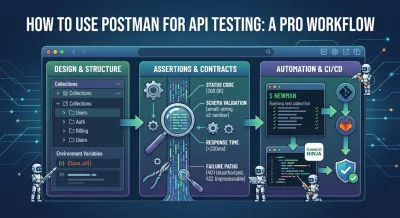
You’ve built an endpoint in Django Ninja, hit it once in Postman, and got a clean response back. That feels like progress because it is. But it’s also the point where many beginner APIs stop being engineering projects and remain demos.
Knowing how to use Postman for API testing starts with a simple request. Knowing how to use it well means treating your API as a contract, organizing tests so they survive change, and wiring those tests into the way you ship software. That’s the difference between proving an endpoint works once and proving a backend is reliable.
Moving Beyond Sending Simple API Requests #
You ship a Django Ninja endpoint, send a request in Postman, get a 200 OK, and move on. Two days later, the frontend breaks because a nested field changed shape, or an authenticated route starts returning a different error body than the client expects. The request worked. The contract did not hold.

That is the point where Postman stops being a convenient API client and starts becoming part of your testing architecture. Sending a one-off GET or POST is useful for debugging routing, headers, auth, and payload shape. It does not prove the endpoint is safe to depend on in a real application.
Professional API testing is about promises. If a mobile app calls /users/me, it relies on more than “the server responded.” It relies on a stable status code, a predictable JSON structure, clear authorization rules, and error responses that stay consistent across releases. Postman is valuable because it lets you capture those expectations and rerun them instead of trusting memory.
Postman’s own 2025 State of the API Report describes testing as a core part of API work, not a cleanup task after implementation. That lines up with what experienced backend teams already know. API failures usually come from drift. A serializer changes, validation gets stricter, auth middleware behaves differently, or an exception handler starts returning a new shape. Basic request sending will catch some of that. Repeatable tests catch much more.
What changes when you test the contract #
Once you treat an endpoint as a contract, your review process gets sharper. You stop asking whether the route returns JSON and start asking whether the response is useful, stable, and safe for clients to build against.
Good Postman tests push on questions like these:
- What does success mean? A
200is not enough if required fields are null, pagination metadata is missing, or the object shape changed. - How should failure behave? Invalid input, expired tokens, and forbidden roles should produce intentional status codes and response bodies.
- Which fields can clients rely on? If the frontend needs
email,id, andis_active, those are part of the contract. - What should stay stable across refactors? Internal code can change freely. Public behavior cannot.
If you are still grounding yourself in request and response mechanics, this guide to what an API is and how it works gives the right foundation.
A saved request becomes a test asset only when it encodes expected behavior and can run again under the same conditions. That distinction matters even more if you plan to run collections in Newman inside CI, where every request needs to produce a clear pass or fail signal without manual inspection.
Why this matters in real projects #
The practical benefit is not just fewer bugs. It is better engineering decisions earlier.
When contract checks exist from the start, backend changes become easier to evaluate. You can refactor a Django Ninja schema, tighten validation, or reorganize service code and know quickly whether you broke consumer expectations. You also create artifacts that belong in a professional workflow, especially if your goal is to show production-ready habits in a portfolio project rather than a demo that only works when you click through it by hand.
That is the shift. Postman is not just for sending requests. Used well, it becomes the first layer of a testing system that can later run in Newman, gate pull requests, and protect your API from accidental regressions.
Architecting Your First Test Suite #
A messy Postman workspace usually reveals a messy mental model. Random saved requests, duplicated auth headers, hardcoded localhost URLs, and test scripts copied across tabs all create friction. The API might still work, but the testing setup won’t scale with the codebase.

The fix is architectural, not cosmetic. Organize Postman the same way you organize backend code: by feature boundaries, reusable configuration, and predictable execution.
Mirror the shape of the application #
If your Django Ninja project has modules for users, auth, billing, and content, your collections should reflect those boundaries. Don’t create one giant collection called “API Tests” with every request mixed together. That structure becomes painful as soon as multiple people touch it or you add more environments.
A maintainable layout often looks like this:
| Level | How to think about it |
|---|---|
| Workspace | One project or backend domain |
| Collection | One API area or service |
| Folder | A feature, endpoint family, or workflow |
| Request | One concrete HTTP interaction |
| Tests | Assertions attached to that interaction |
This approach has a practical advantage. When a feature changes, you know where its tests live. When a teammate reviews your setup, they can make sense of it without guessing.
Separate configuration from behavior #
Hardcoded values are one of the fastest ways to make a Postman setup brittle. If the request URL says http://localhost:8000/api/users/ in ten different places, your test suite is already harder to maintain than it should be. The same goes for tokens, API keys, tenant IDs, and version prefixes.
Use environments and variables to isolate configuration from test logic.
That means:
- Base URLs belong in variables, such as ``, so the same collection can run locally, in staging, or against a deployed preview.
- Auth values should be injected, not pasted into each request.
- Shared identifiers should be captured once, then reused by dependent requests.
The cleaner the variable strategy, the easier it is to trust the same test collection across development, staging, and production-like environments.
Use data-driven testing when repetition appears #
When you notice yourself duplicating the same request with slightly different bodies, stop. That’s usually the signal to move into data-driven testing.
Postman supports running the same collection against CSV or JSON datasets through the Collection Runner. That pattern is valuable because you maintain one set of test logic and swap inputs through data files rather than creating many nearly identical requests. The workflow is highlighted in this Postman data-driven testing walkthrough, which also notes that testing remains a priority for 81% of developers.
For a Django Ninja API, this is useful for scenarios like:
- User role variations such as admin, editor, and anonymous caller
- Validation cases where one field changes across runs
- Pagination and filtering combinations that should preserve shape and auth rules
What works and what doesn’t #
Good Postman architecture usually looks boring. That’s a compliment.
What works:
- Collections grouped by business feature
- Environment variables for URLs and credentials
- Reusable auth setup
- Shared naming conventions
- Data files for repeated input variations
What doesn’t:
- Copying the same request into multiple folders
- Embedding environment-specific values in saved requests
- Naming requests “test1”, “working one”, or “new endpoint”
- Treating every workflow as a one-off click path
When junior developers ask why their Postman setup feels chaotic after only a few days, the answer is almost always the same. They built requests, but they didn’t design a test system.
Writing Assertions That Actually Mean Something #
A 200 OK can hide a broken API.

Teams usually discover that after a frontend deploy starts failing on a field that vanished three commits ago, while every Postman request still shows green. That is the difference between checking a response and testing a contract. If you are building a Django Ninja API that will later run under Newman in CI, your assertions need to protect behavior that clients depend on. That means validating status, payload structure, and failure cases with intent.
Status codes are a starting point #
Check the status code first because it gives fast signal. Then ask whether it proves anything useful.
For a Django Ninja profile endpoint, solid assertions usually cover:
- Authenticated success returns the expected code and content type
- Missing token fails with the auth response your client code expects
- Invalid resource ID returns a true not-found response, not a generic server error
- Malformed payload produces validation errors with predictable field messages
That last point matters more than beginners expect. Client teams build error handling around specific failure shapes. If your API returns 422 one week, 400 the next, and a plain string after that, you have made the contract unstable even if the business logic still works.
Happy-path checks catch demos. Failure-path checks protect production.
Schema assertions catch contract drift #
A response can return 200 and still break every consumer. I have seen endpoints keep the same URL and status code while a serializer rename changed email into a nested object and removed is_active. The backend looked fine in isolation. The client was now parsing the wrong shape.
That is why schema-focused assertions matter. They verify that fields exist, types stay consistent, arrays remain arrays, and nested objects preserve the keys consumers use. Postman covers this pattern in its documentation on validating responses with test scripts.
For a junior backend engineer, the practical lesson is simple. “JSON came back” is not a useful definition of success.
If you want better contracts before you test them, this guide to REST API design best practices pairs well with schema-based assertions.
Here’s a good point to watch a compact walkthrough before you formalize your own assertions:
A simple Postman test script for /users/me should answer questions like these:
- Does the response include required fields such as
id,email, andis_active? - Are those fields the expected types?
- Does an authenticated user only see fields allowed by the API contract?
- Does an error response use the same structure every time?
Performance assertions need context #
Postman can check response time, but raw speed thresholds are easy to misuse. A local Docker stack on a laptop behaves differently from a CI runner, and both behave differently from production with warm caches and real network latency.
Use timing assertions to catch clear regressions, not to pretend Postman is a full load-testing tool. For example, a read-heavy endpoint that usually responds in 120 ms should not suddenly jump to 1400 ms because somebody added an N+1 query in a Django ORM relation. That is a good Postman assertion. Trying to model sustained concurrency for a search endpoint belongs in a different class of testing.
A practical approach looks like this:
- Set modest thresholds for business-critical endpoints
- Keep the thresholds environment-aware
- Watch for large regressions, not tiny fluctuations
- Separate correctness tests from throughput testing
That trade-off keeps your collection useful in CI. Tight performance checks that fail on random variance train developers to ignore red builds.
What meaningful assertions look like in practice #
Good assertions answer design questions, not just mechanical ones.
| Concern | Useful question |
|---|---|
| Status | Did the endpoint succeed or fail exactly as the contract says? |
| Schema | Did the response preserve the fields and types clients depend on? |
| Performance | Did response time stay within a sensible bound for this environment? |
| Errors | Did invalid input fail clearly, consistently, and with the expected structure? |
That is the level where Postman becomes part of your testing architecture. Once these assertions are stable, exporting the collection and running it under Newman in CI becomes worthwhile because the suite is checking contract quality, not just whether a button click returned green.
From Manual Clicks to Automated Runs With Newman #
If your test process depends on opening Postman, finding the right folder, selecting an environment, and clicking through requests by hand, you don’t have a repeatable test workflow yet. You have a manual ritual.
Newman fixes that by running Postman collections from the command line. That shift matters more than it first appears. Once collections can run outside the GUI, they become scriptable, reviewable, and suitable for automation.
Why Newman changes the game #
The core benefit isn’t speed by itself. It’s decoupling.
A collection stored in Postman is useful. A collection exported and runnable with Newman becomes part of the engineering system. You can execute it on your machine, in CI, before a deployment, or as part of a pull request check. The same test logic travels with the project rather than staying trapped in someone’s desktop app.
A clean Newman workflow usually includes:
- Export the collection you want to treat as the canonical API test suite.
- Export the matching environment so URLs, tokens, and shared variables stay externalized.
- Run Newman from the terminal with explicit environment input.
- Generate reports that other developers or CI tools can consume.
- Fail fast when assertions break.
What to automate first #
Don’t try to automate every request on day one. Start with the flows that protect your API contract best.
That often means:
- Auth checks that verify valid and invalid access paths
- Core CRUD flows that clients depend on every day
- Critical business rules such as permissions or state transitions
- Regression-prone endpoints that have broken before
Newman's greatest value lies in its integration into your daily feedback loop, rather than remaining an ambitious but neglected side setup.
Build habit before coverage. A smaller suite that runs on every meaningful change is better than a giant suite nobody trusts enough to use.
Include negative tests from the start #
One of the biggest gaps in beginner automation is missing failure-path validation. That’s risky because many serious bugs appear when bad input, bad auth, or unexpected sequencing reaches the API.
According to Testfully’s guide to Postman API testing, automating with Newman can lead to 40% faster bug detection compared to manual testing, and overlooking negative tests is a factor in 68% of real-world security audit failures. That same guidance highlights practical habits like setting request timeouts and validating both success and failure states.
For a Django Ninja project, negative tests usually deserve their own first-class place in the collection:
- Unauthorized requests
- Expired or malformed token flows
- Invalid payloads
- Missing required fields
- Accessing resources owned by another user
What works better than overengineering #
Some teams overcomplicate Newman too early with custom wrappers, layered scripts, or brittle shell pipelines. Keep it plain at first.
Use Newman to answer one question reliably: if this collection runs against this environment, does the API still honor its contract?
Once that answer is stable, reporting, dashboards, and CI polish become much easier to add.
Integrating Postman Into Your Django CI/CD Pipeline #
Postman's role shifts from a local testing convenience to an enforcement mechanism. In a Django Ninja project, the best use of Newman is not “run this sometimes.” It’s “block bad code before it merges or deploys.”
That’s the missing piece in many tutorials. Generic CI/CD examples exist, but the details of a Python backend workflow often get glossed over.

The practical pipeline shape #
For Django, the cleanest pattern is to let each tool handle what it’s best at.
- Pytest validates internal logic, models, services, and unit or integration behavior inside the Python codebase.
- Django itself runs a test instance of the server.
- Newman hits the live HTTP surface the same way a real client would.
That layering is valuable because API correctness lives at multiple levels. A Python test can tell you a serializer behaves properly. A Newman run can tell you the actual request path, middleware, auth, routing, serialization, and response contract still work together.
A common branch workflow looks like this:
| Stage | What happens |
|---|---|
| Push or pull request | CI starts automatically |
| Python test phase | pytest runs on backend logic |
| Application startup | Django test server launches with test settings |
| API contract phase | Newman runs the exported Postman collection |
| Gate decision | Failed tests block merge or deployment |
Why this is still underserved #
The gap isn’t whether Newman can run in CI. It can. The gap is backend-specific setup.
Threads from 2025 show that 40% of questions about integrating Newman with Django remain poorly answered, especially around environment variables, authentication, and practical workflow setup, as noted in this discussion of Postman automation and the Django gap. That tracks with what many learners run into: they can find a generic Newman example, but not a clear recipe for Django token handling, seeded test data, and a predictable server lifecycle.
If you’re building the backend itself, not just consuming one, it helps to see that full flow in a concrete Python context. This Django REST API tutorial gives the broader project framing that makes CI integration easier to reason about.
Your CI pipeline should test the API the way clients experience it, not only the way Python modules behave in isolation.
Trade-offs that matter in real projects #
There are a few decisions worth making deliberately.
Use test-specific environments. Don’t point Newman at shared development data unless you enjoy flaky runs and hard-to-debug side effects.
Keep authentication explicit. If your Django Ninja API uses JWT or token auth, inject those values through environment configuration rather than burying them in requests.
Control test data lifecycle. The more your Postman tests depend on preexisting records, the more fragile CI becomes. Seed what you need, create what you can during the run, and clean up when it matters.
Treat contract failures as deployment failures. If the API no longer matches expected behavior, the pipeline should stop. That’s not strictness for its own sake. It protects every client that depends on the interface.
The skill employers actually notice #
Many portfolio projects show endpoints. Fewer show repeatable quality gates. When a candidate can explain how their Django backend is validated by both Python tests and Newman in CI, that signals engineering maturity. It shows they understand not just how to build features, but how to keep those features trustworthy as the code changes.
Adopting a Professional Testing Mindset #
A lot of developers think the hard part is learning Postman features. It isn’t. The harder part is learning to distrust the happy path.
An endpoint that works for valid input under ideal conditions tells you very little about how the system behaves under stress, bad auth, malformed payloads, race conditions, or partial rollout mistakes. Professional testing starts when you stop asking, “Does it work?” and start asking, “How does it fail?”
Debug like an engineer, not a spectator #
When a request behaves strangely, don’t keep clicking Send and hoping the next attempt feels clearer. Inspect the raw exchange.
Postman’s Console is one of the most useful tools for this because it lets you inspect outgoing requests, headers, variables, and returned responses in more detail than the main UI suggests. That’s often where you notice the actual issue: the wrong token, the wrong environment variable, the wrong header, or a request body you thought Postman was sending but wasn’t.
A mature debugging habit usually includes:
- Checking the exact request payload
- Verifying resolved variables
- Looking at auth headers instead of assuming they were attached
- Comparing expected and actual error bodies
Spend time on unpleasant cases #
Most broken systems don’t fail in glamorous ways. They fail in ordinary ways that nobody bothered to test.
Write tests for:
- Unauthorized access
- Missing or malformed input
- Invalid transitions in resource state
- Pagination and filtering edge cases
- Responses that should stay stable for existing clients
The strongest test suites are rarely the most clever. They’re the ones that keep covering the boring failures teams are tempted to skip.
Confidence is the real product #
The long-term benefit of Postman testing isn’t the green checkmark. It’s confidence.
When your tests are organized, meaningful, automated, and integrated into delivery, you can refactor without panic. You can add features without wondering what invisible client you might break. You can discuss your backend like an engineer who understands contracts, not just endpoints.
That mindset compounds. It’s what turns a learning project into something that looks production-aware, and it’s what separates “I used Postman” from “I know how to use Postman for API testing in a way that scales.”
If you want to build those habits through hands-on backend practice, Codeling is worth a look. It teaches Python, Django Ninja, API design, testing, Git, and deployment through interactive exercises and portfolio-ready projects, so you’re not just watching tutorials.