How to Learn Python for Beginners: A Roadmap to Software Engineering
If you want to learn Python, forget about memorizing every single function. That’s not the goal. The real goal is to learn how to think like a software engineer, and the only way to do that is by building real things.
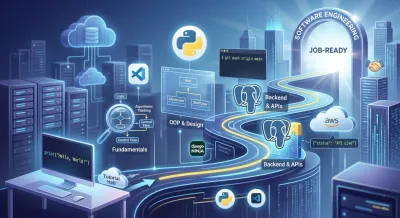
Too many beginners get stuck in "tutorial hell," passively consuming content without ever creating anything from scratch. This guide offers a different path. It's a principles-driven roadmap designed to take you from writing your first line of Python to designing and deploying a complete backend application.
This journey is all about building mental models. You’ll start with the fundamentals, but you'll quickly move on to designing systems with Object-Oriented Programming (OOP), understanding software architecture, and eventually, building and deploying a real-world API with a modern framework like Django Ninja.
A Realistic 3–6 Month Timeline #
It helps to have a rough timeline in mind. Not as a strict deadline, but as a way to structure your learning and see how the pieces fit together. This isn't a random walk through topics; it's a progressive plan where each skill builds on the last, focusing on high-level concepts over syntax.
The roadmap shows how a total beginner can progress from fundamentals to deploying a real project in about 3 to 6 months. The most important part? The final months are all about applying architectural principles to build the portfolio projects that actually get you hired.
Here's a more detailed breakdown of what that journey looks like, month by month. Think of it as a series of milestones, not a rigid schedule.
A Beginner's 3–6 Month Python Learning Milestones #
| Month(s) | Core Focus Area | Key Principles to Master | Portfolio Project Goal |
|---|---|---|---|
| 1 | Core Python Fundamentals | Algorithmic thinking, control flow, problem decomposition, modularity with functions. | Build command-line tools that demonstrate clear, logical problem-solving. |
| 2–3 | OOP & Software Design | Object-Oriented principles (Encapsulation, Inheritance), data structures, and choosing the right tool for the job. | Design and build a console application using classes and objects to model a real-world system. |
| 3–4 | Backend Foundations & Git | The request/response cycle (HTTP), RESTful API design principles, and professional version control with Git. | Design and build a simple REST API, focusing on clean endpoint structure and versioning on GitHub. |
| 5–6 | Full-Stack Architecture & Deployment | System design, database modeling, authentication patterns, CI/CD pipelines, and cloud infrastructure. | Design, build, and deploy a complete backend for a web app, demonstrating end-to-end architectural thinking. |
This structure ensures you're always applying what you learn. You’re not just memorizing syntax; you're designing systems and building tangible applications at every stage.
Why This Project-First Approach Is a Game-Changer #
Let's be real: learning Python for a software engineering career is a smart move. The demand is huge. As of PYPL's real-time index in early 2026, Python has a staggering 28.56% global share among programming languages people are searching for, leaving Java in the dust at 15.18%.
For aspiring backend engineers, this translates directly to job security. The Bureau of Labor Statistics projects a 25% growth in software developer roles through 2032. Even better, adding Python to your skillset can boost your salary by 20%, with the median in the US hitting $120K.
The single biggest turning point in your learning journey will be when you stop consuming tutorials and start producing software. A project-based path forces that switch from day one.
This is what hiring managers actually care about. They want to see that you can do more than just solve a coding puzzle; they want proof you can design, build, and deliver a working application. Your GitHub profile, filled with real projects, becomes your resume.
This is also why interactive platforms that guide you through building actual projects are so effective. Instead of just watching a video, you're in the code, getting instant feedback and bridging the gap between theory and a working application. If you need some extra resources to get started, check out our guide on the best websites to learn Python for free.
Building a Rock-Solid Python Foundation #
Before you can build sprawling backend systems, you need to get the fundamentals right. I know it's tempting to jump straight to building cool APIs, but this first stage isn't a race. It's about building a deep intuition for why the code works, not just memorizing the syntax.
This is where you learn to think like a programmer. It’s less about knowing a specific Python command and more about learning how to break a big, messy human problem—like "find the most popular item in a list"—into tiny, logical steps a computer can follow perfectly. This skill, often called algorithmic thinking, is the real foundation.
First, Learn to Think in Code #
When you're just starting out, you're really just learning to use a few core building blocks of logic. Almost every program you'll ever write, no matter how complex, boils down to these fundamental principles:
- Data Representation (Variables & Data Types): Learning to model the real world. A "user" becomes a set of variables; a "product" becomes an object. The skill isn't knowing what an integer is, but deciding what information is essential to store.
- Logical Branching (Control Flow): This is how software makes decisions. Mastering
if/elseisn't about syntax; it's about mapping out every possible path a user or a piece of data can take through your system. - Modularity (Functions): Functions are your first step into software architecture. They teach you to create reusable, single-responsibility components. A good function does one thing well, making your system easier to understand, test, and maintain.
Getting comfortable with how these three pieces fit together is everything. You're not just writing code; you're designing a logical process from the ground up.
The goal isn’t just to make code that works. The goal is to write code that clearly communicates its intent. That’s the first sign you’re thinking like an engineer.
Set Up Your Workspace Like a Pro #
Those online code editors are fine for quick tests, but you'll hit their limits fast. Real development happens in a local environment on your own machine. Setting this up might feel like a hurdle, but it's a one-time task that gives you complete control.
Your professional toolkit really just comes down to two essential items:
- A Code Editor (like VS Code): There's a reason Visual Studio Code is the industry standard. It's free, fast, and has a massive library of extensions that help with everything from debugging to automatically formatting your Python code.
- The Command Line: The terminal, or command line, is where you'll orchestrate your development process. It’s where you’ll run your Python scripts, manage dependencies with tools like Pip, and control your project's history with Git.
Getting comfortable with the command line is non-negotiable for a software developer. It is the interface to your entire toolchain, from version control to deployment, giving you direct, powerful control over your projects.
Where the Real Learning Happens: Interactive Practice #
Theory is one thing, but the concepts don't truly sink in until you get your hands dirty. This is where interactive exercises with immediate feedback become your best friend.
Platforms like Codeling are built for exactly this. They give you a space to solve small, focused problems and see the results instantly, all without the hassle of setting up a full local environment.
This hands-on practice is what bridges the gap between knowing what a for loop is and knowing how to use one to solve a real problem. It builds muscle memory, and maybe more importantly, it builds your confidence. Every little win in an interactive exercise gets you ready for the bigger, more complex challenges ahead.
Thinking Like an Architect with OOP and Data Structures #
Okay, you've got the basics down. You can write scripts that do things. Now comes the most important leap you’ll make: moving from just writing code to actually designing software.
This is where you start thinking like an architect, and the two pillars holding up that thinking are Object-Oriented Programming (OOP) and Data Structures.
These aren't just abstract computer science topics to cram for an interview. They are the practical, day-to-day tools you'll use to build applications that are clean, scalable, and don't make you want to tear your hair out six months later.
Designing Systems with Object-Oriented Programming #
Imagine you’re building a user management system. With a procedural approach, you might have scattered logic everywhere—a function here to update an email, another over there to check a password. It’s a recipe for chaos.
OOP cleans up this mess by letting you model your system as a collection of interacting "objects," each with its own data and responsibilities.
Think of a User object as a self-contained blueprint for all user-related concerns. It holds its own data (username, email) and the behaviors it can perform (change_password(), deactivate_account()). Everything related to a user is in one place. This introduces a few powerful design patterns:
- Encapsulation: This is the principle of bundling data and the methods that operate on it. It creates a clean public interface while hiding the complex internal logic, making your system more robust and easier to change.
- Inheritance: This allows you to create specialized objects from more general ones, promoting code reuse. For example, a
AdminUserclass can inherit from a baseUserclass, gaining all its functionality while adding new administrative capabilities. - Polymorphism: This powerful concept allows you to write flexible, generic code that can operate on objects of different types. You can treat an
AdminUserand aStandardUseras the same type ofUser, simplifying your logic significantly.
By thinking in objects, you are no longer just stringing commands together. You are designing a system of interacting components, which is the very essence of backend engineering.
If you want to go deeper, our guide on Python Object-Oriented Programming breaks these concepts down with practical examples. Seriously, this is a non-negotiable skill for writing professional code.
Making Smart Architectural Choices with Data Structures #
If OOP organizes your logic, data structures organize your information. This is another architectural decision that can make or break your app's performance and scalability. The choice isn't about syntax, but about understanding the trade-offs.
Python gives you a few built-in data structures, but for a beginner, the most critical architectural choice often boils down to two: lists and dictionaries.
- A List is an ordered collection, ideal when sequence matters. But its performance for searching is linear (O(n))—finding one item in a huge list means you might have to check every single element.
- A Dictionary stores data in key-value pairs, offering near-instantaneous (O(1)) lookups. It doesn't matter if there are ten items or ten million; finding an item by its key is incredibly fast.
Let's say you're building an e-commerce site. If you need to grab a product's details using its unique ID, storing your products in a dictionary with the ID as the key is massively more efficient than searching through a long list. This isn't just a micro-optimization; it's a fundamental architectural decision that impacts user experience.
Don't just take my word for it. The demand for developers who get this stuff is huge. Back in 2023, a Stack Overflow survey found that 71% of professional developers already used Python. And an Indeed analysis from 2024 showed that entry-level developers in major tech hubs who built GitHub portfolios with real projects (like REST APIs) landed interviews 2.5 times faster. These are the skills that get you noticed.
Building and Deploying Your First Real-World Project #
Alright, you've worked through the Python fundamentals. You understand object-oriented design. Now what? The truth is, theory only gets you so far. The single most important thing that proves you're hireable is a portfolio of real, working software.
This is where all the pieces come together—from basic syntax to software architecture. It’s time to build and deploy your first proper backend project.
The goal here isn't just to make something that works. It’s to build it the right way, using the professional practices and design patterns that employers are actually looking for. We'll walk through the blueprint for creating a REST API, from the initial architectural design all the way to a live, production server.
Designing Your API Blueprint #
Before you write a single line of code, you need to think. A professional developer doesn't just start coding and hope for the best. They start with design. For a REST API, that means designing your endpoints and modeling your data before the first keystroke.
Think of yourself as a system architect. You wouldn't start building a house without a blueprint, right? This initial planning phase shapes your entire application.
- Define Your Resources and Endpoints: Identify the core "nouns" of your system (e.g., Posts, Users, Comments) and map out the standard CRUD (Create, Read, Update, Delete) operations as RESTful endpoints. For example,
GET /poststo list all posts andPOST /poststo create a new one. - Model Your Data and Relationships: Define the schema for your data. What fields does a
Postneed? What is its data type? How does it relate to aUser(e.g., a one-to-many relationship)? This becomes the foundation for your database. - Choose the Right Tools for the Job: While SQLite is easy for local tests, starting with a production-grade database like PostgreSQL teaches you skills that matter. It forces you to think about data integrity, transactions, and performance from day one, just like you would on a real job.
This planning is what separates a hobby project from a professional one. It's a critical step if you're serious about your career and want to learn Python for beginners the right way.
Embracing Professional Development Workflows #
Building the API is only half the job. How you build it matters just as much. Employers need to see that you can operate within a professional development lifecycle. Two practices here are completely non-negotiable: version control and automated testing.
Git is your professional diary. Using Git and hosting your code on GitHub isn't just a good idea—it's the industry standard. It's how you track changes, collaborate, and, most importantly, showcase your work. A clean commit history with clear, descriptive messages demonstrates a methodical, professional approach to problem-solving.
A clean, active GitHub profile with well-documented projects is more valuable than any certificate. It's a live demonstration of your ability to design, build, and deliver production-ready code.
Testing is a design practice, not an afterthought. Writing unit tests for your API endpoints forces you to write modular, decoupled code. It proves you have a mature, defensive coding mindset and care about building reliable, maintainable software. This is a hallmark of a professional developer.
Demystifying the Deployment Process #
Let's be blunt: a project sitting on your laptop is an experiment. A deployed application is a professional asset. Getting your API live on the internet for the world to use might sound scary, but it’s a fundamental part of the software development lifecycle.
Deployment is the final piece of the puzzle. It's where you take your app from your local machine and put it on a server that's always on and accessible. Modern platforms like Heroku or cloud services from AWS and Google Cloud have made this process much more approachable.
This final step forces you to get comfortable with key DevOps concepts like:
- Environment Configuration: Managing secrets like API keys and database credentials securely, outside of your codebase.
- Production-Ready Servers: Using a robust WSGI server like Gunicorn to handle real-world traffic, instead of the simple development server.
- Continuous Integration/Continuous Deployment (CI/CD): Automating the process of testing and deploying your code, ensuring reliability and speed.
Successfully deploying an application shows a complete, end-to-end understanding of the development pipeline. It's the ultimate signal to an employer that you can not only write code but also deliver a finished, working product.
Avoiding Common Pitfalls on Your Learning Path #
Let's be real. The journey to becoming a developer is full of traps that can completely kill your motivation. Knowing what they are from day one is the best way to sidestep them and build habits that lead to a successful career.
The most common trap is "tutorial hell." This is where you bounce from one video to the next, copying code line-for-line. You feel like you're being productive, but you aren't actually learning how to solve problems on your own. The only way out is to stop consuming and start creating, even when it feels daunting.
Escaping Tutorial Hell and Embracing Action #
That leap from following instructions to building your own thing is scary. It’s like the difference between assembling an IKEA desk and building a table from scratch. To bridge that gap, you need to start small.
- Modify an Existing Project: Finished building a to-do list API from a tutorial? Great. Now design and implement a new feature, like user authentication or task categorization, without instructions.
- Re-architect from Memory: The day after you finish a project, try to sketch out its architecture and data models on paper. This forces your brain to recall high-level concepts, not just lines of code.
- Start a Tiny Project: Think of a simple, personal problem. You don't need to build the next Facebook. A script that organizes your downloads or a simple API for your personal blog is a fantastic start for applying design principles.
This shifts you from being a passive consumer to an active problem-solver. That's the entire job of a software engineer.
Redefining Your Relationship with Errors #
Beginners see an error message and think, "I failed." A professional sees an error and thinks, "Okay, here's some feedback." An error isn't a wall; it's a guidepost pointing you toward a flaw in your logic or design. Learning to debug is just as critical as learning to write code.
So when you see an error, don't just immediately Google it. Take a breath and follow a real debugging process:
- Read the Full Error Traceback: Don't just skim it. The traceback tells a story about the exact sequence of calls that led to the failure.
- Form a Hypothesis: Based on the message and the context, make an educated guess about the root cause. "I bet that object was
Nonebecause the database query returned no results." - Test Your Hypothesis: Use a debugger or simple
print()statements to inspect the state of your application at the point of failure. Validate or invalidate your guess.
Embracing errors as feedback transforms them from frustrating roadblocks into invaluable learning opportunities. Every bug you fix deepens your understanding of the language and your application's architecture.
Measuring Progress Beyond Code #
How do you know you're actually improving? Counting tutorials or lines of code is a terrible metric. The real measure is your growing ability to think and operate like an engineer.
Real progress means you can answer "yes" to questions like these:
- Can you design the data models and API endpoints for a new feature?
- Can you articulate the trade-offs of choosing a specific data structure or design pattern?
- Can you write a unit test for a piece of business logic before you implement it?
- Can you deploy a simple application to a cloud service from scratch?
Answering yes to these is a much better sign of growth than finishing another video. The self-taught path can feel isolating, and a lack of clear progress is why so many people quit. This is where structure makes a huge difference. For example, beginners on guided platforms often move through material four times faster than those piecing things together from random YouTube videos.
Platforms like DataCamp offer this structure, and at Codeling, our hands-on courses see a project completion rate of 95%. That's a world away from the 30% average for many online courses. That structure gives you the feedback and momentum to push through the hard parts.
Your Biggest Questions, Answered #
When you're diving into the world of Python and backend engineering, a few big questions always pop up. It's natural to wonder about timelines, credentials, and which tools to pick. Let's cut through the noise and get you some straight answers based on real-world engineering principles.
How Long Does It Realistically Take to Become a Job-Ready Backend Developer? #
There's no magic number, but most dedicated beginners can get job-ready in about 6 to 12 months. The key word here is dedicated. This isn't about watching tutorials for a year; it's about consistently designing and building software.
Think of it in two phases. Your first three months are for mastering core programming principles and object-oriented design. The next three to six months are for deep-diving into a framework like Django, wrestling with databases and system architecture, and—most importantly—building the kind of projects that prove your engineering competence.
The goal isn't to "finish" learning Python. That never happens, not even for senior engineers. The goal is to develop a strong enough foundation in software engineering principles to build useful products and continue learning effectively on the job.
Your actual timeline will come down to how many hours you put in and, more importantly, the quality of that time. Focused, project-based work beats cramming syntax any day of the week.
Do I Really Need a Computer Science Degree? #
Nope. Absolutely not. While a CS degree gives you a strong theoretical background, the tech industry in 2026 cares far more about what you can actually build. Your portfolio is the ultimate proof of your skills.
A hiring manager would much rather see a well-architected API you designed and built on GitHub than a piece of paper. Your ability to apply engineering principles to solve real-world problems is the only credential that matters.
A well-maintained GitHub profile demonstrates your ability to:
- Design and Architect: It reveals how you structure applications, model data, and make sound engineering decisions.
- Write Quality Code: It's a public record of your commitment to writing clean, maintainable, and well-tested code.
- Use Professional Tooling: It proves you are fluent in essential tools like Git and understand modern development workflows.
Seriously, think of your GitHub as your real resume. It’s a living, breathing showcase of your engineering capabilities.
Should I Start with Django or Flask? #
For anyone aiming for a backend engineering job, starting with Django is almost always the better strategic choice. It's an "opinionated" framework, which means it guides you toward established best practices for building scalable and secure web applications.
Those opinions are a huge advantage for a beginner. Django's structure forces you to learn proper project layout, database migrations (ORM), and security patterns from day one. You learn sound web architecture by default because the framework provides the guardrails.
Flask, on the other hand, is a "micro-framework." Its flexibility is its biggest strength, but it requires you to make many architectural decisions yourself. For a beginner, this freedom can easily lead to building applications with poor structure and security vulnerabilities.
Start with the battle-tested architecture Django provides. You'll build more robust, professional applications much faster.
Why Is a GitHub Portfolio So Important? #
Let's be blunt: your GitHub profile is the most important asset you have in your job search. It’s the raw, unfiltered proof of your skills, and it speaks way louder than any bullet point on a resume.
Recruiters and hiring managers don't just want to read about your skills; they want to see your code and, more importantly, your thought process. An empty GitHub profile is a red flag. It suggests a lack of practical experience beyond tutorials.
An active GitHub demonstrates the key traits employers are desperate for:
- Engineering Skill: It's tangible proof of your ability to design systems, write code, and use modern tools.
- Design Process: Commit histories and pull requests tell a story. They show how you break down problems, implement features, and respond to feedback.
- Passion and Drive: A profile full of personal projects shows you’re not just looking for a paycheck. You're motivated and you genuinely love to build things.
An impressive resume might get your foot in the door, but a strong portfolio filled with well-documented projects is what actually gets you interviews. It’s the ultimate proof that you can do the job.
Ready to stop watching and start building? Codeling provides a structured, hands-on path to becoming a backend engineer. Our interactive Python curriculum takes you from fundamentals to deploying portfolio-ready APIs, all within a real development environment. Try our interactive demo and start building your future today at https://codeling.dev.