What is an api and how does it work: A Quick Beginner's Guide
An Application Programming Interface, or API, is one of those terms you hear all the time, but what does it actually mean?
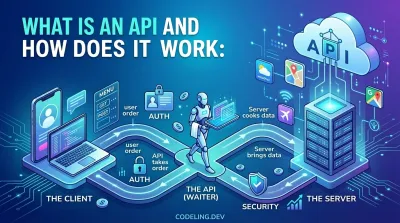
At its core, an API is just a way for different software applications to talk to each other.
Think of it like a waiter in a restaurant. You, the customer, don't go into the kitchen to cook your own food. You don't need to know the recipes, the ingredients, or how the oven works. You just need to give your order to the waiter.
The waiter acts as the intermediary. They take your request (your order) to the kitchen (the system that has what you want), and then bring the food (the data or functionality) back to you. That waiter is the API.
What Is an API? The Hidden Engine of the Digital World #
Every single time you use an app on your phone, you're almost certainly interacting with an API. They are the invisible workhorses of the modern internet, running silently in the background to connect different systems and services.
APIs are what let developers build complex applications without having to create every single feature from scratch. They are the glue that holds our connected world together.
For example, when you open a weather app, it doesn't have its own fleet of weather satellites. That would be absurd. Instead, it makes an API call to a meteorological service like the National Weather Service, asks for the forecast for your location, and then displays the data it gets back.
The same goes for a travel site like Kayak or Expedia. They don't have a direct line into every airline's private reservation system. They use publicly available APIs provided by the airlines to ask for flight information and prices, then gather all the responses and show them to you on one page.
This is the power of APIs. They enable a kind of collaboration between different pieces of software, allowing them to share data and capabilities seamlessly.
The Key Players in an API Call #
To really get how APIs work, it helps to break down the three main players involved in any interaction. The restaurant analogy works perfectly here to make these roles crystal clear.
At its core, an API is all about creating a well-defined contract for how one system can ask for things from another. It’s a structured conversation where a "client" makes a request and a "server" provides a predictable response.
Let's meet the cast of characters.
| Component | Role in the Digital World | Restaurant Analogy |
|---|---|---|
| Client | The application making the request (e.g., your mobile app). | You, the customer, placing an order. |
| API | The intermediary that translates and delivers the request. | The waiter who takes your order to the kitchen. |
| Server | The system with the data or functionality that fulfills the request. | The kitchen that prepares your meal. |
So, the Client is what initiates the request, the Server is what has the information or ability to fulfill it, and the API is the messenger that handles the communication between them.
This simple pattern is everywhere. When you use a ride-sharing app like Uber, the app on your phone doesn't try to reinvent mapping from scratch. It makes an API call to Google Maps to get route data, traffic information, and ETAs.
This is a perfect example of APIs in action. Uber focuses on its core business—connecting drivers and riders—while relying on Google's API for the complex mapping functionality. To see just how common this is, you can explore more about the growing API industry and see how many companies rely on this model.
By structuring things this way, developers can build incredibly powerful applications much, much faster. Instead of spending months building a custom map for a delivery app, they can simply "plug into" an existing mapping API. This modular approach saves a ton of time and money, letting companies focus on what makes them unique instead of reinventing the wheel.
In the next sections, we'll dive deeper into exactly how this request-and-response cycle works on a more technical level.
How Does an API Work: The Request and Response Cycle #
At its core, every single API interaction is a simple conversation. It's a back-and-forth between a client (like your web browser or a mobile app) and a server (where the data lives). This whole dance is called the request-response cycle.
Think about what happens when you open a social media app and tap on your profile. That simple tap kicks off the entire process. Your app sends a request to the company's servers, asking for your profile details. This isn't just a vague shout into the internet; it's a very specific, structured message sent through the API.
The API acts as the middleman, taking your app's request, translating it for the server, and then bringing the server's answer back to your app.

Once the server delivers the data, the app displays your profile picture, username, and bio. This entire loop, from your tap to the screen updating, happens in the blink of an eye.
The Anatomy of an API Request #
So, what does one of these requests actually look like? It’s not just one thing; it’s made up of several key pieces that tell the server exactly what you want. Think of it like ordering a pizza: you need to give the address for delivery, specify what you want, and maybe add some special instructions.
A typical API request has a few main parts:
- The Endpoint: This is the specific URL you're sending the request to. It's like the specific street address for the data you want. For our social media profile, the endpoint might be
/users/me. - The HTTP Method: This is the verb of the request. It tells the server what action you want to perform. The most common ones are
GET(to read data),POST(to create something new),PUT(to update what's already there), andDELETE(to get rid of something). - Headers: This is where you put extra info, or metadata, about your request. A super common piece of information here is an authentication token—it's like showing your ID to prove you're allowed to ask for this data.
- The Body: This part is for requests that are sending data to the server, like
POSTorPUT. If you're uploading a new profile picture, the image file itself would be in the request body. For aGETrequest, the body is usually empty because you're just asking for data, not sending any.
The Server Responds #
After the server gets the request, it gets to work. It checks your authentication, makes sure the endpoint is valid, and does what you asked. Once it's finished, it sends back a response.
An API effectively acts as a contract between services. You define specific endpoints like
/users/{id}, detail the expected request and response formats, and use standard HTTP status codes to handle outcomes like200 OKor404 Not Found.
This simple pattern powers an incredible amount of the web. The API for X (formerly Twitter), for example, lets developers hit endpoints like /tweets to fetch posts. That's what makes it possible for other apps to show a live feed of tweets or for analytics tools to track trends. It's a huge part of why the cloud API market is growing so fast.
The response from the server has its own clear structure, too:
- Status Code: A three-digit number that tells you how the request went. We've all seen a
404 Not Foundpage. A successful request gets a200 OKstatus, which is the one you're always hoping for. - Headers: Just like the request, the response has headers with useful metadata, like what format the data is in.
- Body: This is the main event—the data you actually asked for. For a successful
GETrequest to/users/me, the body would contain your profile info (username, bio, profile picture URL) neatly packaged up in a format like JSON.
This entire cycle—from request to response—often finishes in milliseconds, which is why modern apps feel so responsive and seamless.
Exploring the Different Types of Web APIs #
Not all APIs are built the same. Just like you'd use a different tool for a different job, developers choose different API architectures depending on what they need to accomplish.
While there are a few out there, you'll run into three main types in modern web development: REST, GraphQL, and RPC. Each one has its own philosophy on how data should be exchanged. Let's dig into what makes them tick and when you’d pick one over the others.
REST The Dominant Standard #
For years, Representational State Transfer, or REST, has been the undisputed king of the API world, and for good reason. It’s not a rigid protocol but a set of design principles that lean on the same foundation as the web itself—standard HTTP methods like GET, POST, PUT, and DELETE.
The whole idea behind REST is that everything is a resource. A user, a blog post, a product—each is a resource identified by a unique URL (an endpoint). To get a user's data, you might send a GET request to /users/123. To get rid of that user, you’d send a DELETE request to that very same URL. Simple.
A core concept in REST is that it's stateless. This means every single request sent from the client has to contain all the information the server needs to do its job. The server forgets about you the moment it sends a response, which makes the system much easier to scale.
This straightforward, resource-focused approach makes REST predictable and incredibly reliable. It’s a fantastic choice for public APIs where you need wide compatibility and a design that’s easy for other developers to understand and work with.
GraphQL The Flexible Challenger #
Developed at Facebook back in 2012 and open-sourced in 2015, GraphQL is a query language for your API. It was born out of a need to fix some of REST’s biggest headaches, especially for complex mobile apps where every byte of data counts.
With a classic REST API, you often end up making multiple trips to the server to get all the data for one screen. Imagine you need a user's profile, their recent posts, and their followers. That could mean calling /users/123, then /users/123/posts, and finally /users/123/followers.
This leads to two common problems: over-fetching (getting way more data than you need) and under-fetching (not getting enough, forcing you to make another request).
GraphQL solves this by giving you a single, powerful endpoint. The client sends one query that describes exactly what it needs, and the server sends back a JSON object that mirrors that structure perfectly. This puts the client in the driver's seat, cuts down on network chatter, and has made GraphQL a favorite for modern front-end development. You can see detailed examples of GraphQL in action to get a better feel for it.
RPC The High-Performance Executor #
Remote Procedure Call, or RPC, is one of the oldest and most direct API styles around. The idea is dead simple: you execute a function on a remote server as if it were running on your own machine. Forget about resources and HTTP verbs. You just call a procedure by name, like get_user_profile(user_id=123) or create_new_post(title, content).
Modern takes on this, like gRPC (from Google), have made RPC incredibly popular for internal systems where performance is everything. It's the go-to for communication between microservices. gRPC often uses something called Protocol Buffers, which turns data into a super-compact binary format that’s much faster to send and process than text-based JSON.
You won't see RPC as much in public-facing web APIs, but for backend systems where speed and low latency are non-negotiable, it's an absolute powerhouse.
Comparison of Major API Architectures #
To help you keep these straight, here's a quick rundown of how REST, GraphQL, and RPC stack up against each other. Each has its place, and knowing their strengths will help you understand why engineering teams make the choices they do.
| Architecture | Primary Concept | Best For | Data Fetching |
|---|---|---|---|
| REST | Manipulating resources through standard URLs. | Public APIs, simple resource-based operations. | Fixed data structure defined by the server. |
| GraphQL | Querying for exactly the data you need. | Mobile apps, complex UIs, microservice gateways. | Flexible structure defined by the client. |
| RPC | Executing a specific function on a remote server. | High-performance internal microservice communication. | Pre-defined function calls and responses. |
As you can see, the choice isn't about which one is "best" overall, but which one is the right tool for the specific problem you're trying to solve.
Building Your First API: A Practical Walkthrough #
Theory is great, but let's be honest—the real learning happens when you get your hands dirty. To really grasp what an API is and how it works, nothing beats building one yourself. We're going to do just that, creating your very first REST API endpoint using Python and a fast, modern framework called Django Ninja.
We’ll go from setting up a project all the way to defining a data structure and creating an endpoint that actually returns data. Then, you'll see how to "talk" to your new API using two indispensable developer tools: the command-line utility curl and the graphical client Postman.
The goal here isn't to make you an expert in an afternoon. It's to demystify the whole process and show you that building and testing a basic API is totally achievable. Let's make the jump from knowing the concepts to actually building something real.
Setting Up Your Python Environment #
Before we can write a single line of API code, we need a clean workspace and the right tools. For any Python project, it's a solid best practice to use a virtual environment. Think of it as a clean, isolated container for your project's dependencies, which keeps them from messing with other projects on your machine.
-
Create and Activate a Virtual Environment: Open your terminal and run these commands. The first creates a new directory named
venv, and the second "activates" it so your terminal session uses it. python -m venv venv source venv/bin/activate -
Install the Necessary Libraries: With our environment active, we’ll use
pip, Python's package manager, to install Django and Django Ninja. pip install django django-ninja
That’s it. Your local development environment is ready. We have the core framework (Django) and our API toolkit (Django Ninja) installed and waiting for instructions.
Creating Your First API Endpoint #
Now for the fun part. We’re going to build a simple API that serves up a list of programming languages. This is the "Hello, World!" of API development—it's straightforward but perfectly shows the core mechanics in action.
First, we need to create a new Django project and then a dedicated app inside it to hold our API code.
django-admin startproject myapi
cd myapi
python manage.py startapp core
Next, open the project in your favorite code editor. We need to tell Django about our new core app and get Django Ninja wired up. Open myapi/settings.py and add core to your INSTALLED_APPS list.
Now, let's actually create the API. Inside the core folder, create a new file and name it api.py. This is where the magic happens.
from ninja import NinjaAPI, Schema
from typing import List

api = NinjaAPI()

# Define the data structure for a language

class LanguageSchema(Schema):
    name: str
    year_created: int

    # Our in-memory "database" of languages

    languages_db = [
        {"name": "Python", "year_created": 1991},
        {"name": "JavaScript", "year_created": 1995},
        {"name": "Rust", "year_created": 2010},
    ]

@api.get("/languages", response=List[LanguageSchema])
def list_languages(request):
"""Returns a list of programming languages."""
    return languages_db
Here, we defined a LanguageSchema to guarantee our data is structured correctly, created a simple Python list to act as our database, and built a GET endpoint at the /languages path that returns our list. That response=List[LanguageSchema] part is Django Ninja's way of automatically validating that our output actually matches a list of language objects. If you want to dive deeper into structuring larger projects, you can explore more comprehensive guides on REST API design.
Finally, we need to hook this into our project's main URL configuration. Open myapi/urls.py and modify it to include our new API.
from django.contrib import admin from django.urls import path from core.api import api
urlpatterns = [ path("admin/", admin.site.urls), path("api/", api.urls), # Add this line ]
With that, it's time to bring your API to life. Run the development server:
python manage.py runserver
If you open a browser and navigate to http://127.0.0.1:8000/api/docs, you'll see that Django Ninja has automatically generated interactive documentation for you. Pretty cool, right?
Testing Your API with Curl and Postman #
An API isn't much use if you can't actually talk to it. Let's send a request to our brand-new endpoint using two of the most popular tools for the job.
Using curl on the Command Line
curl is a powerful command-line tool for making web requests. It's fast, scriptable, and installed on most systems by default. Open a new terminal window and run this command to send a GET request to our endpoint.
curl http://127.0.0.1:8000/api/languages
You should see the JSON data we defined printed directly to your terminal. This is a raw, no-frills confirmation that our API is live and responding to requests over the network.
Using Postman for a Visual Experience
While curl is great for quick checks, a GUI client like Postman provides a much richer, more user-friendly environment for testing and debugging. It's an industry-standard tool used by over 30 million developers for exactly this kind of work.

This workflow is universal: you write the code, then you use a client—whether it's curl in the terminal or a tool like Postman—to send a request to your server and inspect the response.
To test our API in Postman:
- Open Postman and create a new request.
- Set the HTTP method to
GET. - Enter the URL:
http://127.0.0.1:8000/api/languages. - Hit "Send."
Key Takeaway: Both
curland Postman are just clients making HTTP requests. One is text-based and perfect for quick checks and automation scripts, while the other is visual and excels at exploration and managing complex workflows. Getting comfortable with both is a huge asset for any backend developer.
The response body in Postman will show the same data, but beautifully formatted as a JSON array. You've now successfully built and tested your very first API! This simple exercise cuts through the theory and shows exactly how an API works: it receives a defined request and returns structured data.
Beyond "Hello, World": Building APIs That Don't Fall Over #

Getting a "Hello, World!" API running is a great feeling. But the leap from a simple endpoint to a professional, production-ready service is huge. This is where you learn to build systems that can actually handle the real world—with all its complexities like user permissions, sudden traffic spikes, and the constant need for updates.
This is where you stop just knowing what an API is and start understanding how to build one that people can depend on. We'll walk through the three pillars of professional API design: authentication, rate limiting, and versioning. Getting these right is what separates a portfolio toy from a system that gets you hired.
Authentication and Authorization: Who Are You, and What Are You Allowed to Do? #
First things first: you need to know who is using your API and what they're allowed to touch. That’s the job of authentication and authorization. Think of it like getting into a secure building.
- Authentication: This is you showing your ID badge at the front desk. The system checks your credentials—like an API key or token—to prove you are who you say you are.
- Authorization: This is your badge only opening certain doors. Just because you're in the building (authenticated) doesn't mean you have access to the server room (authorized).
A super common way to handle this is with a Bearer Token. When a user logs in, the server hands them a unique, encrypted string of text. The client then has to include this token in the Authorization header of every request it makes. The server can then instantly check the token, identify the user, and enforce the rules—like letting a user delete their own comments, but not anyone else's.
Rate Limiting: Protecting Your API from Being Too Popular #
Imagine a great little coffee shop that suddenly gets a thousand orders all at once. The baristas are overwhelmed, the machine breaks, and nobody gets their coffee. That's what happens to an API without rate limiting.
Rate limiting is the bouncer at your API's front door. It sets a cap on how many requests a single user can make in a certain period, like 100 requests per minute. This isn't just to stop bad actors from trying to crash your service, although it's great for that. It also ensures fair use for everyone. One power user making thousands of requests shouldn't be able to slow things down for everybody else.
A professional API is a responsible API. It anticipates high traffic and protects itself and its users from poor performance. Rate limiting isn't an afterthought; it's a core feature of a reliable and scalable system.
This becomes critical as systems grow. Globally, 40% of organizations manage over 250 internal APIs, and a staggering 80% depend on them for core business functions. With API vulnerabilities costing an estimated $75 billion a year, robust security like authentication and rate limiting is simply non-negotiable. If you want to dive deeper, you can explore more about the accelerating digital transformation driven by APIs.
API Versioning: How to Evolve Without Breaking Everything #
Your API is going to change. That's a guarantee. You'll want to add features, tweak how data is structured, or get rid of old endpoints. But what about all the apps out there that are already using your API? If you just change an endpoint, you could break every single one of them overnight.
This is the problem that API versioning solves. It's a strategy for rolling out changes without causing chaos. The most common way to do it is by putting the version number right in the URL.
https://api.example.com/v1/usershttps://api.example.com/v2/users
By launching /v2, you can introduce your shiny new features—even breaking changes—without touching the stable /v1 that everyone is still using. This gives developers the breathing room to update their apps to the new version on their own schedule, not yours. It’s all about maintaining trust and stability.
If you’re interested in this way of managing change, you can check out our guide on how to use Git for version control to see how similar principles apply to managing your codebase.
Why Mastering APIs Is Your Gateway to a Backend Career #
So far, we’ve covered a lot of ground—from the basic request-response cycle all the way to building your first API endpoint. Now, let’s talk about why this matters for your career. Learning what an API is and how it works isn't just another box to tick on your technical skills list. For anyone serious about backend engineering, it’s completely non-negotiable.
APIs are the glue that holds modern software together. They’re the bridges that let totally different applications talk, share data, and create the smooth, connected experiences we all take for granted. Almost every major digital product you use—from your phone's weather app to your banking portal—relies on a web of APIs to function. This isn't just a trend; it's an economic tidal wave.
The Undeniable Growth of the API Economy #
The numbers don't lie. APIs now power an estimated 83% of all web traffic, and the market for managing them is exploding. Industry analysts project the API management market will leap from USD 6.92 billion to a staggering USD 20.89 billion by 2030. You can discover more insights about the API industry's rapid expansion to see just how big this is.
What's driving this? The shift to cloud-native applications and microservices—the exact kinds of systems that companies are desperate to hire engineers to build.
This explosive growth translates directly into jobs. For aspiring developers learning on a platform like Codeling, getting your hands dirty with RESTful APIs using a framework like Django Ninja isn't just about finishing a course. It's about building real, production-grade skills that make hiring managers sit up and take notice.
Mastering APIs transforms you from someone who just writes code into an engineer who builds integrated systems. It’s the skill that proves you can create value not just within a single application, but across the entire digital ecosystem.
When you focus on these practical, in-demand skills, you're not just learning; you're positioning yourself as a valuable candidate who can contribute from day one. If you're ready to take the next step on this path, our detailed guide on how to become a backend developer lays out a clear roadmap.
Trust me, your ability to design and build clean, efficient APIs isn't just another skill—it's the key that unlocks countless doors in the tech industry.
Frequently Asked Questions About APIs #
As you dig into the world of APIs, a few common questions always seem to pop up. Let's tackle them head-on to clear up any confusion and get you on the right track.
API vs Web Service What Is the Difference #
You’ll hear people use “API” and “web service” like they’re the same thing. They're close, but not quite. The easiest way to think about it is that all web services are APIs, but not all APIs are web services.
A web service is a specific type of API that has to communicate over a network, like the internet. On the other hand, the term “API” is much broader. It can also describe how different parts of a single application, running entirely on your own computer, talk to each other without ever touching the web.
Are All APIs Free to Use #
Definitely not. While you can find plenty of fantastic free APIs, especially from government agencies or open-source projects, API monetization is a huge business. In fact, the market is expected to rocket from USD 18 billion in 2024 to an estimated USD 49.5 billion by 2030. You can discover more about API management statistics to see just how big the financial side of APIs has become.
Companies have gotten creative with how they charge for access. You'll run into pay-as-you-go models where you're billed for each call, or tiered subscription plans that offer more data and higher usage limits for a flat monthly fee.
Do I Need to Be a Coder to Use an API #
Not always, which is pretty cool! While you absolutely need programming skills to build a custom application that provides or consumes an API, a whole new class of tools has emerged to bridge that gap.
Platforms like Zapier or IFTTT act as translators between different apps. They let you connect services through their APIs using a simple drag-and-drop interface, creating powerful automations without writing a single line of code.