Python Project Based Learning: A Backend Roadmap
Backend employers hire for evidence (ie: projects) that show you can design a service, manage data, reason about trade-offs, and work in a repeatable development process.
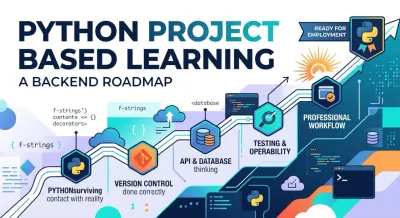
Most advice about python project based learning is wrong in a very predictable way. It tells you to keep building projects, but it doesn't tell you how those projects should connect, how to evaluate whether you're improving, or how to shape them into backend engineering skill instead of a pile of demos.
That advice creates a portfolio full of disconnected apps. A calculator. A weather script. A to-do app. Maybe a guessing game. You wrote code, but you didn't practice system design, persistence, testing, API boundaries, deployment, or maintenance. You practiced typing.
Backend employers don't hire for "has made several small Python things." They hire for evidence that you can design a service, manage data, reason about trade-offs, and work in a repeatable development process. That's the proper frame for python project based learning. A project isn't just something you finish. It's a container for learning architecture, debugging habits, and engineering judgment.
Go Beyond "Just Build Projects" #
The biggest mistake self-taught developers make isn't laziness. It's randomness.
They pick projects based on novelty instead of skill coverage. They build whatever feels fun that weekend. Then they wonder why they still feel shaky with Git, APIs, database design, and tests. The problem isn't the project count. The problem is the lack of a learning system.
Research on project-based learning in Python courses points to this exact gap. Projects can build critical thinking, but public guidance is weak on structuring milestones, feedback, and systematic progression for learners who need backend skills like Git, APIs, and testing, as discussed in this Bryant University paper on project-based learning gaps.
Coding is not the same as engineering #
A lot of beginner project advice teaches feature completion. Engineering requires constraint management.
That means asking better questions:
- What boundary does this module own? If everything talks to everything, your project teaches chaos.
- What breaks if I change the data model? If one change causes failures everywhere, your design is too coupled.
- How will I verify behavior? If your answer is "I'll click around manually," you still need a testing strategy.
- How does this run outside my laptop? If you can't explain setup, environment variables, and deployment assumptions, the work isn't finished.
A random project list rarely forces those questions. A structured roadmap does.
Practical rule: Don't start by asking "What should I build?" Start by asking "What capability should this project force me to learn?"
What works better than project collecting #
Strong python project based learning looks more like a curriculum than a scavenger hunt. Each project should add one new layer of complexity while preserving the previous layers.
A better sequence looks like this:
- Start with one bounded problem you can explain clearly.
- Add persistence so state survives beyond runtime.
- Expose behavior through an API instead of only a script.
- Write tests around behavior before adding more features.
- Package and deploy it so somebody else can run it.
- Refactor under pressure when requirements change.
That sequence teaches software development. Building five unrelated apps usually doesn't.
The shift that matters #
If you want to become a backend engineer, treat each project as a system under construction. Define milestones. Keep scope tight. Add professional constraints early. Review what failed after each iteration.
That's how projects stop being hobbies and start becoming proof of competence.
The Foundational Backend Milestones #
Most learners jump into web frameworks too early. They can spin up routes, but they can't explain what the application is doing underneath. That's why they stall as soon as the tutorial ends.
Formal project-based programs handle this differently. NC State's Data Science and AI Academy uses defined milestones such as data selection, analysis planning, and final storytelling, with rubrics tied to each milestone so learners move through a workflow instead of drifting through syntax, as described in NC State's project-based learning model. Backend learning needs the same discipline.

Milestone one means Python that survives contact with reality #
You don't need every corner of the language. You do need the parts that keep backend code readable and maintainable.
Focus on:
- Data structures: lists, dicts, sets, tuples, and when each one makes lookup or mutation easier.
- Functions and modules: code should be decomposed into units with clear inputs and outputs.
- Classes when they help: don't force OOP into everything, but know how to model state and behavior cleanly.
- Exceptions and validation: bad input is normal in backend work.
- File and environment handling: configuration and persistence start here.
If your Python code is still one long script, you're not ready for larger backend projects.
Milestone two is version control you actually use correctly #
Git isn't a side tool. It's part of the skill.
A serious learner should know how to create branches, write meaningful commits, resolve merge conflicts, and use pull requests even on solo projects. A clean Git history shows how you think over time. If you need a deeper path for the broader role, this backend developer roadmap from Codeling lays out the adjacent skills that sit around Python itself.
Milestone three is API and database thinking #
Many portfolios collapse. Learners build endpoints without understanding resource design, status codes, validation boundaries, or database trade-offs.
You need to be comfortable with:
| Area | What you should understand |
|---|---|
| HTTP basics | Requests, responses, methods, status codes, headers |
| Resource design | How to model users, orders, tasks, reports, or any domain entity |
| Data storage | Tables, relationships, indexes, migrations, constraints |
| ORM trade-offs | Faster development, but also abstraction leaks and query surprises |
A backend project becomes credible when the data model and API shape make sense together.
Milestone four is testing and operability #
A backend app isn't finished when it works once. It's finished when you can trust changes.
That means learning:
- Unit tests for isolated behavior
- Integration tests for database and API flows
- Basic logging so failures leave evidence
- Environment setup so another machine can run the project
A junior developer often asks, "How do I add more features?" A stronger question is, "How do I keep this safe to change?"
Those are the milestones that matter. Framework names change. Engineering habits last.
A Progressive Python Project Roadmap #
The strongest learning path isn't four separate portfolio pieces. It's one project that grows up.
Popular Python project lists still lean on beginner demos like calculators and Hangman, while backend roles increasingly care about API design, database interaction, and testing, as noted in this analysis of common Python classroom project ideas. That's why the roadmap below is cumulative. Each stage inherits the previous one.

Stage one starts as a command line tool #
Build something small but operationally real. A personal finance tracker, log parser, bookmark organizer, inventory tracker, or habit reporting tool all work.
The point isn't the domain. The point is to learn structure.
At this stage, your project should force you to handle:
- Input validation
- Local file persistence
- Error handling
- Modular code organization
- Basic tests for core logic
You learn whether your code is readable without a tutorial holding it together.
Stage two turns the same project into an API #
Now the project gets a proper boundary.
Take the same domain and expose it through Flask or FastAPI. Add CRUD endpoints. Replace ad hoc file storage with SQLite if needed. Introduce request validation and response schemas.
This stage teaches the first serious backend lesson: the transport layer changes how you think about the application. Functions that were fine in a CLI now need explicit contracts. Failures need proper status codes. Shared logic has to move out of route handlers.
If you're still browsing for beginner-friendly project prompts before choosing a domain, these programming projects for beginners can help you pick something simple enough to evolve.
Stage three adds accounts, roles, and a database worth respecting #
Toy apps typically break at this stage.
Adding authentication and authorization exposes weak architecture fast. Suddenly you need to think about ownership, permissions, session or token strategy, and database relationships that aren't flat anymore. A user owns records. Some users can read but not modify. Admin behavior diverges from normal behavior.
Use this stage to learn trade-offs like these:
| Decision | Good reason to choose it | Common downside |
|---|---|---|
| SQLite first | Fast setup, low friction | Limited realism for multi-user behavior |
| PostgreSQL | Better practice for production-like apps | More setup and migration discipline |
| Thin routes | Keeps handlers readable | Requires stronger service-layer design |
| Fat routes | Fast for prototypes | Becomes hard to test and maintain |
The right answer depends on your scope. The point is to make the trade-off explicit.
Stage four hardens the project #
Most learners stop when the feature works. That is when backend learning gets serious.
Add the things that make software maintainable:
- A test suite for business rules and endpoint behavior
- Logging for failures and important events
- Environment-based configuration
- Seed scripts or fixtures so the app is easy to demo
- Linting and formatting
- Dependency management
This stage feels less glamorous because you're not adding shiny features. You're building reliability. That's exactly why it matters.
Small demo projects reward novelty. Backend work rewards consistency, clarity, and change safety.
Stage five packages and deploys the system #
Containerize the application. Add a CI workflow that runs tests on push. Deploy it somewhere public. If it makes sense, integrate one external API or one AI-assisted feature, but only if it supports the product instead of distracting from it.
This is also where you learn what not to do. Don't split into microservices just to sound advanced. Don't add Redis because a tutorial mentioned caching. Don't bolt on an LLM because it's fashionable. Add complexity only when the project creates a real reason for it.
A better final portfolio project is usually one coherent service with careful design, not a fake "enterprise" stack assembled from buzzwords.
Adopt a Professional Developer Workflow #
A backend engineer's credibility shows up in process before it shows up in architecture. You can often tell how experienced someone is by looking at their branch names, commit history, local setup, and deployment hygiene.
In project-based learning, the workflow matters as much as the artifact. A practical implementation should mirror an end-to-end development cycle where learners define a problem, acquire data, write code to process it, and present results, as described in this study of Python courses using real-world project workflows.

Use Git like somebody else will read it #
Most beginners use Git as a panic button. Save everything. Commit everything. Push everything.
That's not enough.
A stronger workflow looks like this:
- Branch by change: one branch for auth, another for pagination, another for logging cleanup
- Commit by intent: each commit should explain a meaningful step, not "updates"
- Open pull requests: even on solo work, write a short description of the change and what you tested
- Review your own diff: catch dead code, noisy changes, and accidental formatting churn before merge
If your Git habits are weak, this guide to using Git for version control is a practical place to tighten them.
Make local development reproducible #
A professional workflow reduces setup ambiguity.
Use a virtual environment. Keep dependencies explicit. Store configuration in environment variables. Add a README with exact setup steps. If your app uses a database or supporting service, Docker becomes useful because it standardizes the local environment and eliminates a lot of "works on my machine" confusion.
A clean local setup usually includes:
- One command to install dependencies
- One documented way to load environment variables
- One command to run tests
- One command to start the app
- Sample data or seed instructions
That isn't overkill. It's respect for future you and anyone reviewing the project.
Treat CI as part of development, not a finishing touch #
Continuous Integration sounds bigger than it is. For a solo learner, it often just means this: every push should automatically run linting and tests.
That creates a feedback loop. Break something, and the system tells you immediately. That's better than discovering regressions three weekends later.
If a change can't be verified quickly, your project is getting harder to learn from.
Continuous Deployment can come later. The important habit is automation around verification. Once tests and checks run consistently, deployment becomes a smaller next step instead of a dramatic event.
Build a Portfolio That Gets You Hired #
A project isn't done when the code works. It's done when another developer, recruiter, or hiring manager can evaluate it without guessing.
That's where most portfolios fail. The code may be decent, but the presentation is weak. No setup instructions. No screenshots or live demo. No explanation of architecture. No trade-offs. No evidence that the author understands why the project is built the way it is.

Document decisions, not just features #
Your README.md should answer questions a reviewer has:
- What problem does this solve
- Why did you choose this architecture
- How do I run it locally
- What does the API look like
- How is it tested
- What would you improve next
That last one matters. Mature engineers don't pretend software is complete. They explain constraints and next steps.
A short technical walkthrough can help reviewers see what "good" project presentation looks like:
Show depth, not just breadth #
In statistics education, 66% of students, representing 55 individuals, preferred project-based courses over exam-based courses, while 22% preferred exam-based formats, according to the Wiley study on project-based learning preferences. That matters for portfolio work because sustained engagement is what gets learners through the less exciting parts of serious projects: refactoring, writing tests, and cleaning documentation.
Hiring managers usually learn more from one deep project than from six shallow ones. A single backend service with authentication, persistence, tests, deployment, and clear architectural notes says more about your readiness than a gallery of mini-apps.
What a strong repository signals #
A credible portfolio repo usually has these traits:
| Signal | What it tells a reviewer |
|---|---|
| Clear README | You can explain technical work to another human |
| Organized structure | You understand separation of concerns |
| Tests included | You care about reliability |
| Meaningful commits | You work in a traceable process |
| Deployment instructions or live app | You can move beyond local-only code |
If you can't explain your trade-offs, the project still looks junior even if the code runs.
Your 6-Month Backend Learning Plan #
You don't need a perfect schedule. You need a stable cadence that compounds.
A good six-month plan mixes four things every month: study, implementation, review, and documentation. If one of those is missing, progress gets lopsided. You either consume too much and build too little, or you build recklessly without understanding what you're doing.
A workable rhythm #
Keep your week simple:
- Study days for language, framework, and database concepts
- Build days for project implementation
- Review time for refactoring, tests, and debugging notes
- Documentation time for your README, architecture notes, and commit cleanup
That rhythm is boring in the right way. It creates consistency.
Sample 6-Month Backend Learning Plan #
| Months | Primary Focus | Key Activities & Projects | Portfolio Goal |
|---|---|---|---|
| Month 1 | Python fundamentals and code organization | Build a CLI tool, practice functions, modules, file handling, exceptions, and basic tests | One small repo with clean structure and setup instructions |
| Month 2 | Git and backend basics | Add disciplined Git usage, refactor the CLI project, sketch domain models, start HTTP concepts | Commit history that shows intentional progress |
| Month 3 | First web API | Convert the project into a Flask or FastAPI service, add CRUD endpoints and validation | Working API with documented routes |
| Month 4 | Database and auth | Add SQLite or PostgreSQL, model relationships, introduce authentication and permissions | Backend project that stores real data and controls access |
| Month 5 | Testing and workflow maturity | Add unit and integration tests, logging, environment config, linting, and reproducible local setup | Repo that looks maintainable, not just functional |
| Month 6 | Deployment and portfolio polish | Containerize, add CI checks, deploy publicly, improve README, explain trade-offs and future work | One polished portfolio piece that demonstrates backend engineering judgment |
How to know the plan is working #
Use qualitative checkpoints, not vanity metrics.
Ask yourself:
- Can I explain the architecture without opening the code?
- Can I add a feature without breaking unrelated areas?
- Can another developer run this from the README?
- Do my tests catch regressions I would otherwise miss?
- Can I describe at least one trade-off I made on purpose?
If the answer keeps moving from "not really" to "yes," you're on track.
The value of python project based learning isn't that projects feel practical. It's that the right projects force you to think like an engineer. That's the shift that gets you employable.
If you want a structured way to practice that style of learning, Codeling offers a hands-on backend path built around Python, Git, APIs, databases, testing, and portfolio projects. It combines browser-based exercises with local project work, which fits well if you want more guidance than tutorial hopping but still want to build real systems.