10 Backend Programming Projects for Beginners to Build in 2026
This guide moves beyond generic advice by outlining 10 specific programming projects for beginners
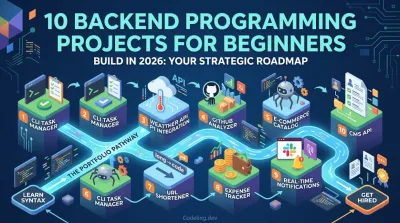
Staring at a blank editor and wondering what to build is a universal experience for aspiring developers. The journey from learning Python syntax to becoming a confident backend engineer is paved with practical application. Passive learning through tutorials isn't enough; employers want to see what you can do, and a strong portfolio is your best evidence.
This guide moves beyond generic advice by outlining 10 specific programming projects for beginners, each tailored to build the real-world backend skills that get you hired. Forget surface-level ideas. We provide a strategic breakdown for each project, including the tech stack, core skills you'll acquire, and step-by-step milestones to guide your development process from the first line of code to a deployed application.
We will cover everything from building a Personal Blog REST API with Django to a Real-Time Notification System with WebSockets. Each example is designed not just to be completed, but to become a cornerstone of your job-ready portfolio. Think of this as a structured path to building demonstrable expertise, one repository at a time. This approach transforms abstract concepts into tangible skills, preparing you for the technical challenges of your first backend role.
1. Command-Line Task Manager with File Persistence #
Among the most recommended programming projects for beginners, a command-line interface (CLI) task manager is a perfect starting point. This project involves creating a terminal application where users can add, view, and delete tasks. Instead of a complex database, tasks are saved to a local file (like JSON or CSV), providing a gentle introduction to data persistence.
Building this tool teaches core backend concepts without the overhead of web frameworks. You'll work directly with fundamental Python skills like functions, lists, dictionaries, and file I/O. The project requires you to think about data serialization (converting Python objects to a storable format) and deserialization (reading them back). It’s an ideal way to solidify your understanding of application logic and data handling before tackling more complex systems.
Strategic Breakdown #
- Goal: Build a terminal application for managing a to-do list that persists between sessions.
- Skills Learned: Python fundamentals, file I/O (reading/writing to JSON or CSV), data structures, user input validation, basic Object-Oriented Programming (OOP), and command-line argument parsing.
- Tech Stack: Python,
jsonorcsvmodule,argparselibrary (optional but recommended). - Estimated Time: 8-12 hours.
Actionable Takeaway: Start by defining the core data structure for a task. A dictionary with keys like
id,title,completed, andcreated_atis a great choice. This structure makes it easy to serialize to JSON and manage within your application’s logic. This simple decision directly impacts how you'll implement every feature, from adding to deleting tasks.
2. Command-Line Task Manager with File Persistence #
Among the most recommended programming projects for beginners, a command-line interface (CLI) task manager is a perfect starting point. This project involves creating a terminal application where users can add, view, and delete tasks. Instead of a complex database, tasks are saved to a local file (like JSON or CSV), providing a gentle introduction to data persistence.
Building this tool teaches core backend concepts without the overhead of web frameworks. You'll work directly with fundamental Python skills like functions, lists, dictionaries, and file I/O. The project requires you to think about data serialization (converting Python objects to a storable format) and deserialization (reading them back). It’s an ideal way to solidify your understanding of application logic and data handling before tackling more complex systems.
Strategic Breakdown #
- Goal: Build a terminal application for managing a to-do list that persists between sessions.
- Skills Learned: Python fundamentals, file I/O (reading/writing to JSON or CSV), data structures, user input validation, basic Object-Oriented Programming (OOP), and command-line argument parsing.
- Tech Stack: Python,
jsonorcsvmodule,argparselibrary (optional but recommended). - Estimated Time: 8-12 hours.
Actionable Takeaway: Start by defining the core data structure for a task. A dictionary with keys like
id,title,completed, andcreated_atis a great choice. This structure makes it easy to serialize to JSON and manage within your application’s logic. This simple decision directly impacts how you'll implement every feature, from adding to deleting tasks.
3. Weather API Integration with Data Processing #
Fetching and processing external data is a core function of almost every backend application. This project introduces you to this fundamental pattern by having you build a tool that consumes a public weather API, like OpenWeatherMap. You will write code to make an HTTP request, receive a JSON response, and then parse that data to display it in a clean, human-readable format.
This is one of the best programming projects for beginners because it directly mirrors a common real-world task. You'll learn how to handle API keys securely, manage potential network errors, and transform complex data structures into something useful. Understanding this workflow is essential for building any application that relies on external services, from social media bots to e-commerce platforms. If you're new to APIs, you can learn more about how they work before starting.
Strategic Breakdown #
- Goal: Fetch real-time weather data from a public API, process the JSON response, and present formatted information to the user.
- Skills Learned: API consumption (HTTP GET requests), JSON parsing, error handling (network failures, invalid responses), data transformation, environment variables for security.
- Tech Stack: Python,
requestslibrary,jsonmodule,osordotenvfor environment variables. - Estimated Time: 6-10 hours.
Actionable Takeaway: Start by making your first API call with a tool like Postman or Insomnia to inspect the raw JSON response. Identify the exact nested keys you need, for example,
main.tempandweather[0].description. This initial exploration lets you map out your data extraction logic before writing a single line of Python, preventing confusion when dealing with deeply nested API responses.
4. GitHub User Profile Analyzer #
A GitHub User Profile Analyzer is an excellent project for beginners looking to interact with a real-world API. This tool fetches data directly from the GitHub API to analyze a user's profile, repositories, and contribution activity. By processing this information, you can generate valuable insights, such as a user’s most-used programming languages or activity heatmaps, which are common features in developer portfolio dashboards.
This is one of the most practical programming projects for beginners because it teaches you how to handle external data, manage API rate limits, and transform raw JSON into meaningful statistics. Building it demonstrates a clear understanding of API integration and data aggregation, skills that are fundamental for backend development. It also reinforces the importance of using Git and GitHub for version control, which are central to modern software engineering workflows.
Strategic Breakdown #
- Goal: Create a tool that fetches and analyzes a GitHub user's public data to generate insightful statistics and visualizations.
- Skills Learned: API interaction (REST), JSON data parsing, data aggregation, handling API rate limits and pagination, authentication with tokens, and basic data visualization.
- Tech Stack: Python,
requestslibrary,PyGithub(optional wrapper),matplotlibor a simple HTML/CSS template for reporting. - Estimated Time: 15-20 hours.
Actionable Takeaway: Authenticate your requests with a personal access token from the very beginning. The GitHub API has a strict rate limit for unauthenticated requests (60 per hour), but this increases to 5,000 per hour with a token. This small setup step prevents frequent interruptions and allows you to fetch comprehensive data for multiple repositories without being blocked.
5. E-Commerce Product Catalog API #
Building a backend API for an e-commerce platform is one of the most practical programming projects for beginners aiming for a backend career. This project involves creating a REST API with endpoints to manage products, categories, and inventory. It mimics the core functionality behind major platforms like Shopify or Amazon, providing a solid foundation in database design, API architecture, and business logic.
You will learn to model complex data relationships, such as how products belong to categories or how inventory levels are tracked. Implementing features like filtering, sorting, and pagination will expose you to common patterns for handling large datasets efficiently. This project is a significant step up from simpler applications, as it forces you to think about how different parts of a system interact, such as checking stock before adding an item to a cart.
Strategic Breakdown #
- Goal: Create a RESTful API to manage product catalogs, inventory, and eventually, shopping cart and order logic.
- Skills Learned: API development with Django REST Framework, database modeling (one-to-many, many-to-many relationships), data serialization, endpoint filtering and pagination, and implementing business rules (e.g., stock validation).
- Tech Stack: Python, Django, Django REST Framework, PostgreSQL or SQLite.
- Estimated Time: 25-40 hours.
Actionable Takeaway: Start by modeling your
ProductandCategorytables with a clear relationship. AProductshould have a foreign key toCategory, establishing a many-to-one link. Use Django's admin panel immediately after creating your models to visualize and test these relationships. This simple step confirms your database schema works as intended before you write a single line of API code.
6. Python Web Scraper with Data Pipeline #
A Python web scraper is one of the most practical programming projects for beginners looking to understand how data moves across the internet. This project involves building a bot that automatically extracts specific information from websites, such as news headlines, product prices, or job listings. The core challenge is not just fetching the data but also cleaning it and structuring it for storage in a database or file, introducing you to basic ETL (Extract-Transform-Load) pipelines.
Creating a scraper teaches you to parse HTML, handle network requests respectfully, and build resilient code that can manage errors and website changes. You'll learn to interact with the web programmatically, a foundational skill for backend development. Projects like a news aggregator or a price comparison tool provide a tangible outcome and a dataset you can use for further analysis, making your portfolio more compelling.
Strategic Breakdown #
- Goal: Build an application to automatically extract data from a target website, process it, and save it in a structured format like a database or CSV file.
- Skills Learned: HTML parsing, HTTP requests, error handling, data cleaning and transformation, database interaction (optional), and responsible scraping practices (rate limiting, user agents).
- Tech Stack: Python,
requestslibrary,BeautifulSouporScrapy,loggingmodule, and a database like SQLite or a file format like CSV. - Estimated Time: 15-20 hours.
Actionable Takeaway: Before writing any parsing code, save the raw HTML of your target page to a local file. This creates a stable testbed for your parsing logic, allowing you to debug selectors and extraction functions without repeatedly hitting the website's server. This simple act of decoupling the request from the parsing will save you hours of debugging and help you respect the site's rate limits.
7. URL Shortener Service with Custom Domains #
Creating your own URL shortener service, inspired by platforms like Bitly or TinyURL, is a fantastic backend project for beginners. This project involves building an application that takes a long URL and generates a short, unique alias for it. When a user visits the short URL, your service redirects them to the original, longer destination. It’s a classic system design problem that offers a practical introduction to several core backend engineering concepts.
Building a URL shortener touches upon API design, database management, and HTTP protocols. You will learn how to handle URL validation, generate unique short codes, and manage redirects efficiently. Implementing features like click tracking and custom slugs introduces you to analytics and database indexing for performance, making this one of the most well-rounded programming projects for beginners looking to build a portfolio-ready application.
Strategic Breakdown #
- Goal: Build a backend service that shortens long URLs, redirects users, and tracks basic analytics.
- Skills Learned: API development (REST), database schema design, URL routing, HTTP redirects (301 vs. 302), database indexing, data validation, and potentially caching with Redis.
- Tech Stack: Python, Flask or FastAPI, a database (PostgreSQL or SQLite), SQLAlchemy.
- Estimated Time: 15-20 hours.
Actionable Takeaway: A critical step is designing your database schema. Create a table with columns like
id,original_url,short_code, andcreated_at. Add a unique constraint and an index on theshort_codecolumn. This index is crucial for ensuring fast lookups when a user hits your short URL, preventing your database from slowing down as it grows. This single optimization is fundamental to a performant redirect service.
8. Expense Tracker REST API with Budget Analysis #
Developing an expense tracker REST API is a fantastic project for aspiring backend engineers ready to tackle a more complex application. This project involves creating a system where users can log expenses, categorize them, and analyze their spending against set budgets. Unlike simpler projects, this API requires user authentication, complex database queries, and business logic for financial calculations, making it an excellent portfolio piece.
Building this system teaches crucial backend skills applicable to many real-world applications, from FinTech to e-commerce. You will implement secure endpoints, manage financial data with precision, and provide valuable analytics. It serves as a practical introduction to building full-featured APIs and stands out as one of the more substantial programming projects for beginners who want to demonstrate job-ready competence.
Strategic Breakdown #
- Goal: Build a secure REST API for personal expense tracking with user authentication and spending analytics.
- Skills Learned: REST API design, user authentication (JWT), CRUD operations, database schema design, complex SQL queries (joins, aggregations), data validation, and handling financial data.
- Tech Stack: Python, Django REST Framework or FastAPI, PostgreSQL, and a JWT library (e.g.,
PyJWT). - Estimated Time: 25-40 hours.
Actionable Takeaway: Use a
DecimalField(or equivalent) for all monetary values in your database instead of aFloatField. Floating-point arithmetic can introduce small precision errors that are unacceptable in financial applications. This early design decision prevents bugs and ensures the accuracy of all calculations, from simple expense logging to complex budget analysis.
9. Real-Time Notification System with WebSockets #
Venturing into a real-time notification system is a significant step up, moving from simple request-response models to persistent, two-way connections. This project involves building a service that pushes instant updates to users, much like the notifications you see on Slack, Discord, or GitHub. It introduces you to the power of WebSockets, which maintain an open connection between the server and client, allowing the server to send data without waiting for a client request.
This is one of the more advanced programming projects for beginners, but it's incredibly rewarding. You'll learn about event-driven architecture, asynchronous programming, and how to manage state for many simultaneous connections. By integrating a message queue like Redis, you also tackle real-world problems like message reliability and decoupling your system's components, making it a fantastic portfolio piece that demonstrates modern backend skills.
Strategic Breakdown #
- Goal: Create a service that delivers real-time notifications to connected clients over WebSockets, with a persistent backend.
- Skills Learned: WebSockets, asynchronous programming (async/await), event-driven architecture, message queues (Redis), background task processing (Celery), and managing persistent connections.
- Tech Stack: Python, Django Channels or FastAPI, Redis, Celery.
- Estimated Time: 25-40 hours.
Actionable Takeaway: Begin by implementing a simple "echo" WebSocket endpoint. This is a server that immediately sends back any message it receives from a client. This small step forces you to set up the entire WebSocket infrastructure (like Django Channels and its ASGI server) correctly before you add any complex notification or business logic. It isolates the setup challenge first.
10. Content Management System (CMS) API with Role-Based Access #
Building a headless Content Management System (CMS) API is an advanced but highly rewarding project for aspiring backend developers. This project involves creating an API that manages content (like blog posts or pages) with a critical twist: different user roles have different permissions. For example, an administrator can create, edit, and delete anything, while an editor can only manage posts, and a viewer can only read published content.
This is one of the more complex programming projects for beginners, but it directly mirrors the architecture of enterprise-grade systems like Contentful or the WordPress REST API. It forces you to think deeply about authorization, data modeling, and state management. Implementing features like draft/publish workflows and revision history introduces you to state machines and content versioning, which are essential skills for building reliable, large-scale applications.
Strategic Breakdown #
- Goal: Develop a backend API for a headless CMS with role-based access control and a content publishing workflow.
- Skills Learned: API development (Django REST Framework or FastAPI), role-based access control (RBAC), database modeling, state machines, content versioning, and secure API design.
- Tech Stack: Python, Django (with its built-in auth system) or FastAPI, PostgreSQL.
- Estimated Time: 25-40 hours.
Actionable Takeaway: Model content status explicitly in your database. A post model should have a
statusfield with states likedraft,in_review, andpublished. Use this field to control both API permissions and data visibility. For instance, only users witheditororadminroles should be able to see posts with adraftstatus, which you can enforce at the database query level for efficiency and security.
10 Beginner Programming Projects Comparison #
| Project | Implementation Complexity 🔄 | Resources & Time ⚡ | Expected Outcomes 📊 | Ideal Use Cases 💡 | Key Advantages ⭐ |
|---|---|---|---|---|---|
| Personal Blog REST API with Django Ninja | Intermediate — web framework, ORM, auth, testing | DB + hosting; 3–4 weeks | Portfolio-ready REST API; strong HTTP/auth skills | Backend portfolio pieces; job interview demos | Clear API design, extensible, employer-recognized |
| Command-Line Task Manager with File Persistence | Beginner — basic I/O, control flow | Local files only; 1–2 weeks | Solid Python fundamentals and CLI experience | Beginners learning Python basics quickly | Fast to build, easy to test and extend |
| Weather API Integration with Data Processing | Beginner–Intermediate — HTTP, JSON parsing, caching | External API key + network; 1–2 weeks | Real-data handling; API consumption and parsing | Learning API integration and data formatting | Visible results, minimal setup, real-time data |
| GitHub User Profile Analyzer | Intermediate — pagination, aggregation, auth | GitHub token + network; 2–3 weeks | Developer-centric insights; portfolio analytics | Showcase GitHub-centric portfolios and metrics | Highly relevant to developer portfolios |
| E-Commerce Product Catalog API | Intermediate–Advanced — complex relations & transactions | DB, hosting, more tests; 4–6 weeks | Scalable business logic; relational modeling | E‑commerce backends, SaaS, complex APIs | Teaches transactions, relationships, scalability |
| Python Web Scraper with Data Pipeline | Intermediate — parsing, ETL, error resilience | Network, storage DB; 2–3 weeks | ETL skills and structured datasets for analysis | Data collection for analytics or monitoring | Practical ETL patterns; immediate analyzable output |
| URL Shortener Service with Custom Domains | Intermediate — routing, indexing, analytics | DB + optional cache (Redis); 2–3 weeks | High-perf lookup & redirect logic; analytics | Small deployable services; system design practice | Simple core with clear optimization paths |
| Expense Tracker REST API with Budget Analysis | Intermediate–Advanced — auth, aggregations, alerts | DB, auth, hosting; 3–4 weeks | Personal finance analytics; complex queries | Personal finance tools, analytics demos | Real-world usefulness; aggregation and alerts |
| Real-Time Notification System with WebSockets | Advanced — async, message queues, scaling | Broker (RabbitMQ/Celery), ASGI server; 4–6 weeks | Real-time delivery, reliability patterns | Chat, live updates, alerts, high-concurrency apps | Teaches async/event-driven architecture |
| Content Management System (CMS) API with RBAC | Advanced — RBAC, workflows, versioning | DB, storage, extensive testing; 5–7 weeks | Enterprise workflows; content versioning and permissions | Enterprise content platforms and headless CMS | Covers RBAC, state machines, auditability |
Your Next Step: From Project Plan to Portfolio Piece #
You now have a detailed blueprint for ten powerful programming projects for beginners. These are not just simple exercises; they are strategically designed to build the specific, in-demand skills required for a backend engineering career. From creating a REST API for a personal blog to engineering a real-time notification system, each project is a self-contained learning module that pushes you to tackle authentication, database management, API design, and data processing.
The core lesson from this guide is simple: action separates aspiring developers from employed engineers. A completed, well-documented project on your GitHub profile is infinitely more valuable than a dozen perfect ideas that never get built. The real learning happens when you encounter a cryptic error message, refactor a messy function, or successfully deploy your application for the first time.
From Theory to Tangible Skills #
The projects detailed in this article were chosen to provide a practical education in modern backend development. As you build them, you're not just writing Python code; you are practicing the entire development lifecycle.
- Problem Solving: You'll learn to break down a large requirement (like an "E-Commerce Product Catalog API") into small, manageable milestones.
- Technical Proficiency: You'll gain hands-on experience with foundational technologies like Django, Flask, PostgreSQL, and WebSockets.
- Documentation and Communication: A clean README and commented code demonstrate professionalism and are critical for collaborating on a team.
Key Takeaway: The most impactful programming projects for beginners are those that mirror real-world engineering challenges. By focusing on projects with clear business logic, like an expense tracker or a URL shortener, you create portfolio pieces that hiring managers can instantly understand and appreciate.
Your Action Plan for Success #
Feeling overwhelmed by the options is normal. The key is to build momentum with a single, focused effort. Pick one project from this list that genuinely interests you, whether it’s the data-centric GitHub Profile Analyzer or the interactive Command-Line Task Manager.
Once you’ve chosen, commit to the process. Set up your development environment, create a new GitHub repository, and tackle the very first milestone. The journey from a blank file to a finished application is a series of small, consistent steps. Each bug you squash and each feature you implement builds not only your technical skills but also the confidence needed to succeed in interviews and on the job. The path forward is clear: stop planning and start building.
Ready to turn these project ideas into a standout portfolio with expert guidance? Codeling provides a structured curriculum with hands-on exercises and real-world projects designed to build job-ready backend engineering skills. Move from learning fundamentals to deploying production-grade applications with a platform built to get you hired.