How to Architect Your Python Environment on macOS in 2026
When you install Python on your Mac, you are choosing an architectural pattern for version and dependency management. Each pattern has trade-offs in terms of simplicity, control, and scalability.
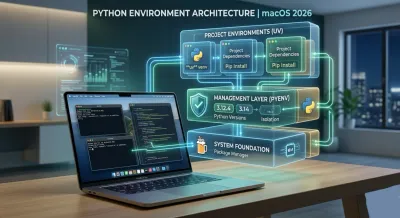
Before you even think about installing Python, we need to discuss a higher-level concept: architectural design for your development workflow. Getting Python to run on a Mac is trivial. Architecting a professional, resilient, and scalable development environment—one that anticipates future needs and prevents common pitfalls—is an entirely different challenge. This is not a technical chore; it's a foundational design decision.
The fact that macOS no longer ships with Python is a blessing in disguise. It forces a deliberate choice, moving you from a passive consumer to an active architect of your own toolkit. For any developer aspiring to build robust software, a managed, isolated environment isn't a luxury; it's a core principle of professional practice. It’s the difference between building on a solid foundation versus quicksand.
Let's explore the architectural patterns for setting up Python, focusing on the why behind the what.
Four Architectural Patterns for Python Installation #
When you install Python on your Mac, you are choosing an architectural pattern for version and dependency management. Each pattern has trade-offs in terms of simplicity, control, and scalability.
-
The Singleton Pattern (Official Installer): Downloading from Python.org installs a single, global Python instance. This is simple but fundamentally flawed for professional work. It creates a tightly coupled system where all projects must share one interpreter and one set of packages, inevitably leading to version conflicts. It's an anti-pattern for a multi-project workflow.
-
The System-Managed Pattern (Homebrew): Using
brew install pythonoutsources version management to Homebrew, your system's package manager. This introduces a dangerous coupling. Homebrew's job is to keep system-level tools up-to-date. When you runbrew upgrade, it may update Python unexpectedly, breaking your project's dependencies. This violates the principle of least surprise. -
The Manager Pattern (Pyenv): This is the professional standard. Pyenv acts as a meta-manager, allowing you to install and switch between multiple, independent Python versions. Each version is isolated from the system and from each other. This is a design pattern that promotes decoupling, isolation, and reproducibility—hallmarks of a robust software architecture.
-
The All-in-One Ecosystem (Anaconda): For data science, Anaconda provides a pre-packaged ecosystem. It bundles Python, a package manager (
conda), and hundreds of scientific libraries. It’s a powerful, opinionated framework, but its monolithic nature can be heavyweight and introduce complexity for general-purpose backend development.
This decision tree illustrates the architectural choices based on your goals.
For anyone serious about software engineering, the "Pro Dev" path—adopting a dedicated version manager like pyenv—is the only logical choice. It is architecturally sound.
Comparing Python Installation Strategies for macOS #
This table breaks down the four main approaches for installing Python on macOS, helping you choose the best strategy based on your development needs and long-term goals.
| Strategy | Best For | Complexity | Key Advantage |
|---|---|---|---|
| Official Installer | Quick setup for a single, simple project or script. | Low | Direct and official, no extra tools needed. |
| Homebrew | Quickly installing a single modern Python version. | Low | Simple command, integrates with other brew tools. |
| Pyenv | Professional backend and full-stack development. | Medium | Manages multiple, project-specific versions. |
| Anaconda/Conda | Data science, machine learning, and scientific computing. | Medium | All-in-one ecosystem with pre-packaged libraries. |
For a stable, scalable, and professional development architecture, the principle of isolation provided by pyenv is paramount. Other methods trade long-term stability for short-term convenience.
The Strategic Importance of a Managed Environment #
The conversation around Python installation on macOS intensified with Apple's transition to Apple Silicon in 2020. With Macs commanding over 50% market share among US programmers, this shift had a profound impact.
Apple's decision to stop pre-installing an outdated Python 2.7 was a pivotal moment. It forced the developer community to adopt better practices and take ownership of their environments. This move ended years of confusion stemming from conflicts with a system-provided Python. For deeper insights, see Dataquest's analysis of Python on macOS.
As a software developer, your local environment is a reflection of your professional discipline. A managed approach like
pyenvis not just about installing a tool; it's about designing a system for stability and predictability, a core tenet of software engineering.
For any non-trivial application, managing multiple Python versions is a necessity, not a niche requirement. The professional standard follows a layered architectural principle: use a system package manager (Homebrew) to install a dedicated language version manager (pyenv).
This approach embraces the principle of Separation of Concerns. Homebrew manages system-level utilities. Pyenv, installed via Homebrew, is a specialist tool focused exclusively on managing Python interpreters. This decoupling is the key to preventing the environmental chaos that plagues so many developers.
The Architectural Advantage of a Layered Setup #
A well-designed development environment mirrors the principles of good software architecture. By using Homebrew to install pyenv, you are implementing a layered design that provides clear benefits:
- Isolation & Encapsulation: Your legacy project on Python 3.9 remains entirely separate from a new project using Python 3.14. Each project's environment is an encapsulated unit, preventing side effects and dependency collisions. This is the local equivalent of microservices.
- Reproducibility & Idempotence: You can define a specific Python version (e.g., 3.12.4) for a project. When a new team member joins, they can provision the exact same environment, ensuring that setup is an idempotent operation. This eliminates the "it works on my machine" anti-pattern.
- System Stability: The host operating system remains pristine. Your development activities are sandboxed within
pyenv, ensuring no interference with system-level tools.
This isn't a "trick"; it's an application of sound engineering principles to your local workflow. It's how high-performing teams maintain velocity and reduce environment-related bugs.
From Principles to Practice #
The implementation follows a logical progression. First, establish your foundational layer: Homebrew. If you are a developer on macOS, this is your primary provisioning tool.
With Homebrew in place, you use it for its intended purpose: installing command-line tools. A simple brew install pyenv provisions the version manager itself, not a specific Python version.
Now, you have the pyenv command, an abstraction layer for Python installations. To instantiate a specific version, you command it: pyenv install 3.12.4. Pyenv handles the fetching, compiling, and installation, placing it within its own managed directory, decoupled from the system.
This represents a crucial mindset shift: from being a passive user of a pre-installed language to an active architect of a multi-version development platform.
This deliberate choice demonstrates an understanding of environment management, a skill that is a prerequisite for any senior engineering role.
Configuring Your Shell: The 'Why' Behind the 'How' #
The final architectural component is routing. You must instruct your shell (your command-line interface) to direct Python commands through the pyenv management layer. Most tutorials provide a command to copy-paste without explaining the underlying mechanism.
When you type python, your shell traverses its PATH—an ordered list of directories—to find a matching executable. The goal is to ensure the directory containing pyenv's control scripts (shims) is evaluated first.
This is achieved by adding eval "$(pyenv init -)" to your shell's configuration file (e.g., .zshrc). This command sets up shims, a powerful interception pattern.
A shim is a lightweight script that intercepts commands like python or pip. The shim inspects your current context (e.g., your project directory's configuration), determines the correct Python version you've specified, and then delegates the command to the actual Python interpreter.
This design pattern provides dynamic, context-aware routing of your commands. It's what enables seamless, automatic version switching as you navigate between projects—a clean, powerful, and elegant solution to a complex problem.
Once pyenv is managing your Python interpreters, the next layer of your architecture is dependency management. For years, the standard pattern involved a combination of venv for environment isolation and pip for package installation. This two-tool approach is functional but suffers from performance bottlenecks and complex dependency resolution logic.
A paradigm shift is underway, led by a tool called uv. Created by Astral and written in Rust, uv is a unified, high-performance replacement for both pip and venv. This is not an incremental improvement; it's a fundamental re-architecture of the Python tooling experience. You can find the official documentation at https://docs.astral.sh/uv/.
Adopting uv is a strategic decision. It demonstrates a commitment to efficiency, modern practices, and optimizing the developer feedback loop. In 2026, proficiency with such tools is a key differentiator.
The Power of a Unified Toolchain #
The architectural elegance of uv lies in its unification of package and environment management into a single, cohesive tool. Instead of thinking in separate steps (venv creation, activation, pip installation), you operate within a single, streamlined workflow.
This unified design delivers significant architectural benefits:
- Extreme Performance:
uvis often 10-100x faster thanpipandvenv. This is achieved through its Rust implementation and a sophisticated global caching strategy. This speed radically shortens the feedback loop during development and in CI/CD pipelines. - Superior Dependency Resolution: It employs a state-of-the-art dependency resolver, significantly reducing the probability of encountering the "dependency hell" that plagues complex projects. The resolution process is not only faster but more robust.
- A Simplified Mental Model: The workflow becomes more intuitive. Creating an environment and populating it with dependencies are treated as part of the same logical operation, reducing cognitive load.
By adopting uv, you are not just changing tools; you are adopting a more modern and efficient development paradigm. You are consciously choosing to optimize your workflow for speed and reliability.
A Modern Workflow in Practice #
How does this architectural choice manifest in your daily work? After using pyenv to set your project's Python version (e.g., pyenv local 3.12.4), uv takes over for all environment and package operations.
First, provision uv using Homebrew, following our layered architecture principle:
brew install uv
With uv available, creating a new virtual environment is a single, declarative command:
uv venv
This creates a standard .venv directory, but does so almost instantaneously.
After activating the environment (source .venv/bin/activate), you use uv for package management:
uv pip install <package-name>
The commands are familiar, but the underlying engine is a complete overhaul.
The performance gain is transformative. A complex installation that might take a minute with pip can complete in seconds with uv, especially on subsequent runs that leverage its cache. This transforms a tedious wait into an afterthought.
Key Principle: The adoption of
uvis a strategic choice to prioritize developer productivity and workflow efficiency. It is an investment in a faster, more reliable development cycle.
The modern Python stack—pyenv for interpreters and uv for environments and packages—creates a powerful, clean, and exceptionally fast foundation. To explore this further, see our guide on how to use uv for Python development.
Why This Architecture Matters for Your Career #
Knowing how to install python mac is table stakes. Designing and defending your development architecture is what distinguishes a senior engineer. A project set up with this modern, layered stack communicates a clear message to peers, hiring managers, and technical leads.
It demonstrates that you are:
- Architecturally Minded: You think in terms of systems, layers, and trade-offs, not just ad-hoc commands.
- Efficiency-Driven: You value time—yours and your team's—by adopting tools that eliminate bottlenecks and streamline workflows.
- A Modern Practitioner: You are current with the evolution of the Python ecosystem and proactively adopt best-in-class tools.
These are not just buzzwords; they are indicators of a professional engineering mindset. The choice to use pyenv and uv is a concrete example of a developer who thinks about the why—the architectural principles—not just the how.
Designing Your Integrated Development Workflow #
A robust command-line architecture with pyenv and uv is the foundation. However, a professional workflow is incomplete until this foundation is seamlessly integrated with your Integrated Development Environment (IDE). The goal is to create a cohesive system where your IDE is an intelligent participant in the environment you've architected.
Your editor, such as Visual Studio Code, must be aware of the specific Python interpreter and package set for each project. This is the crucial link that prevents a whole class of "file not found" or "module not found" errors that arise from a disconnected setup. It ensures that your static analysis, debugging, and code intelligence tools are operating in the correct context.
Integrating VS Code with Your Python Architecture #
VS Code's dominance in the Python community stems from its extensibility, primarily through Microsoft's official Python extension. This extension acts as the bridge, connecting the terminal-level architecture to the visual editing environment.
The integration is designed to be automatic. When you open a project folder, the Python extension probes for a virtual environment. Our choice to use uv venv created a standard .venv directory, a pattern the extension is explicitly designed to recognize.
Upon detecting this directory, VS Code will prompt you to select it as the workspace interpreter. Affirming this choice establishes the critical link. From this point forward, all of the IDE's Python-related functionalities are scoped to the isolated environment within .venv. Your editor is now synchronized with your command-line architecture.
The Payoff: High-Fidelity Development #
With the correct interpreter selected, your IDE transforms from a simple text editor into a high-fidelity development environment. It operates with complete knowledge of the project's specific dependencies.
This integration unlocks several critical capabilities that define a professional coding experience:
- Context-Aware Linting: Linters and formatters operate against the exact libraries inside your
.venv. You get real-time, accurate feedback on code quality and style that is directly relevant to your project's state. - Intelligent Code Completion: Autocompletion becomes precise. The methods and attributes suggested are derived from the specific versions of the libraries installed in your environment, not a global or different project's set.
- Reliable Debugging: The debugger executes your code using the interpreter from
.venv. This guarantees that your debugging session is a perfect representation of the command-line execution environment, eliminating a notorious source of bugs and confusion.
This integrated loop—from shell to editor and back—is the embodiment of a professional, reproducible workflow. The isolation principles established with
pyenvanduvare extended into the IDE, ensuring that every development activity is performed within the correct, hermetically sealed context.
This complete system reduces cognitive overhead, prevents common errors, and allows you to focus on the business logic of your application. The next logical step in this professional workflow is mastering version control. Our guide on how to use Git for version control provides the principles for tracking your work. By mastering this integrated architecture, you are not just learning to install python mac; you are adopting the design patterns of a senior software engineer.
When Things Go Wrong: Troubleshooting Your Setup #
No architecture is flawless, and no setup is immune to misconfiguration. The true measure of a developer is not the ability to follow a guide, but the ability to diagnose and resolve issues when they inevitably arise. This requires a deep understanding of the system's principles.
This section focuses on the mental models and diagnostic patterns for maintaining a robust professional workflow.
A primary anti-pattern to address immediately is the use of sudo pip install. This command is a symptom of a fundamental misunderstanding of environment management. It is never the correct solution.
Running pip with sudo bypasses all isolation and installs packages into system-level directories with root permissions. This pollutes your base OS, can overwrite critical system dependencies, creates permission nightmares, and poses a significant security risk. It is the architectural equivalent of punching a hole in your firewall to get an application to work.
Core Principle: Isolation is non-negotiable. Project dependencies must reside within a dedicated, unprivileged virtual environment. Any action that violates this principle is an anti-pattern.
Debugging Your Environment with First Principles #
Most environment issues stem from a single source of truth: the shell's PATH variable. When you experience a command not found error or a script uses the wrong Python version, the root cause is almost always a misconfigured PATH.
The PATH is an ordered list of directories that your shell searches to find an executable. It stops at the first match. Your goal is to ensure the pyenv shims directory is positioned at the beginning of this list, giving it priority.
Your diagnostic toolkit for this is simple and powerful:
which python: This is your primary diagnostic command. It reveals the absolute path to thepythonexecutable that your shell will actually use. If this path is not inside your~/.pyenv/shimsdirectory, yourpyenvarchitecture is not active.echo $PATH: This command displays the currentPATHin order. You can visually inspect it to confirm that thepyenvshims path is present and appears before any other system Python paths (like/usr/bin).
These two commands form a powerful framework for debugging your environment based on first principles. They will resolve the vast majority of "which Python am I using?" issues.
The pipx Pattern for Global Tools #
A common architectural question is how to manage command-line tools written in Python that you want to use globally, such as linters, formatters, or deployment utilities. The naive approach is to install them into a global pyenv interpreter, but this leads to dependency conflicts between the tools themselves.
The correct design pattern is to use pipx.
pipx is to Python applications what pyenv is to Python interpreters. It installs each tool into its own isolated virtual environment and adds its executable to your path.
For example, to install the code formatter Black, you would run pipx install black. pipx creates a dedicated, isolated environment just for Black and its dependencies.
This pattern provides three key benefits:
- Conflict Elimination: Each tool is perfectly isolated. Their dependencies can never conflict.
- Pristine Interpreters: Your
pyenv-managed Python versions remain clean, containing no globally installed applications. - Simplified Maintenance:
pipx upgrade-allupdates all your global tools in a single, safe operation.
Mastering these concepts—rejecting sudo, debugging your PATH with first principles, and using the pipx pattern for global tools—is what elevates your practice. A stable, predictable environment is a product of sound architectural design, just as important as the application code you build on top of it. Once your environment is solid, you can focus on code quality by learning how to write effective unit tests in Python.
Frequently Asked Questions About Installing Python on Mac #
You've architected your environment, but core questions about the "why" remain. Understanding the principles behind your choices is what separates rote execution from deep comprehension. Let's address the most common architectural questions.
Can I Skip Pyenv and Just Use Homebrew? #
Architecturally, this is a poor decision. While brew install python is simple, it creates a tight coupling between your development environment and your system's package manager. This violates the principle of Separation of Concerns.
Homebrew's purpose is to manage system-wide tools. When you run brew upgrade, its primary goal is to bring those tools to their latest versions. This can, and will, unexpectedly upgrade your Python interpreter, which can break your projects' dependencies. This makes your development environment fragile and non-deterministic.
pyenv introduces a necessary layer of abstraction and control. It decouples your project-specific Python versions from your system management tools. This isolation is a fundamental principle for building reproducible and stable software.
Is It Worth Learning uv If I Already Know pip? #
Yes, unequivocally. This is not just about performance; it's about adopting a superior workflow and a more elegant architectural pattern. For years, the Python ecosystem has been fragmented, requiring separate tools for environment management (venv) and package installation (pip). uv unifies these into a single, high-performance tool.
Learning
uvsignals that you are a developer who actively seeks to optimize your workflow and adopt modern best practices. It shows you value your time and the stability of your projects. By replacing a slow, two-step process with a fast, unified one, you are demonstrating a commitment to professional-grade tooling and efficiency—a trait highly valued in any engineering organization.
Why Not Just Use the Official Python Installer? #
The installer from Python.org implements a singleton pattern: one global Python for the entire system. While simple, this is an anti-pattern for professional development.
The moment you have two projects with conflicting dependency requirements—Project A needs library==1.2 and Project B needs library==2.0—the singleton model breaks down. You cannot satisfy both requirements in a single, shared environment.
This is the exact problem that pyenv combined with virtual environments is designed to solve. This architecture allows for per-project dependency and interpreter management, which is an absolute requirement for any non-trivial software development. The official installer lacks the architectural flexibility for this.
Ready to move beyond installation and start building real-world Python skills? Codeling offers a structured, hands-on curriculum designed to turn you into a confident backend software engineer. Our interactive platform guides you through building portfolio-ready projects, from your first line of code to production-grade APIs. Start your journey at https://codeling.dev.