Mastering Input in Python for Backend Development
Accepting input into your application from the outside world goes beyond keyboard input.
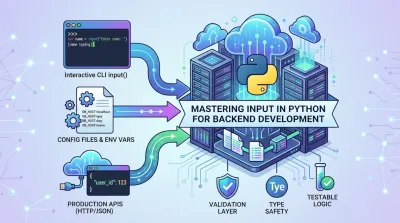
Sure, input() seems simple. You call the function, the user types something in, and your Python script gets a string. Done. But if you think that's all there is to handling input, you're missing the bigger picture—the one that separates hobby coders from professional backend engineers.
Why Mastering Input Is Foundational for Backend Engineers #

The leap from writing simple scripts to building real software starts with a single idea: how your application takes in data from the outside world. That little input() function is the tip of a massive iceberg. Underneath the surface lies the core architectural challenge of almost every system we build—defining how an application communicates with the outside world.
This has always been important, but it's especially true now. Python wasn't always the giant it is today. Back in the early 2000s, it was more of a niche language. Fast forward to 2026, and it's sitting at the #1 spot on the TIOBE Programming Community Index with a massive 22.61% rating. That incredible growth is built on a foundation of approachable yet powerful concepts, where a simple idea like user input scales up to complex system design. You can check out the full story in the latest TIOBE Index analysis.
From Simple Scripts to System Architecture #
For a beginner, getting input in python is about making a script feel interactive. You ask for a name, you print "Hello, [name]". It's a fun and crucial first step.
For a professional, input is about defining your system's contract with the entire world. The way your application handles data from the outside—whether it's from a command line, a file, or an API request—defines its entire architecture. It dictates how secure, scalable, and reliable your software will be.
The professional mindset isn't just about getting data into a script. It's about designing a robust system that can handle any data—valid, invalid, or even malicious—without falling over. This is the non-negotiable skill for building production-grade software.
This is the kind of architectural thinking that separates a weekend project from an enterprise application. It’s about planning for the messy reality of the data your system will actually face.
The Gateway to Professional Development #
Honestly, if you get good at handling input, you're well on your way to understanding much bigger software engineering concepts. It's a gateway skill.
Why? Because it forces you to think about the hard questions right away:
- Data Validation: How does my system define and enforce its data contract? How do I reject invalid data without crashing?
- System Boundaries: Where does my application's logic end and the unpredictable outside world begin? How do I protect that border?
- Error Handling Strategy: What is the system-wide plan for handling malformed, incomplete, or malicious input?
- Testability: How do I design my application so that its core logic can be tested independently of its input sources?
When you start wrestling with these architectural problems early, you build the habits that define a skilled engineer. Nailing this stuff is a huge step when you're learning how to become a successful backend developer.
The Three Levels of Python Input: From Simple Scripts to Production APIs #
To really get good at Python, you have to move beyond just writing code that runs and start thinking about how your programs talk to the outside world. It helps to think about input not as a single command, but as a series of architectural levels you'll master as a developer.
Think of it like learning to communicate. First, you have a simple, direct conversation. Then you learn to leave detailed written instructions. Finally, you build automated systems that speak a universal language to other machines. Each level solves a different kind of problem, and knowing which one to use is what separates a beginner from a pro.
Level 1: The Interactive Script #
This is where everyone starts. Level 1 is all about direct, real-time interaction between a user and the code. It’s a simple conversation. The program prompts for information, waits for a response, and then continues.
This approach is perfect for:
- Learning and experimentation: It provides immediate feedback for trying out ideas.
- Simple administrative tools: Think of a script that asks for a filename to process or a folder to organize.
- One-off tasks: Need to quickly rename a bunch of files? A script that prompts for a naming pattern is a quick solution.
The core idea here is immediacy. The application's execution is tightly coupled with a human operator. While it's a fantastic way to learn, this tight bond is a major architectural constraint in any automated system.
Level 2: The Automated Tool #
As you start building more serious software, you'll need your tools to run without anyone holding their hand. Welcome to Level 2. Here, your scripts mature into configurable applications that can be automated.
Instead of a conversation, you're providing a complete set of instructions for your program to follow at launch. The main design patterns for this involve command-line arguments (often managed with libraries like argparse) and environment variables.
The entire architectural mindset shifts. Input isn't provided while the script is running; it’s all given upfront. Instead of asking "What server should I connect to?", the application is launched with that configuration: python my_app.py --server-address 10.0.0.1.
This enables headless execution—the ability for your code to run on servers, in Docker containers, or as part of a CI/CD pipeline, with no human intervention required.
This jump from interactive prompts to configuration-driven input is a critical milestone. It's the moment your code graduates from being a simple script to a real component in a larger, automated system.
Level 3: The Production API #
At the highest level, your application stops talking to a single user at a terminal and starts speaking to the entire internet. This is the world of production APIs, typically built with frameworks like Django or Flask.
Here, input arrives over the network, usually as an HTTP request. It’s not a simple string typed into a console; it's a structured data payload, often in JSON format, sent from a web browser, a mobile app, or another backend service.
The guiding principles are abstraction and decoupling. A REST API is designed to handle potentially thousands of concurrent requests. It relies on a strict, machine-readable format like JSON because that "contract" allows any client, written in any language, to communicate with it reliably.
Mastering this is non-negotiable in modern backend development. Python is a giant in this space, powering workflows for 48% of data analysts and 41% of machine learning developers—fields that absolutely depend on robust, scalable data ingestion through APIs. You can see a full breakdown of Python's popularity in key domains to understand just how crucial this skill is.
Understanding these three levels gives you a roadmap. It helps you pick the right architectural approach for the job, ensuring your programs aren't just functional, but well-designed, scalable, and ready for whatever you throw at them.
Architecting for Input: Validation, Type Safety, and Staying Sane #
When you're building a backend system, there’s one rule you have to burn into your brain: all external input is hostile until proven otherwise.
This isn't about being paranoid; it's about being a professional. Moving from just getting data into your app to actually trusting that data requires a shift in architectural mindset. You have to start practicing defensive programming.
Architecturally, this means building a dedicated validation layer. Think of it as a bouncer at the door of your application's club. Nothing gets past the velvet rope without being on the list, getting its ID checked, and proving it belongs there. This layer creates a hard boundary between the wild, unpredictable outside world and your clean, stable business logic.
This simple idea will completely change how you handle any input in python, from a quick script to a massive production API.
The Art of Defensive Programming #
Defensive programming is built on the assumption that anything coming into your functions might be wrong, malformed, or even actively malicious. The goal is to design software that runs predictably, even when it gets hit with garbage data. It's a proactive strategy for stopping bugs and security holes before they can do any damage.
A system that crashes when someone enters "ten" instead of "10" isn't just buggy—it's broken by design. A robust system expects the unexpected, validates every single piece of data it receives, and handles errors with clear, predictable logic.
Instead of letting a simple user mistake take down your whole application, a proper validation layer would catch that "ten," reject it, and return a helpful message. This is your first line of defense against everything from annoying bugs to serious security threats like injection attacks, where an attacker tries to sneak malicious code into what looks like normal input.
From Simple Checks to a Full-Blown Validation Layer #
This idea of a validation layer isn't all-or-nothing. It scales right alongside your application's complexity. A simple script has simple needs, while a production API requires a fortress.

As you climb this ladder from simple interactive scripts to full-scale production APIs, the need for automated, iron-clad validation becomes non-negotiable.
Here’s how that evolution typically looks:
-
Basic Type Casting: The first step is simply ensuring data conforms to basic types. This is the absolute bare minimum for making sure your data has the right fundamental shape. It's better than nothing, but it's not enough for the real world.
-
Structured Data Validation: When you start dealing with complex data like API payloads, you bring in the heavy hitters. Libraries like Pydantic are essential here. They let you define a declarative schema for your data with strict types, constraints (like
min_length), and default values. This schema becomes the single source of truth for what valid data looks like.
Mastering this architectural pattern is non-negotiable. It's what separates a brittle application that falls over in a light breeze from a resilient, secure one that can take a punch. For backend developers, solid validation is especially critical when building APIs, a topic we dive deep into in our guide on REST API design best practices.
Choosing the Right Input Design Pattern #
Writing code that works is one thing. Writing code that lasts is another. When it comes to handling input in Python, the architectural choices you make early on can either set you up for success or lead to a world of pain down the road. It's the difference between a quick, throwaway script and a professional, scalable application.
This decision really boils down to two core approaches: the Interactive Wizard and the Configuration-Driven pattern. They each have their place, but picking the wrong one for your project is a classic rookie mistake.
Interactive Wizard vs. Configuration-Driven #
The Interactive Wizard is a conversational pattern. It uses a series of prompts to guide the user through a process. The script asks a question, waits for an answer, asks the next question, and so on.
This is perfect for one-off tasks or simple setup scripts. Think of a tool that helps you initialize a new project, asking you for the project name, the database type, and other initial settings. It's friendly, intuitive, and gets the job done without forcing the user to learn a bunch of command-line flags.
But here's the catch: this pattern completely falls apart in any kind of automated environment. A script that stops and waits for a human to type something can't run in a Docker container, a CI/CD pipeline, or as a scheduled cron job. It creates a system that’s impossible to automate, test, or scale.
That’s where the Configuration-Driven pattern comes in. This is the gold standard for backend services, command-line tools, and any professional software meant to run without a human babysitting it. Instead of a conversation, the application gets all its instructions upfront at launch time.
This is typically done through:
- Command-line arguments (using a library like argparse)
- Environment variables
- Configuration files (like
.toml,.yaml, or.inifiles)
This design allows for headless execution—the application just runs, no questions asked. A microservice doesn't stop to ask which database to connect to; it reads that from its configuration and gets to work. This is the architectural decision that makes modern, automated software deployment possible.
The real test of an application's design is its operational context. An interactive wizard is great for a local utility you run by hand. But for any code that's part of an automated, production-level workflow, a configuration-driven design is non-negotiable.
So, how do you pick? You have to think about the application’s entire lifecycle. Is this a quick script to migrate some data just once? An interactive wizard is probably fine. Is this a web service that needs to run 24/7 for the next three years? It absolutely must be configuration-driven.
Choosing Your Input Design Pattern #
To make this crystal clear, let's break down when to use each pattern. Think of this table as your cheat sheet for making the right architectural call.
| Consideration | Interactive Wizard (e.g., input()) | Configuration-Driven (e.g., argparse, config files) |
|---|---|---|
| Best Use Case | One-time setup scripts, simple local tools. | Backend services, automated tasks, CI/CD pipelines. |
| Execution | Requires direct user interaction to proceed. | Runs headlessly without any human input after launch. |
| Scalability | Not scalable; tied to a single user session. | Highly scalable and easy to containerize or deploy. |
| Testability | Very difficult to test in an automated way. | Simple to test by providing different configurations. |
| Maintainability | Logic is often tangled up with user prompts. | Cleanly separates configuration from application logic. |
Ultimately, choosing the right input pattern is a mark of an experienced developer. It shows you’re thinking not just about making the code work today, but about how it will be operated, tested, and maintained for its entire lifetime.
9. Testing Your Input Logic Like a Professional #

Writing code that works is one thing. Writing code that you know works—and can prove it—is what separates a hobbyist from a professional. The problem is, any code that relies on an external source like input() or reading a file is a nightmare to test automatically. How do you run a test that requires a human to type something in? You don’t.
The solution is to decouple your core logic from your input gathering. Instead of having a critical function call an I/O function inside itself, design it to accept the data as a parameter. It’s a simple change, but it completely transforms your architecture, making your business logic predictable and independent of the outside world.
The Power of Pure Functions and Mocking #
When you separate the "what to do" from the "how to get the data," your core logic starts to look like a "pure function." That's a fancy term for a function that, given the same input, always returns the same output without any side effects—like waiting for a user to type. This predictability is the secret to good automated tests.
Once your logic is decoupled, you can use a powerful technique called mocking. Think of mocking as hiring a stunt double for the messy, unpredictable parts of your code. Instead of actually waiting for a user or reading a real file, you create a "mock" object that pretends to be the real thing and feeds your function whatever data you want.
By decoupling your logic from the input source, you can simulate any scenario you can think of—valid data, weird edge cases, even malicious inputs—all without any manual work. This is how you level up from writing simple scripts to building professional, maintainable applications.
This shift in mindset is crucial for modern developers. Python has come a long way since its start in 1991. Today, it’s TIOBE’s top-ranked language, and its fundamental I/O capabilities now underpin everything from simple prompts to complex data streams. With Python's global adoption hitting 51%, mastering these professional practices is a key skill. You can explore the research on Python's growing popularity and versatility to see just how widespread it's become.
Simulating Reality with unittest.mock #
Python’s built-in unittest.mock library is the standard tool for the job. It lets you temporarily replace parts of your system—like the input() function or an API client—during a test run. You can tell your mock to return specific values, perfectly simulating user behavior or network responses.
This lets you build a solid test suite that verifies your logic handles every possibility:
- Does it work correctly with valid data?
- Does it gracefully handle malformed data?
- What happens with edge cases, like empty or unexpected values?
This is the kind of automated testing that employers want to see. It shows that you don't just solve problems; you build robust, reliable software that lasts. To get your hands dirty with the code, you should check out our complete guide on how to write unit tests in Python.
Building Your Path to a Backend Career #
We've come a long way. This guide started with a single input() command and ended up designing robust, scalable backend systems. That journey from a simple script to a production service is built on the principles we've covered—validation, solid design patterns, and testability.
You haven't just learned some new syntax. You've started to build a professional software engineering mindset. And that, right there, is the real skill employers are desperate for. It’s the ability to look past the immediate task and architect systems that are secure, reliable, and won't be a nightmare to maintain six months down the line.
Your Next Step: A Portfolio Project #
The absolute best way to make these concepts stick is to build something. A fantastic portfolio project is a small REST API that takes in and validates JSON data. A single project like this forces you to put everything we've talked about into practice.
- Design an API Contract: First, define the exact structure of the JSON your API will accept. What fields are required? What are their data types?
- Build a Validation Layer: Use a library like Pydantic to enforce that contract and immediately reject any bad or malicious data.
- Decouple Your Logic: Keep your data processing code completely separate from your API framework (like Flask or FastAPI). This makes everything easier to test and change later.
- Write Automated Tests: Create a test suite that proves your validation and business logic work exactly as you expect, even for weird edge cases.
A project like this isn't just a coding exercise; it's tangible proof of what you can do. It shows you don't just know how to handle input in python—it shows you can think like an architect and build professional-grade software.
Mastering these fundamental concepts is more than just getting through a tutorial. It's a huge, concrete step toward becoming a confident, hireable backend engineer who's ready to contribute to real-world projects from day one.
Frequently Asked Questions About Python Input #
As you get past the basics, you start running into the real-world questions about handling input. It’s one thing to write a simple script, but it’s another thing entirely to build professional software.
Let's dig into some of the common questions that separate the hobbyist coders from the career engineers.
How Should I Structure Input Handling in a Large Project? #
This is a big one. The best architectural practice is to create a clear boundary at the edge of your application. This is your configuration and validation layer.
Think of it as your app's bouncer. No data gets into your core business logic without being checked first. Whether it’s from a user typing in their terminal, a file upload, or an API call, it all stops at the door. This layer is responsible for one thing: ensuring the data is clean, sane, and conforms to the expected contract before passing it along.
This separation is non-negotiable in serious projects. Your core logic should never have to wonder if the data it's receiving is a string when it expects an integer, or if it contains malicious code. It should be designed to receive clean, trusted data and do its job. This makes your code safer, far easier to test, and a whole lot simpler to understand.
Treat your core application logic like a secure vault. The validation layer is the armed guard at the only entrance, who frisks every piece of data trying to get in. This single architectural pattern will save you from a whole world of bugs and security headaches.
When Is It Okay to Use the input() Function? #
The input() function is fantastic for two things: learning Python and building small, interactive tools for local use.
Think of a script that walks you through setting up a project, or a little utility to rename files in a folder. In those cases, input() is perfect. The conversational back-and-forth is exactly what you want.
But the moment your code needs to run in an automated context, input() becomes an architectural liability. Never use it in code that runs on a server, in a CI/CD pipeline, or as a background job. These environments are "headless," meaning there’s no human sitting there to answer a prompt. Your program will just stop and wait forever, completely freezing the process. For any professional, production-bound software, a configuration-driven design is the only choice.
At Codeling, we believe mastering these architectural principles is what separates a good coder from a great engineer. Our hands-on curriculum is designed to help you build this professional mindset from day one. Start learning with our interactive Python exercises.