How to Learn Python Programming Language A Backend Roadmap
If you're trying to figure out how to learn python programming language in a way that leads to backend work, you need more than variables, loops, and a few toy scripts.
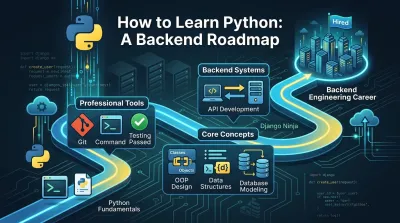
Beginners often start learning Python ineffectively. They open ten tabs, watch a few beginner videos, copy some syntax into a terminal, and then stall when they try to build anything without a guide.
That frustration usually isn't a Python problem. It's a learning strategy problem.
If you're trying to figure out how to learn python programming language in a way that leads to backend work, you need more than variables, loops, and a few toy scripts. You need a path that teaches you how software is designed, how systems fit together, and how professionals work when the code stops being simple.
A Clear Path Through the Chaos of Learning Python #
The internet gives beginners too many choices and too little judgment. One person says start with algorithms. Another says build projects immediately. Another tells you to grind syntax until it becomes automatic. None of that helps if you don't know what matters first.
The first thing to understand is that Python itself is not the hard part. Python was created by Guido van Rossum in the early 1990s, and its readable syntax made it the preferred starting language for many newcomers. Python tutorials also became the most popular Google search in the PYPL Index after overtaking Java in 2018, which reflects how strongly beginners gravitate toward it, as noted in this overview of Python's rise.
What makes learning hard is the gap between writing code that runs and building software that holds up. That's why most beginners can finish exercises but freeze when asked to design a small API, structure a project, or debug a messy bug across several files.
A better path is narrower and more practical.
- Learn syntax in service of problems: Don't study language features as isolated facts.
- Build with increasing complexity: Start with scripts, move to small applications, then move to backend systems.
- Adopt professional workflows early: Use a real editor, a terminal, Git, tests, and clean project structure.
- Think in systems: Ask what the program does, what data it owns, and how parts interact.
If you're still comparing beginner resources, this guide to free Python learning websites is a useful filter. But the bigger point is this: the right resource matters less than the right learning model.
"Learn enough syntax to build. Then let the project expose what you need to study next."
That's how engineers grow. Not by consuming more tutorials, but by turning confusion into design decisions.
Foundations First Mastering the Developer Mindset #
Most beginners rush to code. Strong developers slow down just enough to build the right habits first.
Python helps because its syntax is readable and approachable. That's a real advantage when you're new. But beginner-friendly syntax can also trick you into thinking progress means finishing lessons quickly. It doesn't. Progress means you can break down a problem, choose a reasonable approach, and improve your solution after it works.

Think like a builder, not a student #
A student asks, "What does a dictionary do?"
A developer asks, "What data shape fits this problem, and how will I access it later?"
That shift matters more than most beginner advice admits. You are not training yourself to remember every Python feature. You are training yourself to model real problems in code.
A good mental loop looks like this:
- Define the input: What comes into the program?
- Define the output: What should come out?
- Define the rules: What transformations need to happen?
- Split the work: What parts belong in separate functions or modules?
- Check assumptions: What can fail?
That is engineering. If you want a deeper explanation of that mental model, read this piece on thinking like an engineer.
Set up a real workshop #
Install Python. Use VS Code. Learn your terminal. Create project folders intentionally. Use virtual environments. Keep your dependencies isolated.
None of that is glamorous, but it changes how you learn. When your machine is set up like a developer's machine, every practice session reinforces professional habits instead of throwaway shortcuts.
Use your environment to support experimentation:
- Run small files often: Short feedback loops beat long study sessions.
- Keep notes in code comments sparingly: Clarify intent, don't narrate obvious syntax.
- Create separate projects: Don't dump every exercise into one folder.
- Name things clearly: If your variable names are vague, your thinking probably is too.
Version control isn't advanced #
Beginners often postpone version control because it feels like a team skill. That's a mistake.
Git helps even when you're working alone because it gives you a history of decisions. You can try something, break it, inspect the diff, and recover cleanly. That makes experimentation safer, which makes learning faster.
Practical rule: If a change feels risky, commit before you make it.
Memorization is overrated #
You don't need to memorize the whole language. You need to recognize patterns and know how to find what you need.
That means your early practice should favor:
| Focus | Weak approach | Better approach |
|---|---|---|
| Syntax | Rewatching lessons | Rewriting small programs from memory |
| Debugging | Copying the fix | Explaining why the bug happened |
| Problem solving | Looking for exact examples | Building a rough solution, then refining it |
| Growth | Chasing topic lists | Repeating core patterns across projects |
One practical option is using an interactive platform that pairs browser exercises with synchronized local projects so you're not learning in an artificial sandbox. Codeling does that with a structured Python path that mirrors a local workflow, which is useful if you want guided practice without separating learning from real development habits.
From Syntax to Solutions The Project-Based Path #
The fastest way to get stuck is passive learning. You watch a clean tutorial, the instructor types everything perfectly, and it all makes sense until the video ends. Then you open a blank file and realize you didn't learn the skill. You borrowed someone else's momentum.
Project-based learning fixes that because it forces retrieval, decision-making, debugging, and iteration.
Python is a strong choice for this style of learning because it has broad real-world adoption. Its GitHub adoption grew by over 22% year over year in 2022, it became the second most-used language with over four million developers contributing, and 51% of developers report using Python with a 30.6% market share, according to this Python popularity breakdown. That matters because the projects you build while learning map well to work you'll be asked to do later.
Start with projects that teach one idea well #
Your first projects shouldn't be ambitious. They should be small enough to finish and rich enough to teach a concept.
Good early project categories:
- Automation scripts: Rename files, clean CSV data, organize folders.
- Command-line tools: Build a note manager, task tracker, or expense logger.
- Data exercises: Read a dataset, filter records, summarize results, produce a simple chart.
- API consumers: Call a public API, parse JSON, display useful output.
Each type teaches something different. Automation teaches control flow and file handling. CLI tools teach input validation and program structure. API consumers teach request-response thinking and data parsing.
Bad beginner projects usually have one of two problems. They are either too trivial to force decisions, or too large to finish without copying a tutorial.
Build in layers #
Don't treat a project like a one-shot assignment. Treat it like a product with versions.
A good sequence looks like this:
- Version one: Make it work.
- Version two: Refactor duplicated logic into functions.
- Version three: Handle bad input and edge cases.
- Version four: Organize files and separate concerns.
- Version five: Add tests for critical behavior.
That progression teaches more than starting five different unfinished projects.
Your code doesn't need to be elegant on day one. It needs to become clearer each time you touch it.
Many learners need to see this process in action before it clicks:
Escape tutorial hell by changing your rules #
If you keep following tutorials, set stricter rules for yourself.
- Pause before the instructor solves it: Try the next step first.
- Rebuild without looking: The second pass is where learning happens.
- Change the requirements: Add a feature the tutorial didn't include.
- Write down what confused you: Confusion is a study roadmap.
For project ideas that fit that progression, this list of beginner programming projects is a practical place to start.
What works and what doesn't #
Here's the trade-off that learners often miss. Passive courses feel efficient because they reduce friction. Project-based learning feels slower because you hit walls constantly. But those walls are the actual training.
| Approach | Feels better today | Builds confidence later |
|---|---|---|
| Watching lessons | Yes | Rarely |
| Copying solutions | Yes | No |
| Debugging your own broken code | No | Yes |
| Refactoring finished projects | No | Yes |
If your goal is a backend career, you need scars, not just exposure. You need to have written code that failed for reasons you didn't expect, then made it cleaner after you understood why.
Architecting Backend Systems with Python #
There is a clear line between scripting and backend engineering. A script does a task. A backend system manages data, exposes behavior, handles failure, and stays maintainable as features grow.
That transition is where many Python learners stall. They know syntax, but they haven't learned how to shape software.
A structured learning path helps here. One effective progression is 6 to 9 months, with months 1 to 3 focused on fundamentals, months 4 to 6 on intermediate topics like OOP and data structures, and the period beyond that on backend skills such as REST APIs via Django Ninja. Guided paths can also reduce time-to-proficiency by 50% compared to unstructured learning, according to this Python learning roadmap.

Learn OOP as a design tool #
Object-oriented programming is often taught badly. Beginners get buried in terminology and leave thinking OOP is about pleasing an interviewer. It isn't. It's one way to organize behavior and state so a growing codebase stays understandable.
Use classes when they make the domain clearer. Don't use them just because the language supports them.
A few ideas matter more than the vocabulary:
- Encapsulation: Keep related data and behavior together.
- Abstraction: Hide details behind a clean interface.
- Composition: Prefer combining smaller objects over deep inheritance chains.
- Responsibility boundaries: Each class should have a clear reason to exist.
If you're building a backend service, this isn't academic. A user service, an order processor, a payment client, and a validation layer all benefit from boundaries that make change safer.
Data structures are architecture, not homework #
Many beginners treat data structures and algorithms as interview-only material. In backend work, they shape everyday decisions.
Choosing between a list and a dictionary affects lookup behavior. Choosing how you model relationships affects how data flows through your API. Choosing whether logic belongs in memory, in the database, or behind a service boundary affects performance and maintainability.
The right structure makes code simpler before it makes code faster.
Use data structure study to sharpen judgment:
- Lists are good for ordered collections you iterate through.
- Dictionaries are good for keyed access and aggregation.
- Sets help when uniqueness matters.
- Queues and stacks become useful when processing tasks or controlling flow.
The goal isn't textbook mastery. The goal is learning to ask, "What shape of data does this system need?"
APIs teach you to think in contracts #
Backend engineering becomes real when you build an API. At that point, your code isn't just solving a problem internally. It is promising stable behavior to another client.
That changes how you think.
A clean API requires:
- Clear resource design: Name endpoints around domain concepts, not internal implementation.
- Validation at the boundary: Reject bad data early.
- Separation of concerns: Keep request handling, business logic, and persistence distinct.
- Consistent error responses: Clients need predictable failure modes.
- Database discipline: Model data intentionally, don't just add tables reactively.
Django Ninja is a good framework for learning this because it encourages explicit request and response schemas while still giving you the practical strength of Django's ecosystem. More importantly, it pushes you toward contracts. That's what backend clients depend on.
Clean architecture beats clever code #
When beginners build APIs, they often put everything in the endpoint. Validation, database queries, business rules, side effects, formatting. It works for a while, then it collapses under new features.
A cleaner approach separates layers:
| Layer | Responsibility |
|---|---|
| API layer | Parse requests, validate input, shape responses |
| Service layer | Apply business rules and coordinate actions |
| Data layer | Read and write persistent state |
| Domain models | Represent the core concepts of the system |
This doesn't need to become enterprise theater. Keep it light. But do keep responsibilities distinct.
Build systems that can survive change #
Professional backend work is mostly change. New requirements, modified payloads, new edge cases, new integrations. Code quality matters because future work will land on top of today's choices.
That means your learning projects should include design pressure:
- Add authentication after the first version.
- Change a data model and update downstream logic.
- Introduce pagination.
- Add tests before a refactor.
- Split one large file into modules with clear ownership.
If a project can't survive one round of change, it hasn't taught you enough yet.
The Professional's Toolkit Git Linux and Testing #
Plenty of beginners can write Python that works on their laptop. Fewer can work like a backend engineer. The difference usually shows up in workflow, not syntax.
Git, Linux, and testing aren't side topics. They are part of the job.

Git is your professional memory #
Git does more than save code. It records how your software changed and why.
If you're learning alone, that still matters. A clean commit history shows that you can make focused changes, isolate experiments, and recover from mistakes. On GitHub, it also becomes visible proof that you ship work incrementally instead of dumping one giant project all at once.
Use Git with discipline:
- Commit small units: One idea per commit is easier to review and revert.
- Write useful messages: "Add request validation for signup endpoint" is better than "update code."
- Use branches for experiments: Keep your main branch stable.
- Push finished work: A private laptop folder doesn't help in interviews.
Linux teaches operational thinking #
Backend development lives close to the operating system. Even if you work on macOS or Windows, you'll keep running into Linux conventions in servers, containers, deployment workflows, and automation tasks.
You don't need to become a sysadmin first. You do need to stop fearing the shell.
Focus on practical habits:
| Skill area | Why it matters |
|---|---|
| File navigation | You need to move through projects quickly |
| Process awareness | Backend apps fail, hang, and restart |
| Permissions basics | Services and scripts depend on correct access |
| Environment variables | Configuration should stay outside code |
| Shell commands | Automation starts with repeatable commands |
The command line also forces precision. That's useful for engineers. Graphical interfaces often hide mechanics you should understand.
Testing changes how you write code #
Beginners often treat testing as a final polish step. Professionals use it as a design constraint.
When code is hard to test, it's often a sign that responsibilities are mixed together. Tight coupling, hidden side effects, and giant functions become obvious the moment you try to write a test around them.
Start simple:
- Unit tests check small pieces of logic.
- Integration tests check whether parts work together.
- API tests verify the contract your client depends on.
Code that can't be tested easily is often code that will be hard to maintain.
You don't need full coverage obsession. You need confidence around important behavior. Validation, transformations, permission checks, and core business rules are good starting points.
Documentation is part of engineering #
A backend engineer doesn't just produce code. They leave behind clarity.
That includes:
- README files that explain what the project does and how to run it
- sensible folder structure that signals intent
- clear naming for endpoints, modules, and services
- issue tracking or task notes that show how work was approached
This is one reason portfolio projects often fail to impress. The code might be acceptable, but the workflow evidence is missing. Recruiters and hiring managers don't just want proof that you can code. They want signs that you can collaborate, reason about changes, and keep systems understandable.
Advancing Your Career AI Engineering and Interview Prep #
Once you have a backend foundation, your next job is packaging your skills in a way employers can evaluate quickly. That means portfolio quality matters more than portfolio quantity.
A weak portfolio is full of clones. A strong portfolio shows judgment. It has a clear problem, a usable API, sensible data modeling, tests around key behavior, and a readable GitHub history. Even one solid backend project can carry more weight than several unfinished experiments.
Build projects that say something about you #
Good portfolio projects usually demonstrate one or more of these:
- API design: Clear routes, validation, error handling, documentation
- Data modeling: Thoughtful relationships and query patterns
- System thinking: Background tasks, external integrations, or permission logic
- Operational maturity: Tests, environment configuration, deployment readiness
If you're interested in AI engineering, this backend base transfers well. AI products still need APIs, authentication, logging, storage, request handling, and clear service boundaries. The model is only one part of the system. Many aspiring developers chase AI tools before they can build the backend needed to support them.
Motivation is a technical problem too #
A lot of learning advice assumes discipline will appear on demand. It won't. Motivation usually drops when progress becomes ambiguous.
That matters because many guides still overfocus on solo study. A 2025 meta-analysis of forums found that 58% of queries about staying motivated went unresolved, and gamified platforms with community features boosted completion rates by 3.2x for non-CS students, according to this discussion of motivation and structure in coding education. If you've struggled to stay consistent, that's not a personal flaw. It's often a sign that your learning setup lacks accountability and visible progress.
Prepare for interviews by explaining decisions #
Interview prep shouldn't begin with memorizing trick questions. Start by learning to explain your own code.
Practice answering:
- Why did you structure the project this way?
- How does data move through the system?
- What trade-offs did you make?
- What would you improve with more time?
- Where could the system fail?
"The candidate who can explain trade-offs calmly often sounds more senior than the candidate who memorized more trivia."
For algorithm interviews, keep practicing core patterns. For backend interviews, add system design at a small scale. Describe an API, model the entities, discuss validation, think about scaling pain points, and explain testing strategy. That's the language of engineering, not just coding.
Your Next Step on the Backend Engineering Path #
Learning Python gets easier when you stop treating it like a school subject and start treating it like a craft. Syntax matters, but syntax is only the entry point. The work that changes your career is learning how to structure code, model data, design APIs, use professional tools, and keep building when the path gets messy.
That's why the best roadmap is usually the least glamorous one. Set up a real environment. Build small projects. Refactor them. Learn Git, Linux, and testing before they feel convenient. Move from scripts to systems. Keep your portfolio honest and practical.
If you're serious about how to learn python programming language for backend work, don't wait until you feel ready. Read less. Build more. Finish something small this week, then improve it until it starts to look like software instead of an exercise.
If you want a structured way to practice that progression, try Codeling. It focuses on hands-on Python learning for backend engineering, with guided exercises, local-style workflows, and portfolio projects that help you move from fundamentals to APIs, testing, Git, Linux, and AI-oriented backend work.